Google Ads Search Campaign: Setup from Scratch (2026)
A search campaign is the most transparent Google Ads format: you see every query and control every word of your ad. Here is how to build a 2026 campaign step by step — structure, match types, RSA, negative keywords, and the GA4 connection.


I have been setting up Google ads since 2010 — back when the platform was still called AdWords and an ad consisted of a single 25-character headline.
Since then the platform has changed beyond recognition: manual bids gave way to machine-learning Smart Bidding, plain text ads were replaced by responsive RSAs, and thousands of exact-match keywords turned into intelligent broad match and AI Max. Old setup guides are not just useless today — they are harmful: follow them and you will burn your budget on tactics Google switched off back in 2021–2022.
That is why I rewrote this guide from scratch. It covers only what actually works in the Google Ads interface in 2026 — from account structure to a launch checklist.
In short: how to set up a Google Ads search campaign. First configure conversion tracking, then create a Search campaign: opt out of the Display Network and search partners, set location targeting to “presence,” define a daily budget, pick a bidding strategy (Maximize Clicks or Maximize Conversions to start), group keywords by meaning, write a responsive search ad, and add negative keywords. Every step is covered in detail below.
What a Google Ads search campaign is
A Google Ads search campaign is an ad format where text ads appear above and below Google search results in response to specific user queries. You pay per click (the PPC model), and ad position is decided in an auction that weighs your bid, ad quality, and the expected impact of ad assets.
The key advantage of search over any other channel is hot demand. The person is already searching for “buy 80 l water heater” or “car accident lawyer Kyiv,” and your ad answers an explicitly stated need. That is why search campaigns remain the most predictable source of leads: they are the easiest to model through the funnel of impressions → clicks → conversions → cost per lead.
For reference: until 2018 the platform was called Google AdWords — if you see that name in an article or a course, the material is almost certainly outdated. All screenshots of the “old” interface with its tabs and sidebars no longer reflect the current version.
Account structure in 2026: less is more
The hierarchy is unchanged: account → campaigns → ad groups → ads and keywords. But the logic of building that structure has changed radically.
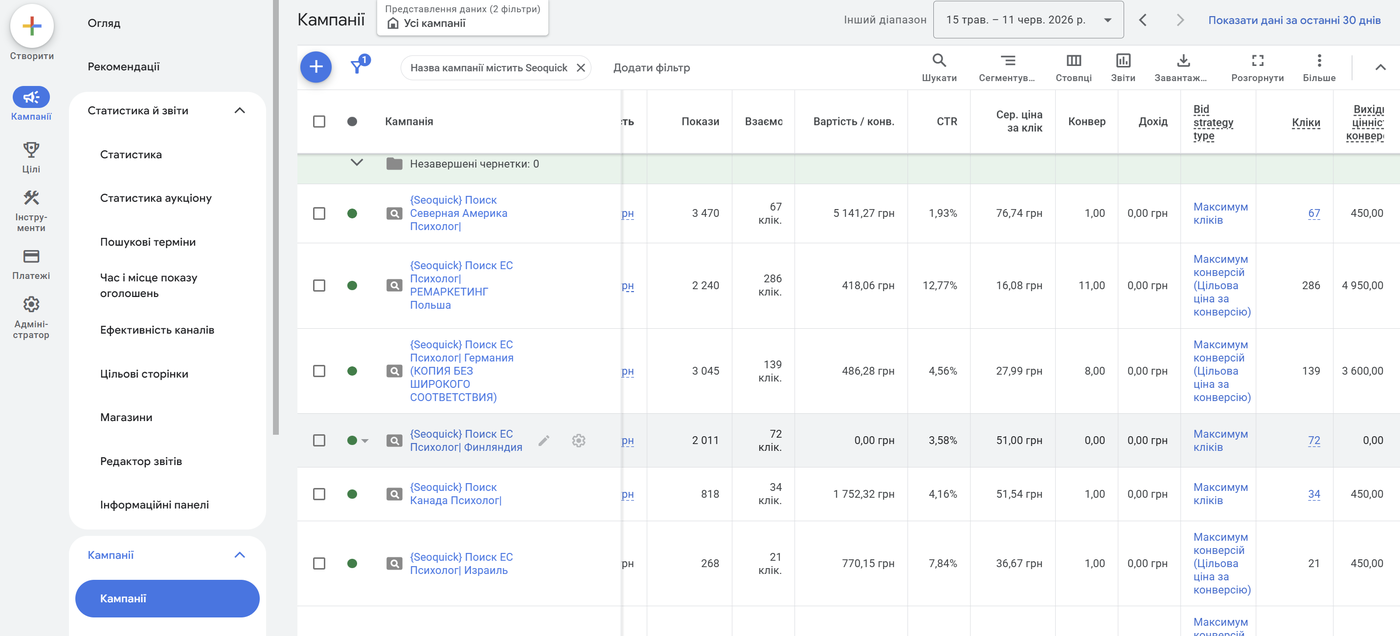
Ten years ago the standard was SKAG (Single Keyword Ad Group) and dozens of tiny campaigns for every category. In the Smart Bidding era that fragmentation hurts: the algorithm needs data to learn, and 2–3 weekly conversions smeared across fifty campaigns give it nothing. Google explicitly recommends consolidation, and practice confirms it.
Working structure principles for 2026:
- Split campaigns only where money or geography differ. A separate campaign is justified when a business line has its own budget, its own target cost per lead (CPA), or its own target region. Everything else lives at the ad group level.
- Build ad groups around semantic themes, not individual keywords. One group = one intent = one landing page. A group holds 5–20 keywords united by a shared meaning: “washing machine repair,” “washer repair at home,” “washing machine technician.”
- Keep the brand campaign separate. Queries containing your company name produce abnormally high CTR and cheap conversions — mix them with generic queries and your campaign stats will look great but lie to you.
- Do not breed campaigns “just in case.” Two or three campaigns collecting 30+ conversions a month beat fifteen campaigns stuck forever in “learning” status.
SEOquick experience. In our multi-region search campaign case for a therapist-matching service, we built the structure exactly this way: separate campaigns per country and language, with intent-based ad groups inside. The result — ad CTR up to 18% and ROAS around 7.4: every dollar invested came back sevenfold. Details in the case study on multi-region search campaign setup (in Russian).
Preparation: what to do before creating a campaign
Launching a campaign without preparation is the number one beginner mistake. The minimum foundation:
- Keyword research. Collect keywords with Google Keyword Planner (free inside your account), search suggestions, and competitor analysis. Immediately separate commercial queries (“buy,” “price,” “order”) from informational ones — the latter do not belong in a search campaign.
- Landing pages. Every ad group points to its own relevant page. An ad about “corner sofas” must lead to the corner sofa category, not the homepage.
- Conversion tracking. Without it Smart Bidding is blind, and you will never know whether your ads pay off. There is a detailed section below, but conversions must be configured BEFORE launch.
- Billing profile. The account currency and country are set once and cannot be changed — double-check them when registering at ads.google.com.
One important quirk of a fresh account: the first-campaign wizard in “smart” mode hides the key settings. Switch to Expert Mode right away — the link is at the bottom of the screen during account creation.
Step-by-step search campaign setup
Below is the sequence of steps in the current interface. Our channel has a detailed video tutorial on setting up a campaign from scratch — it was recorded in an older interface and the buttons have moved since, but the underlying logic (structure, keywords, negatives, ads) has not changed, which is why it remains the most popular video on the channel (in Russian):

Step 1. Objective and campaign type
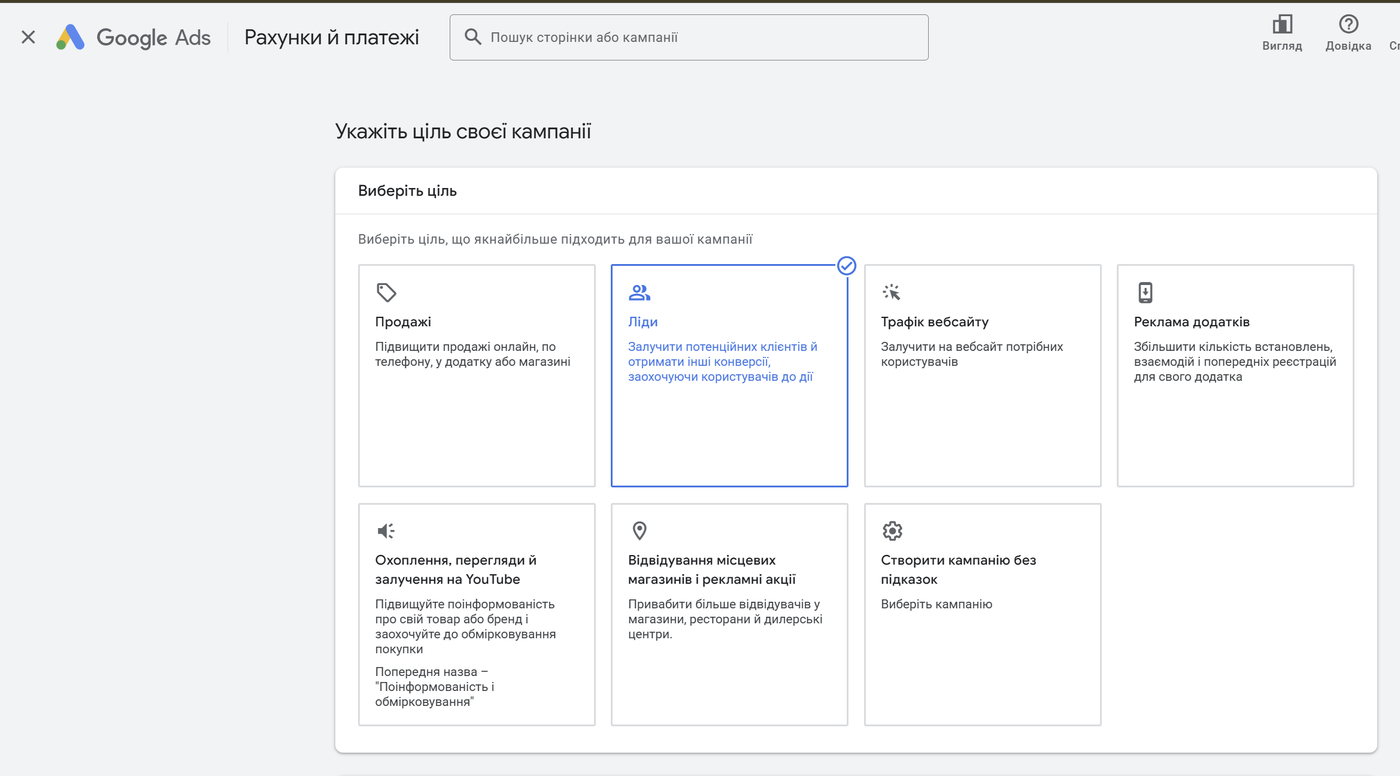
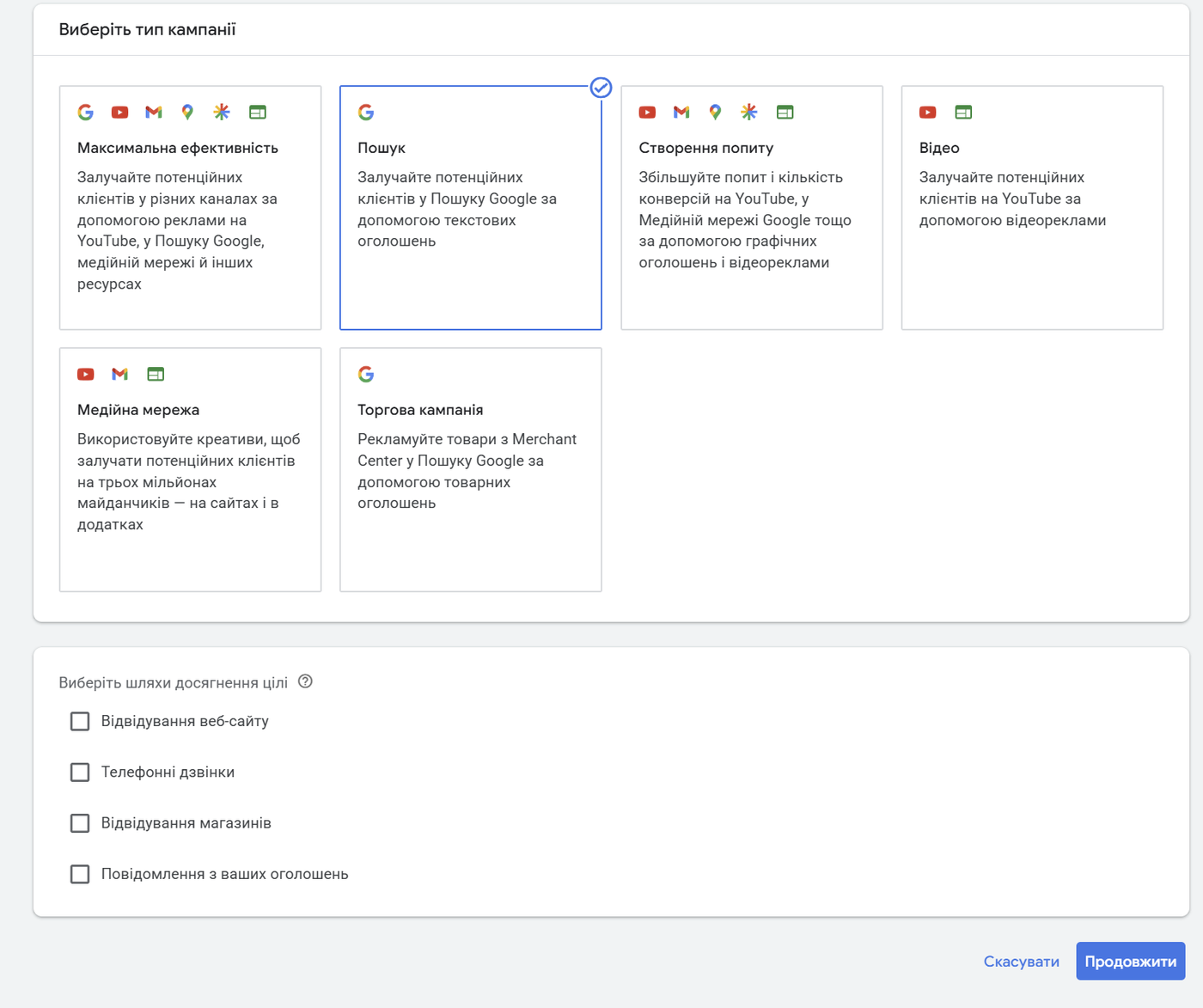
Click “+ New campaign.” Google will ask for an objective: sales, leads, or website traffic. The objective shapes which settings the system suggests next but does not hard-limit anything. Then pick the campaign type — Search.
Right here Google will offer to enable AI Max — a mode where AI expands your targeting and generates ad variations. For your first campaign I recommend leaving it off: gather clean statistics on your own keywords first (there is a separate section below on when AI Max makes sense).
Step 2. Networks: turn off the extras
By default Google bundles the Display Network and search partners into your search campaign. Untick both boxes:
- Display Network means banners on websites: a different audience, different intent, different bids. Mixing it with search is a mistake — it will eat your budget with cheap, irrelevant clicks.
- Search partners are third-party sites with Google search. Traffic quality there is usually lower; you can switch them back on later, once you have statistics to compare against.
Step 3. Locations: “presence,” not “interest”
Specify the cities or regions where ads should run. The critical detail hides under “Location options”: by default Google also shows your ads to people who merely “showed interest” in your region while being anywhere in the world. For a local business those are junk clicks.
Choose “Presence: people in or regularly in your targeted locations.” The exception is businesses where out-of-region interest is valuable: tourism, relocation real estate, nationwide delivery.
Step 4. Languages
Language targeting works off the user’s interface language, not the language of the query. Cover every language your audience may have set: for advertising in Ukraine, for example, that means adding Ukrainian, Russian, and English — so you reach all users in the region regardless of their browser settings.
Step 5. Budget
The budget is set per day. Google may spend up to twice the daily budget on individual days, but over a month it will not exceed “daily budget × 30.4.”
How to size a starting budget: take the forecast CPC from Keyword Planner and multiply by 10–15 clicks a day — anything less will not produce enough statistics to draw conclusions. If clicks in your niche cost more than a 10-clicks-a-day budget allows, narrow your keyword set or geography rather than spreading pennies across a broad campaign.
Step 6. Bidding strategy: which Smart Bidding to choose
Manual bidding (Manual CPC) in 2026 is only available through workarounds and is effectively dead for new campaigns. The real choice is between automated strategies — and it is the single most important choice in the whole setup.
| Strategy | What it optimizes | When to choose it |
|---|---|---|
| Maximize Clicks | Number of visits within the budget | Launching with no conversion data; the goal is to test demand quickly and harvest search terms. Always set a maximum CPC limit |
| Maximize Conversions | Number of conversions | Conversions are tracked but still scarce (under ~30/month). The first “smart” strategy after launch |
| Target CPA | Conversions at or below a set cost | A stable 30+ conversions a month and a clear idea of what a lead is worth. The workhorse of lead generation |
| Maximize Conversion Value | Total revenue | E-commerce with transaction values passed in, and no hard profitability constraint |
| Target ROAS | Revenue relative to spend | E-commerce with lots of data (50+ conversions/month) and accurate value tracking. The most data-hungry strategy |
The typical campaign path: Maximize Clicks (1–3 weeks) → Maximize Conversions (until statistics accumulate) → Target CPA or Target ROAS. Do not jump straight to target-based strategies: without data the algorithm will either choke your impressions or overpay.
Two recent updates worth knowing about. First, Smart Bidding Exploration — a mode in which the system deliberately tests queries it never showed on before: per Google’s data (2025), it delivers on average +18% new converting search query categories and +19% conversions. Second, journey-aware bidding was announced at Google Marketing Live 2026 — bidding that accounts for the entire chain of a lead’s touchpoints, currently in beta. The trend is clear: AI runs the bids, while your zone of control is the CPA/ROAS targets and the quality of your conversion data.
Step 7. Ad groups and keywords
Create groups on the principle of “one theme — one group — one landing page.” Add 5–20 keywords to each. For match types, the reliable starting scheme is phrase plus exact; bring in broad later, once conversion-based Smart Bidding is up and running (details in the next section).
A sample structure for an appliance repair service:
- Campaign “Repair — Kyiv” (its own budget and geo)
- Group “Washing machine repair”: “washing machine repair”, “washer repair at home”, [washing machine technician] → service page
- Group “Refrigerator repair”: its own keywords → its own page
- Group “Dishwasher repair”: its own keywords → its own page
- Campaign “Brand”: queries containing the company name
Do not mix different intents in one group (“washer repair” vs. “washer spare parts”) — you cannot write one ad that is relevant to both, and both CTR and CPC will suffer.
Step 8. Ads
At least one responsive search ad (RSA) per group, ideally two. How to build it properly is covered in a dedicated section below.
Step 9. Assets (formerly extensions)
Add callouts, sitelinks, structured snippets, and a phone number — they enlarge your ad and lift CTR at no extra cost. Details below.
Then hit “Publish.” The campaign goes to review (usually up to one business day) and starts serving.
Keyword match types: what has changed
There are three match types left, and they no longer work the way old textbooks describe.
| Type | Syntax | How it works in 2026 |
|---|---|---|
| Exact | [buy a bike] | Serves on the query and close variants with the same meaning. The “exactness” is relative: Google long ago expanded exact match to semantic synonyms |
| Phrase | “buy a bike” | Serves on queries that include the meaning of the phrase. Noticeably wider than it used to be — at times it behaves like “broad on a leash” |
| Broad | buy a bike | Serves on anything the algorithm deems semantically relevant, using signals such as the other keywords in the group, the landing page, and the user’s history |
Important for anyone who learned from older materials: broad match modifier (+keyword) has been dead since July 2021. Plus signs in front of words do nothing anymore — their behavior was folded into phrase match. If an old campaign still contains keywords with pluses, they run as phrase match.
The big shift is that broad match has stopped being a synonym for wasted budget — but only under two conditions: a conversion-based bidding strategy (Target CPA/ROAS) and accumulated statistics. The algorithm picks queries against the goal of “deliver a conversion at the right price,” and in mature accounts broad match often beats exact on conversion volume at a comparable cost. On manual bids or Maximize Clicks, broad is still dangerous — it will rack up cheap, irrelevant traffic.
A practical scheme for a new account:
- Launch: phrase + exact match. Controlled traffic, understandable queries.
- After 4–8 weeks, once the campaign converts steadily and runs on Target CPA: add broad versions of your best keywords (as a separate group or an experiment campaign).
- Ongoing: review the Search terms report weekly and move the junk into negative keywords.
Responsive search ads (RSA): the only search format
Expanded text ads (ETA) were archived back on June 30, 2022 — they can no longer be created or edited. The responsive search ad (RSA) is the only format you can create in a search campaign.
How an RSA works: you supply up to 15 headlines (30 characters each) and up to 4 descriptions (90 characters each), and Google assembles combinations — usually 2–3 headlines and 1–2 descriptions per impression — testing which mixes earn more clicks and conversions for each specific query.
Rules of a strong RSA:
- Headlines must differ in meaning. Not 15 variations of “buy a cheap sofa,” but a mix: the keyword phrase, a benefit (“Delivery within 24 hours”), price/discount, objection handling (“5-year warranty”), a call to action, the brand name. Any pair of headlines must make sense together.
- Include the group’s keyword in at least 2–3 headlines and one description — it affects both relevance and CTR.
- Fill the slots with substance, not for the sake of it. Google formally advises using all 15 headlines, but Ginny Marvin (Google’s Ads Liaison) has publicly recommended a more moderate approach — 8–10 strong headlines and 3 descriptions beat 15 strained repetitions.
- Pinning — only when necessary. Pinning a headline to position 1 is justified when the brand or a legally required phrase must be there. Every pinned element shrinks the number of combinations and usually lowers performance; if you pin, place 2–3 interchangeable variants on the same position.
- Ad Strength is a guide, not a KPI. The Ad Strength indicator (from Poor to Excellent) scores asset diversity and relevance. Per Google, raising Ad Strength from Poor to Excellent yields on average +15% clicks and conversions. But it is a proxy metric: an RSA rated Average that converts brilliantly should be left alone.
- Two RSAs per group is a healthy maximum: different angles of messaging, not duplicates.
Quality Score: how to pay less per click than your competitors
Quality Score is Google’s 1-to-10 rating for every keyword, reflecting how relevant your ad and landing page are to the query. It consists of three components, each visible as a separate column in the interface:
- Expected CTR — how readily people click your ad compared with competitors.
- Ad relevance — whether the meaning of the query is present in the ad copy.
- Landing page experience — how well the page matches the query, its load speed, and mobile usability.
Why this is a money question: auction position is determined not by the raw bid but by Ad Rank — the bid multiplied by quality (plus the effect of assets). An advertiser with a Quality Score of 8 can rank above a competitor with a 4 while paying noticeably less per click. Over time, a quality gap easily turns into a twofold difference in cost per lead.
The practical takeaway: all the mechanics in this article — themed groups, keywords in RSA headlines, relevant landing pages, negative keywords — also feed your Quality Score. If an important keyword sits at 5 or below, check in order: does the ad’s meaning match the query, does it lead to the right page, and does that page load fast on a phone.
Assets: ad extensions, renamed
What was called “extensions” for years is now called assets. The essence is the same: extra elements make your ad bigger and more informative, while you still pay only per click. An ad with a full set of assets visually takes up one and a half to two times more space than a “bare” one.
The mandatory minimum for any campaign:
- Sitelinks — 4+ links to key pages: “Delivery & Payment,” “Reviews,” “Warranty,” “Special Offers.”
- Callouts — short benefit statements: “18 Years of Experience,” “Nationwide Service,” “Installment Payments.”
- Structured snippets — templated lists: “Services: setup, audit, management.”
- Call asset — for businesses that take phone calls. Clicks on the number can be counted as conversions.
Depending on the situation, add images, prices, promotions, and an address (by linking your Google Business Profile). Google decides which assets to show in each auction, so the rule is simple: fill in everything relevant to your business.
Negative keywords: your budget’s insurance
Negative keywords are the queries your ad must never show for. In the era of “smarter” match types their role has only grown: the more loosely the algorithm interprets your keywords, the more important it is to draw the boundaries.
How to work with negatives:
- Before launch, build a base list: “free,” “used,” “DIY,” “download,” “reviews,” “what is,” city names outside your delivery area, competitor names (unless you are hunting their traffic).
- Use negative keyword lists at the account level (Tools → Negative keyword lists) — one shared list applies to all campaigns, no duplication needed.
- After launch, open the Search terms report weekly and weed out the irrelevant. The first month yields the most junk.
- Mind the direction of conflict: a broad-match negative blocks every query containing that word. Do not accidentally negate your own keywords.
SEOquick experience. In our full-cycle advertising case for a window manufacturer in Odesa, methodical negative keyword work became one of the main levers: over the course of the engagement we added 7,093 negative keywords. The outcome — a 10.93% CTR and a cost per lead of UAH 73.71 (Ukrainian hryvnia, roughly two dollars) in the highly competitive construction niche. The full breakdown is in the case study on PPC setup for a service website (in Russian).
Conversion tracking: the foundation of the whole system
A conversion is a target action on your site: a form submission, a call, a purchase, a one-click order. Smart Bidding optimizes toward conversions, so a mistake in their setup is a mistake in the entire campaign: the algorithm will diligently bring you the wrong people.
The working scheme for 2026:
- The primary source is the native Google Ads tag. Create a conversion action in Google Ads (Goals → Conversions) and install the tag via Google Tag Manager. The native tag records conversions at the click level and feeds Smart Bidding faster than any import — a direct recommendation from both Google and independent analysts (Adswerve, 2025).
- GA4 is for analytics, not for bidding. Link Google Ads with GA4 and import key events — but mark them as secondary if the same conversion is already counted by the native tag. Otherwise you get double counting. GA4 is there for the full picture: post-click behavior, cross-channel attribution, audiences.
- Enable Enhanced Conversions. The tag additionally sends hashed customer data (email, phone), and Google matches conversions to signed-in users where cookies fail. Per Google, this recovers on average 5–10% of “lost” conversions.
- Set up Consent Mode v2 — without it, conversion data in the EU and several other regions will be incomplete, and remarketing audiences will not populate.
- Assign values to conversions. For e-commerce — dynamic transaction value; for lead generation — at least a nominal one (e.g., a form lead = UAH 500, a call = UAH 300, in whatever currency your account runs). Without values, Target ROAS and Maximize Conversion Value are unavailable.
Before launch, test the conversion by hand: submit a test lead and confirm it shows up in Google Ads (tag status “Active,” not “Unverified”).
Search campaign or Performance Max?
The most common question of 2024–2026. Performance Max (PMax) is an automated campaign type that serves ads across all Google channels at once: Search, Display, YouTube, Gmail, Discover, Maps. You provide assets and goals; AI decides everything else.
When to choose what:
| Situation | Decision |
|---|---|
| Lead generation, services, B2B | A search campaign is the backbone. Full control over queries and copy, transparent reporting |
| New account with no conversion history | Search only. PMax without data learns poorly and expensively |
| E-commerce with a product feed and 30+ conversions/month | Search + PMax together: search locks down the core queries, PMax adds reach across all channels |
| Maximum reach with minimum manual work | PMax — if you can live with its limited transparency |
It is important to understand how they coexist: when a query exactly matches your search keyword, the search campaign takes priority; in all other cases the campaigns compete on Ad Rank. That is why the combination of “search for the core queries + PMax for everything else” is the working standard for online stores. For a detailed breakdown of the format, see our article on Performance Max.
SEOquick experience. Combining the formats beats the “either-or” debate: in our shopping campaign optimization case (in Russian) for an online store we pushed ROAS to ~9 (every hryvnia spent on ads brought back nine) and the conversion rate in Kyiv to 20.8%.
And what is AI Max for Search?
AI Max is a set of AI features inside a regular search campaign (not a separate campaign type!), introduced at Google Marketing Live in May 2025: expanded semantic search term matching, automatic adaptation of ad copy, and final URL replacement with a more relevant page. Per Google, the full AI Max feature set delivers on average +7% conversions at the same CPA/ROAS. Starting in 2026, Google is also migrating Dynamic Search Ads (DSA) onto AI Max.
My recommendation: beginners should start with the classic setup from this article and enable AI Max only on accumulated statistics — and always with the Search terms report under supervision. It is a powerful scaling tool, but not a substitute for a well-thought-out structure.
Typical beginner mistakes
Over 18 years of working with client accounts we have seen hundreds of campaigns “after DIY setup.” The mistakes repeat with depressing consistency:
- Launching without conversion tracking. Money gets spent, there is nothing to base decisions on, Smart Bidding does not work. The most expensive mistake of all.
- Display Network and search partners left on. The budget leaks into banner impressions the beginner never even sees in the reports.
- Location targeting by “interest” instead of “presence.” A local service shows ads to people on the other side of the country.
- Everything on broad match with manual bids. Without a conversion goal, the algorithm collects the cheapest and least relevant traffic possible.
- Ignoring the Search terms report. The campaign serves on junk queries for months while the negative list never grows.
- One landing page (the homepage) for all groups. Relevance drops, CPC climbs, conversion rate suffers.
- Drawing conclusions three days after launch. The algorithms need 1–2 weeks to learn; daily “optimizations” during that period reset the learning and only make things worse.
- Blindly applying Google’s Recommendations. Turn off auto-apply right away: some of the system’s advice (like “add broad match keywords” at launch) benefits Google, not you.
A breakdown of the costliest mistakes with examples is in our video (in Russian):
Search campaign launch checklist
Before hitting “Publish,” run through the list:
Preparation
- Account created in Expert Mode; currency and time zone verified
- Conversions configured via the Google Ads tag and verified with a test lead
- Enhanced Conversions and Consent Mode v2 enabled
- GA4 linked to Google Ads
- Keywords collected and grouped by intent; informational queries excluded
- A relevant landing page exists for every ad group
Campaign settings
- Type: Search; Display Network and search partners off
- Locations set to “Presence”; irrelevant regions excluded
- All languages your audience uses (for Ukraine: Ukrainian + Russian + English)
- Daily budget ≥ 10 forecast clicks
- Bidding strategy matches the data volume (start with Maximize Clicks with a CPC cap, or Maximize Conversions)
- Auto-apply recommendations turned off
Content
- 5–20 keywords per group, phrase + exact match
- Base negative keyword list added (at the account level)
- 1–2 RSAs per group: 8–15 distinct headlines, 3–4 descriptions, keyword in the headlines
- Assets: 4+ sitelinks, callouts, structured snippets, phone number
After launch
- Days 1–2: ads approved, impressions running, conversions firing
- Weekly: Search terms report → negative keywords
- After 2–4 weeks: switch to a conversion strategy, pause weak ads
- After 1–2 months: test broad match, experiment with Target CPA
FAQ
How much does Google Ads advertising cost?
There is no fixed price: you pay per click through an auction, and CPC depends on the niche, region, and competition — from cents to tens of dollars. You cap the budget yourself at the daily level. To test a niche, budget for at least 10–15 clicks a day over 2–4 weeks.
How soon will I see results?
Impressions start almost immediately after review (up to one business day). But conclusions about cost per lead are only valid after 2–4 weeks: bidding algorithms need time to learn, and you need statistics of at least a few dozen clicks per group.
Can I run a campaign without a website?
A full search campaign — no, you need a landing page. Substitutes like call-only campaigns work but convert worse. If you have no site, a local business should start with a free Google Business Profile and a simple landing page.
Which is better: SEO or paid search?
They are not competitors but different time horizons. Google Ads delivers traffic instantly, but it disappears the moment you stop paying; SEO takes months but compounds over time. The working strategy is to run ads for quick sales while building SEO as a long-term asset in parallel.
Do I need to manage bids manually in 2026?
No. Manual bidding has effectively been retired, and Smart Bidding with sufficient data consistently outperforms it. Your job is not to move bids but to manage targets (Target CPA/ROAS), the quality of conversion data, and campaign structure.
Search campaign or Performance Max — which should a beginner choose?
The search campaign. It is transparent: you see the queries and control the copy and the negatives. Performance Max makes sense as a second layer once the account has stable conversions (30+ a month) and, for e-commerce, a product feed.
Google Ads Keywords in 2026: Research, Match Types, Negative Keywords
How Google Ads keywords actually work in 2026: real match type behavior, keyword research, campaign structure, negative keywords and PMax.
Read →
Google Tag Manager Setup from Scratch: 2026 Guide
How to install Google Tag Manager, connect it to GA4, and set up Consent Mode v2, tags, triggers, and variables. A step-by-step 2026 guide with a checklist.
Read →
Google Analytics 4: Setup and Configuration From Scratch (2026 Guide)
Step-by-step Google Analytics 4 guide: creating a property and data stream, installing the tag via gtag or GTM, key events, reports, Consent Mode v2, and AI traffic.
Read →Want to apply this to your site?
We will review the current situation, find the first growth levers, and suggest a practical working format.