SEO Promotion in 2026: 13 Steps to Rank Your Website
SEO is no longer a bag of tricks — it is a process. We broke it down into 13 sequential steps: from audit and keyword research to link building and AI search optimization, with checkpoints along the way.


Google’s main goal is to let the user go as quickly as possible with a relevant answer.
And that creates a massive problem. According to Siteefy (2026), there are more than 1.4 billion websites on the internet, and around 200 million of them are active. All of them compete for the same traffic.
No matter your region or niche, competition will be off the charts. But the sites that occupy the top of the search results do systematic SEO work — and they get the coveted traffic.
SEO promotion is a sequential, 13-step process of moving a website to the top of search results: competitor analysis, keyword research, prioritization, meta tags, content creation, user behavior signals, technical optimization, testing, link building, timely content promotion, building trust (E-E-A-T), realistic planning, and optimization for AI search.
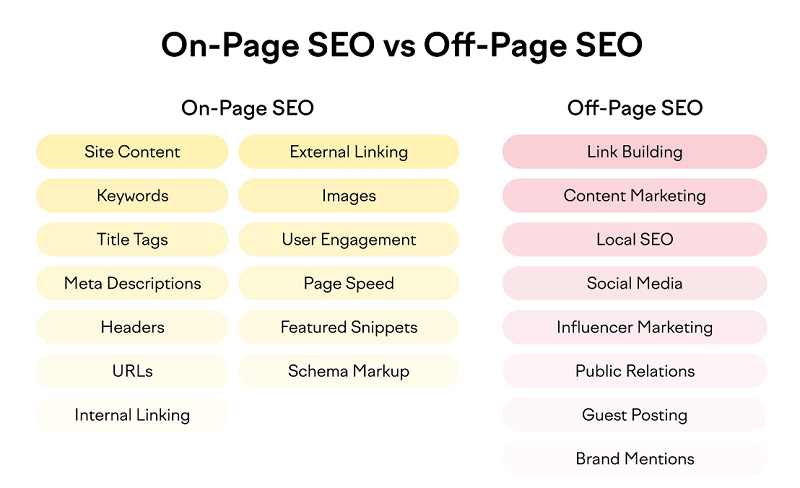
Broadly, all of this work falls into two types:
- On-Page SEO (internal optimization);
- Off-Page SEO (external optimization).
What is on-page optimization?
On-page optimization covers all the work done directly on the website itself, without any external factors — every intervention happens within the content and the codebase.
It includes the following steps:
- Working on website content (its quality and usefulness to the visitor).
- Working with keywords (building a keyword map, writing content briefs for pages).
- Optimizing metadata (Title and Description).
- Optimizing content headings (H1-H6).
- Optimizing URL structure (so-called SEO-friendly URLs).
- Internal linking.
- Optimizing outbound links.
- Optimizing images (ALT tags, image dimensions, format).
- User engagement (UX audit, conversion rate optimization).
- Improving site speed metrics.
- Optimizing the site for rich snippets and AI answers.
- Structured data (schema markup).
We have covered all of these topics in our blog posts, videos, and podcasts. You will find tons of useful information on each of them on our site!
What is off-page SEO?
Off-page optimization means all SEO work carried out outside your website — on other sites, social networks, and dedicated webmaster services.
It includes the following steps:
- Link building (this area alone has more than a dozen strategies!).
- Content marketing (promoting your content on other platforms).
- Local SEO (optimizing for specific areas — districts, cities, or entire countries).
- Social media marketing (SMM — actively growing your own channels on Facebook, YouTube, LinkedIn).
- Influencer marketing (working with opinion leaders in your niche to promote products and services).
- PR (shaping how the company and its people are perceived online and building brand image; overlaps with reputation management, or SERM).
- Guest posting (publishing bylined articles on partner platforms under your own name or your company’s name; finding those platforms is done through outreach).
- Brand mentions (encouraging users to mention your brand online and stimulating positive discussions). In the AI search era, mentions also drive citations in ChatGPT and Gemini answers.
Some methods flow into one another (content marketing, for instance, is directly tied to SMM and guest posting). Some split into many subcategories.
How do you make sense of all of them? Where do you start? This article walks through every step, chapter by chapter, in its logical order of priority!
Step 1. Competitor analysis
Most websites fail because they try to beat competitors at their strong points. Instead, look for their weak spots. Competing that way is much easier and faster.
Many beginner webmasters see some website pulling in huge traffic and sales. They try to copy it — and get nothing. In SEO there are countless indirect competitors, such as Wikipedia. Any query returns millions of results.

Whether you operate in Ukraine, the US, the UK, or Canada — competition will be at its peak everywhere. Read this guide all the way through: it will help you get traffic from Google, Bing, DuckDuckGo, and even AI search engines. Even if you sell unique products and have only a couple of direct competitors.
What does competitor analysis mean?
Competitor analysis in SEO is the process of identifying the competitors in your industry and studying the various strategies they use to acquire traffic. The findings are used to build your own promotion strategy.
It is smarter to find your competitor’s weak spots — the places where you can create something far better. That could be higher-quality content, stronger backlinks, or a unique selling proposition.
Why is competitor analysis important?
Elon Musk did not try to compete with Toyota and BMW where they were strong. Instead, he took the direction everyone was ignoring — electric cars. As a result, Tesla became one of the most valuable car companies in the world. The same applies to SEO.
Competitor analysis helps you solve three key problems:
- find your own weak points and work to strengthen them;
- find your competitors’ weak points and concentrate your efforts there;
- find gaps in the market (where there are simply no competitors) and claim the niche first.
A competitor analysis example
Competitor analysis in SEO consists of four parts:
- Collect your competitors. Build a list of competitors based on your core business keywords.
- Study the list of weak competitors. Note which keywords weak competitors rank for. You will not outrank the strong ones quickly, but the weak ones are far easier targets.
- Audit competitor content. Study competitors’ top pages: not all of their pages bring traffic. See where they are strong and where they are weak. Use this to build a content plan for your own site and for guest posts.
- Run a backlink audit. Study your competitors’ link strategies. Collect the lists of sites where they earned links and categorize them into groups. Identify where trusted links are easy to get — and make that your first-priority strategy.
To the untrained eye, competitor analysis looks like a pile of exports from paid tools. To an experienced SEO specialist, it is a set of valuable data.
What are the benefits of competitor analysis?
In a highly competitive niche you can spend tens or hundreds of thousands of dollars and still fail. In weak niches or low-competition areas, a couple of links and one well-written page may be enough.
The value of competitor analysis is that it can save you from burning huge budgets and hundreds of hours on pointless work. It lets you focus where the profit is!
SEOquick case. Competitor analysis works even against marketplaces. For an online store selling autoclaves, we found the weak spots of the big marketplace platforms in the search results — traffic grew from 5,000 to 20,000 visits per month, and the site took the #1 spot for the “buy autoclave” query, outranking the marketplaces. Details in our e-commerce SEO case study (in Russian).
Spend time finding those weak spots and play to your strengths. You can run this analysis manually or with online tools.
You can look up articles and videos on how to rank a website, or order professional SEO services. Meanwhile, let’s move on to the foundation of SEO — the keyword map.
Step 2. Keyword research (building a keyword map)
Keywords come with several parameters:
- search volume;
- competition level;
- cost per click, and so on.
The point is not to chase high-volume keywords but to pick the right direction.
What are keywords?
Keywords are the words and phrases users type into search engines (also called “search queries”) that define what your content is about (all images, videos, texts, and so on).
All keywords can be roughly divided into four main intent categories:
- commercial — researching a brand or a product;
- transactional — actions aimed at making a purchase;
- informational — queries that are essentially questions the user wants answered;
- navigational — queries aimed at finding a specific website or a specific page.
How to collect keywords
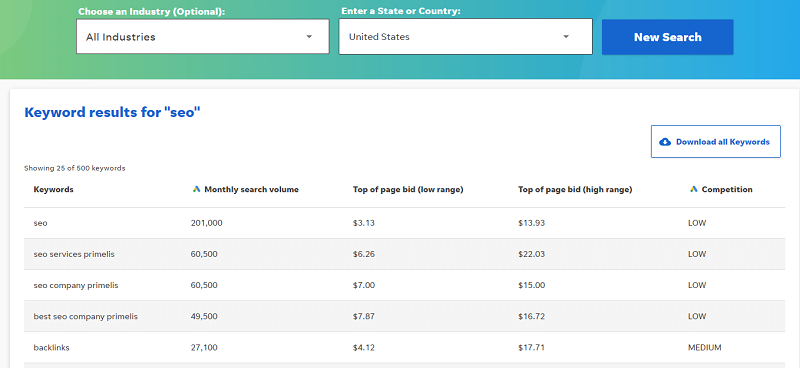
Both paid and free tools are used for keyword research.
The main free tools:
- Google Keyword Planner. Requires a Google Ads account.
- Alternative keyword tools, such as the Wordstream Free Keyword Tool.
Paid tools cost money, of course, but they provide more data. The best-known paid options:
- Ahrefs. Has data for Google, YouTube, Bing, and Amazon.
- Semrush. Mostly focused on Google.
- Serpstat. Shows Google data.
What is a semantic core (keyword map)?
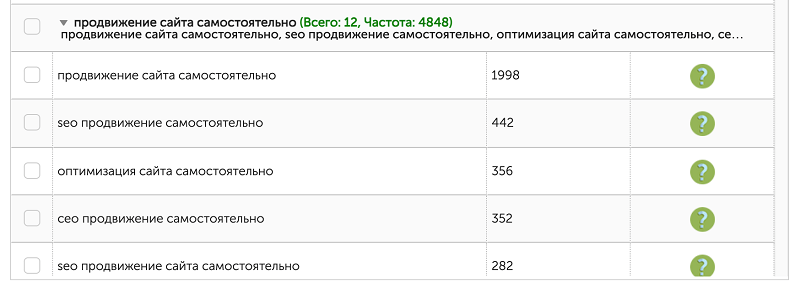
A semantic core — the term used across Eastern European SEO for a structured keyword map — is the full set of collected keywords distributed across your site’s current and future pages.
Once the keywords are collected, you need to cluster them and assign them to landing pages. For that, use our keyword grouping tool, which clusters 40,000 keywords in 1-2 minutes.
Each group contains a list of keywords that does not repeat in other groups. The main purpose of grouping is to avoid cannibalization — duplicating similar keywords across different pages of the site. Clustering also keeps the search engine from getting confused about which page should rank.
How to build a keyword map properly
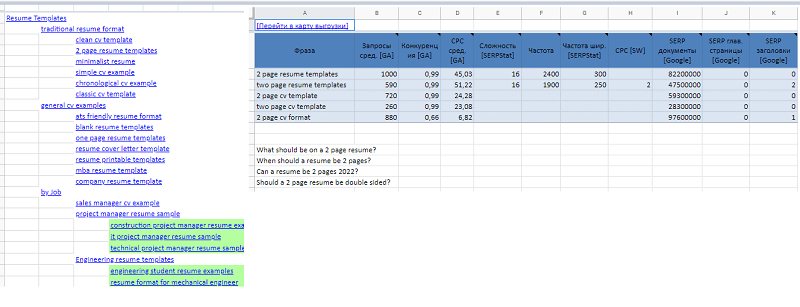
As you work through the keyword map, you split pages into groups and generate:
- Ideas for internal pages (subcategories, product pages, new standalone categories).
- Ideas for editorial content (blog, knowledge base, newsletters).
- Ideas for guest posts (external content for third-party platforms).
In the end, each cluster will contain a small group of keywords plus the search suggestions Google shows for them.
What you need to know when building a keyword map:
- Understanding query types.
- Knowing how to cluster queries (by wording and by Google’s search results).
- Understanding the intent behind each query.
- Knowing the “vocabulary of the business.”

If you would rather delegate this, check out our semantic core service. Once the keyword map is ready, we move on to priorities.
Step 3. Choosing priorities
Webmasters often create lots of content that brings no traffic. The main reason is trying to chase two rabbits at once. Don’t try to cover an enormous keyword pool.
You now have a keyword map with a defined structure. At this stage, focus on the following parameters:
- competition level;
- existing content;
- available resources.
Every keyword has a competition level measured by paid tools. Typically the parameter runs from 0 to 100 in Ahrefs, Semrush, Moz, and Serpstat. The scores are based on the quality of external and internal links pointing to the ranking pages.
Competition is low at 0-10, medium at 10-50, and high above that. Young sites should focus on low competition. If you already have authority, try covering medium-competition keywords too. High competition demands enormous resources and does not always pay off, so it is usually best ignored.
Most of my own traffic comes from low-competition keywords.
Next, evaluate the existing content in the top 10. The key question: can you create something dramatically better (at least 3x better)? Content is the most important ranking factor. If you create something similar or only marginally better, there is no guarantee the search engine will pick you.
By creating content far better than what already exists, you can save money on resources — specifically, on buying backlinks.
Let’s look at an example. You have 10 pages to promote and allocate $100 to each — a $1,000 budget. If you pick 5 pages instead of 10, the budget per page grows to $200. Your odds of reaching the top 10 double.
I often see sites trying to push hundreds of pages without traffic on even one. Don’t do that. Fewer pages, but better ones.
Step 4. Writing meta information
The best content does not always get much traffic, because users can’t see its quality before they click. According to Semrush research (2025), about 60% of Google searches end without any click at all, and on queries with AI Overviews the zero-click share reaches 83%. The remaining clicks are fought over hard — and the snippet wins that fight.
A client once came to me asking for results within one month. SEO is a marathon, not a sprint: in our projects the first results usually show up in 3-6 months. But one thing about this client really caught my attention: his existing meta information was the reason for poor click-through to the site. I rewrote it — and traffic doubled within a month.
What are meta tags?
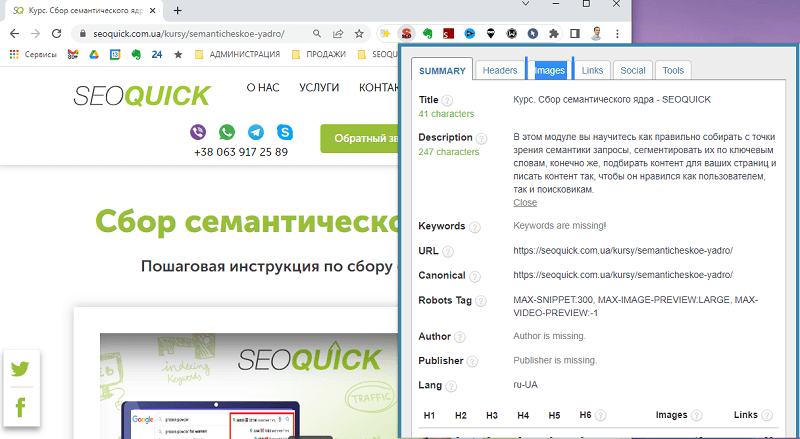
Meta tags (or metadata) are the service-level information of a website, visible primarily to search engines. The most important metadata for SEO includes the Title and Description tags, structured data, Canonical, Hreflang, and certain robots directives.
In HTML code they are usually wrapped in the special <meta> tag. You can inspect your pages’ metadata with the handy SEO Meta in 1 Click extension.
Among the obsolete tags is Keywords — it no longer has any effect on rankings.
How to write meta tags properly
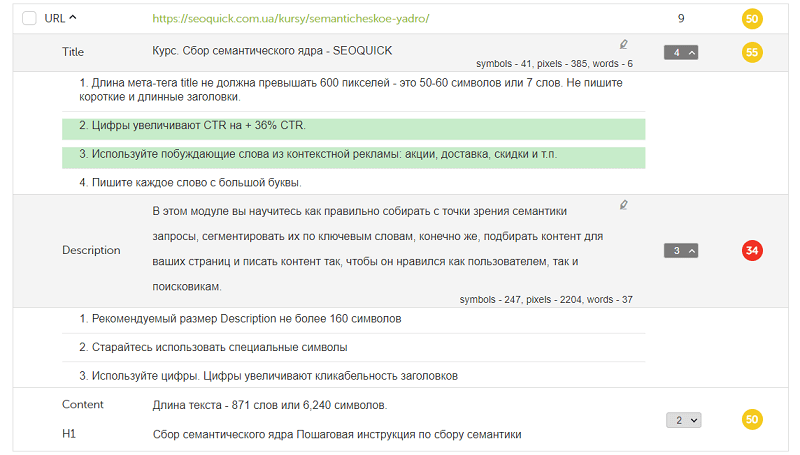
My team built a meta quality calculator that gives hints on the following parameters:
- meta length;
We also built a dedicated tool that runs a website audit and detects metadata errors.
Journalists sometimes spend hours inventing headlines that will make readers click. We made a simple, convenient tool for creating meta for your pages!
Now, time for the most important part — creating content.
Step 5. Creating content that delivers results
Many people create great content and get no results from it. Over time, content goes stale and loses its power. So how do you get results right away?
The main attributes of quality content:
- matching user intent;
- expertise;
- up-to-date data;
- choosing the right goal.
The single most important attribute is user intent. For example, if someone searches for “Elon Musk age,” they don’t want his biography: the search engine shows the answer instantly, and the user never even visits a site.
Or take the keyword “apple macbook review”: the top 10 is full of content offering reviews, not product listings. Before creating content, pin down exactly what users want to see.
Next — the author. All the content on our site is written by marketers with years of hands-on experience. The era of faceless SEO texts is over: search engines have learned to detect quality.
Back in 2018, Google introduced the E-A-T parameter (Expertise, Authoritativeness, Trustworthiness), and in late 2022 it added another E — Experience, the author’s real-world experience. Now it’s E-E-A-T.
Say you fall ill: would you rather read a text from a copywriter who rewrote an article without understanding the subject, or one from a doctor with years of practice? The answer is obvious — the doctor will be far closer to the mark. With the spread of AI-generated text, this filter has only become stricter: there is more text and less real experience in it.
Up-to-date data matters too, because technology moves fast. The internet is full of outdated information that hurts user behavior signals. This is my favorite traffic-acquisition trick: creating new content on topics where the existing information has gone stale.
Finally, define your goals:
- get traffic;
- sell a product;
- earn backlinks and mentions.
Not all content is created for traffic. Some pages get traffic through internal links from other pages. So part of your content doesn’t have to be optimized for search engines at all — optimize it for the user instead.
It is also important to create content that attracts backlinks, mentions, and social shares. Mostly that’s useful non-commercial content: research, free tools, guides.
Either way, every piece of content you create must serve the user. Search engines predominantly rank sites that pay close attention to user behavior.
Step 6. Mind the user behavior signals
The longer users read your content, the higher the chance of a sale. Yet most users leave a site right after opening it. So how do you keep them?
Albert Einstein once said: “Everything should be made as simple as possible, but not simpler.” That is extremely relevant today.
Many sites try to sell everything at once, starting from the homepage. Webmasters are usually power users who know exactly where everything is. But most of your visitors are far from power users.
Open Apple’s website — apple.com. A simple, clear structure, plenty of white space, just one product on the first screen. Apple’s marketers know very well that a complicated structure makes shoppers leave.
Instead of trying to sell everything at once — sell your bestsellers. The menu should be split into an intuitive structure so that any page of the site is reachable within 3 clicks.
Avoid stuffing SEO texts at the bottom of pages — search engines have long since learned to spot them. Any text must be an integral part of the content.
And now we smoothly move on to the technical side.
Step 7. Technical optimization
Many of my colleagues put this step first. For me it always comes after content creation, because you should be optimizing finished content.
Why do you need a technical audit?
The goal of a technical audit is to fix as much as possible — without losing your mind if you can’t fix everything. Plenty of top-10 sites carry a pile of errors and still get great traffic. Users have no idea those technical errors exist.
How to run a technical site audit
Pay attention to:
- correct directives in robots.txt;
- the sitemap;
- whether site modules work properly;
- clean, human-readable URLs;
- catalogue and blog pagination — own URLs, own canonicals, different content;
- broken link checks;
- load speed and Core Web Vitals.
You can find the full technical audit checklist in my video.

For a more thorough technical audit, use Screaming Frog.
How to run a technical audit for free
Screaming Frog is a fairly expensive program (the free version is limited to 500 URLs). But you don’t need to buy expensive tools to run a technical audit.
Use 2 free tools:
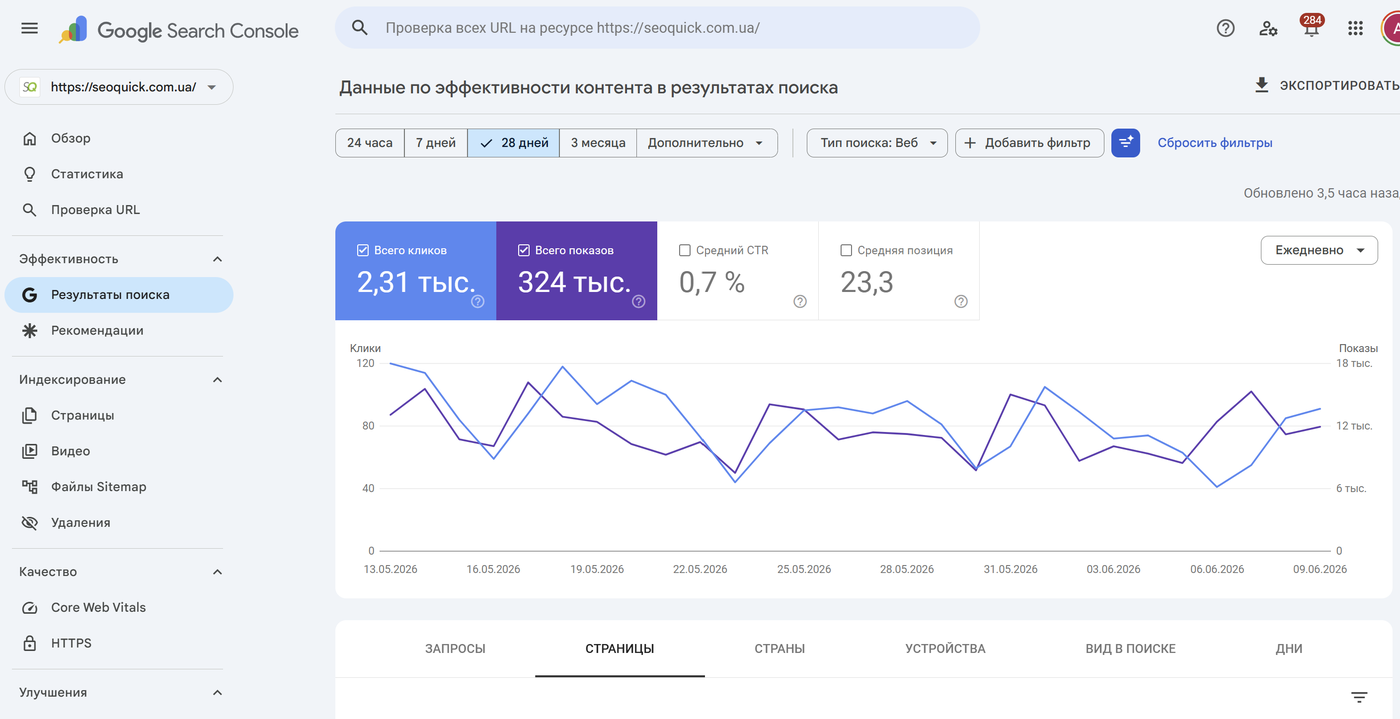
- Google Search Console. Shows errors across the whole site.
- PageSpeed Insights. Analyzes a single page.
By the way, our Website Audit tool can check PageSpeed Insights across the entire site. Verify all the data manually.
Step 8. Website testing
One trait shared by all CMSs: new bugs keep appearing. Mostly this happens when new content interferes with old content. And often the developers themselves have no idea where the bugs come from.
At one point, the lead form on my own site broke. We only discovered it two weeks later. You can imagine how many sales were lost and how many clients were left unhappy.
What is website testing?
Website bug testing is the process of hunting for errors on your site that can cost you traffic and customers — and even put you at risk of search engine penalties.
Bug testing is done in two ways:
- manual — visually reviewing pages, checking buttons and forms;
- automated — using dedicated test cases, software, and pre-written scripts.
Types of website testing
There are countless causes of bugs — too many to list. But bugs can be grouped by type:
- Functional bugs — errors where the actual behavior does not match the intended one: a product won’t add to cart, a form won’t submit, a required field can’t be filled in, an input form doesn’t appear, an element fails to load, or a page returns a 404 error.
- Visual bugs — errors where an element renders incorrectly and looks different from the approved design: shifted elements, broken images. That’s why it is critical to compare design mockups against the live site.
- Logic bugs — when the functionality was poorly thought through in the original specification and the flaw was never caught. For example, the add-to-cart logic requires choosing a color and a size, but if there is only one color, even selecting a size won’t let you add the product.
- UX defects — a special class of bugs that most often shows up across different browsers and mobile devices: everything looks neat on desktop, but on a smartphone the menu button slides away and elements overlap.
- Change-related bugs — hunting for all of the above after a developer ships fixes.
The last type splits into several subtypes:
- Sanity testing — a targeted check that a specific bug is fixed and the feature works as specified.
- Regression testing — searching for new errors after a fix. It often happens that a developer fixes one bug and creates two or three new ones. The most extensive type of testing.
- Smoke testing — a basic check that the developer hasn’t broken the core functionality or layout.
How often should you test for bugs?
When something breaks at Facebook or Google, it usually gets fixed within minutes, because millions of users start reporting it. If, like us, you don’t have millions of users yet, you need to run checks manually.
I would recommend doing it at least once a week, plus after any developer fixes. After any content optimization, do a quick pass over newly created or updated pages.
A specialist on our team typically walks through all pages of the same type, clicks as many links and modules as possible, fills out the forms, then reviews the visual layer. The bug list is compiled into one document for developers (or a separate one for content managers and designers) and handed over for fixing.
How to describe a bug
Any bug should be described so that the person fixing it can:
- locate the bug;
- reproduce it under the documented conditions;
- understand how it should work in the end;
- after the fix, repeat the steps and get the expected result.
A bug ticket consists of these key items:
- Bug title (ideally with internal numbering and type codes).
- Bug description (briefly: what broke or looks wrong).
- Screenshot/video — an image or screen recording showing the bug.
- Bug location — a link to the page or site element.
- Steps to reproduce — describe the conditions for triggering the bug step by step, in maximum detail.
- Actual result — what happens when the bug is reproduced (e.g., the data is not submitted).
- Expected result — what should actually happen.
- Severity — grade bugs on a priority scale; developers are not made of rubber.
- Priority — tickets of equal severity may still have different priorities.
Then assign each bug to an owner and track it to completion.
Step 9. Link building
This is the most disliked and the hardest kind of SEO work. Yet link building is critically important for results. Let me share how I do it.
The first and main rule of link building: do not chase quantity. Even if your top-10 competitors have lots of links, odds are they were built back under the old algorithms. Quality above all.
Link building methods
The popular link building methods include:
- The Skyscraper Technique — finding content with lots of backlinks, creating something better, and doing outreach to the linking sites so they link to you as well.
- Broken link building — finding dead links on popular portals and offering your page as a replacement.
The right strategy depends on your existing content. If you don’t have great, clickable content, many outreach tactics simply won’t work. But plenty of other effective link building methods remain.
For local SEO, for example, these work well:
- listings in directories;
- registering with Google Business Profile;
- adding the site to the geo data of social networks and services;
- registering the company on review sites and job boards;
- creating accounts on local forums.
There are two main sides of SEO: white hat and black hat. There are no gray methods — that idea was invented to justify some of the black-hat ones. Both white and black methods work. Which to use is up to you. Gray methods are really just black methods the search engine hasn’t banned yet.
I get excellent results with white-hat methods, so personally I see no point in walking the knife’s edge.
Step 10. Promote right after publishing
Even the highest-quality product becomes outdated once competitors build something better. That is why Apple releases a new iPhone every year, just as other brands refresh their products. Content ages the same way — don’t put off promoting it.
I constantly see webmasters create piles of content and postpone promotion. New content is always higher quality than the previous batch. Over time it starts going stale, because competitors never sleep.
Instead of producing yet more new content, start promoting what you already have. The simplest methods: share it with your existing audience on social media, then send an email campaign. The more people see it, the higher the chance it gets shared.
The second stage is link building and outreach. It is much easier to earn quality links with white-hat methods while your content is fresh and new. Later it gets much harder.
Nikolay regularly breaks down promotion tactics in our podcasts — be sure to subscribe!
Step 11. Building trust
After Google introduced the E-A-T parameter (now E-E-A-T — Experience, Expertise, Authoritativeness, Trustworthiness), many sites dropped. Most of them never recovered. For our site, that update only helped. Let’s look at why.
Buyers are in no hurry to part with their hard-earned money. There is a lot of fraud online, so buyers frequently check whether they can trust you.
How do you win their trust? Sell your story, not your product. Build a great About Us page with your photos, your real names, and your story — why you deserve to be trusted.
People trust people, not brands. Many pages of our site are full of our photos, because that builds trust. Every author in our blog has a bio and a list of achievements.
Your audience may also want to see awards, experience, and reviews. Show them: without trust, most buyers simply don’t buy. And for YMYL niches (medicine, finance, law), E-E-A-T is nothing less than a matter of survival in the search results.
Step 12. Do NOT build high expectations
SEO is a game for the patient. Results often take a very, very long time. The key is to keep going instead of giving up.
I started selling SEO services long before I had traffic. I mostly used freelance marketplaces, where I still find clients to this day. People often called me “the shoemaker without shoes.” So I decided to change direction and promote the SEOquick site itself.

For a long stretch, traffic kept passing me by. Then Nikolay Shmichkov joined my efforts. Several years went by with almost no results. Don’t assume we are bad marketers. Our competitors are marketers too, there are thousands of them, and the top 10 has only 10 spots.
The main thing was to believe and not give up. We kept creating quality content and promoting it. Today we have stable traffic, because we did not back down.
I have noticed one important quirk of SEO: you never know for sure which content will deliver. Sometimes you expect nothing, and the piece lands in the top 3 and brings a flood of traffic. Other times you try everything, and there is no result at all.
The Pareto principle plays a huge role in SEO: 20% of content brings 80% of traffic. So my main recommendation is: don’t build high expectations — they kill the will to continue.
Never stray from your chosen path and your content plan. And track the results in Google Analytics 4 and Google Search Console.
Step 13. Optimizing for AI search (GEO/AEO)
Between 2024 and 2026, search changed more than in the entire previous decade. AI Overviews appeared above the classic results, followed by the fully conversational AI Mode. According to Google (2025), more than 2 billion users see AI Overviews every month, and AI Mode passed 100 million active users in the US and India alone.
In parallel, a separate channel emerged: ChatGPT with an audience of roughly 900 million weekly users (2026), Gemini, Perplexity. People increasingly get their answer without opening a single website — which is why a thirteenth step of promotion now exists.
GEO (Generative Engine Optimization) is the practice of optimizing a website for generative AI systems so that they cite your content and recommend your brand in their answers. A related term is AEO (Answer Engine Optimization) — optimizing for “answer engines”: AI Overviews, AI Mode, ChatGPT Search.
The good news: GEO does not replace the previous 12 steps — it builds on top of them. AI systems pull their answers from the same pages that rank well in regular search. The bad news: simply “being in the top 10” is no longer enough — your text has to be easy to quote.
What to do, concretely:
- Give direct answers. Right after a question-style heading, the very first paragraph should contain a self-sufficient 40-60-word answer. These are exactly the fragments AI systems pull into their responses.
- Use clear definitions. The “X is…” format at the start of a section sharply increases your chances of being cited.
- Add FAQ blocks. A Q&A section at the end of the page covers the long tail of queries users ask AI in conversational form.
- Structure your content. Numbered lists, tables, clean H2/H3 headings — AI crawlers break pages into fragments, and the cleaner the structure, the more accurate the citation.
- Implement schema markup. Schema.org (FAQPage, HowTo, Article, Organization) helps machines understand who the author is, what the page is about, and how much it can be trusted.
- Grow E-E-A-T and brand mentions. AI models “trust” brands that are frequently mentioned on authoritative platforms — the link building and PR from steps 9-11 now also drive AI visibility.
- Track AI visibility. Check which AI Overviews and ChatGPT answers feature your site, and how much traffic arrives from AI sources (visible in GA4 referrals).
SEOquick case. For a medical website we combined classic SEO with optimization for AI answers: the result — the #2 position for the “dentist Kyiv” query and 26,714 queries for which the site appears in Google’s AI answers. Details in our medical website SEO case study (in Russian).

We collected the detailed playbooks in separate guides: GEO: optimizing your website for GPT and AI search engines and how to write AI content that gets into answers.
Conclusion
Search engine optimization is still the main channel of traffic and sales — Google continues to bring an order of magnitude more visitors than all AI chatbots combined.
Given the enormous level of competition, it is better to focus on keywords with low competition and weak competitor content. Create less, but better. Promote immediately after publishing. And from day one, optimize your content so it is easy for AI systems to quote.
I would love to hear your thoughts in the comments.
FAQ
How long does SEO take?
The first SEO results usually show up within 3-6 months; sustainable traffic growth takes 6-12 months. The speed depends on the site’s age, the competition in the niche, and the scope of work. SEO is a marathon: in our projects, the strongest results came in the second year of systematic work.
Can I do SEO on my own?
Yes. Work through all 13 steps from this article: competitor analysis, keyword research, prioritization, meta tags, content, user behavior signals, technical optimization, testing, link building, timely promotion, trust, realistic expectations, and AI search optimization. Free tools (Google Search Console, PageSpeed Insights, our keyword grouping tool) are enough to get started.
Which step should a new website start with?
Start with competitor analysis and keyword research. They define the site structure, the content plan, and the budget. A mistake at this foundation devalues everything that follows: you will be building pages for queries you cannot compete on — or that have no demand.
What matters more: content or links?
Content comes first. Content that is dramatically better than the competition can reach the top for low-competition queries with almost no links — and attracts them naturally on its own. Links amplify content that is already good, but they won’t save weak content. In competitive niches you need both.
What is GEO and how is it different from SEO?
GEO (Generative Engine Optimization) is optimization for generative AI systems: AI Overviews, AI Mode, ChatGPT, Perplexity. Classic SEO fights for positions in the search results; GEO fights for citations of your content in AI answers. The methods overlap: direct answers, structure, schema markup, and E-E-A-T work for both channels.
Website speed in 2026: how to check LCP, INP, CLS and what to fix first
Why site speed affects SEO, UX, and conversion: Core Web Vitals, PageSpeed Insights, Search Console, technical causes, and optimization plan.
Read →
Online Store Promotion
Learn how to push your online store to the top of search and lift conversions. From keyword research to UX — clear, no-fluff instructions. Start with an audit and turn your site into a sales machine!
Read →
Website and domain history: what to check before SEO, purchase, or redesign
5 reasons to check domain history: indexation, penalties, redirects, backlinks, old content, and risks before promotion or migration.
Read →Want to apply this to your site?
We will review the current situation, find the first growth levers, and suggest a practical working format.