Landing Page Structure in 2026: 10 Blocks of a High-Converting Page
We break down the structure of a high-converting 2026 landing page: which blocks are essential, how mobile-first, speed and AI personalization lift conversion, and where the line between a landing page and a full website lies.

An effective landing page structure in 2026 is a hero block with one clear offer and a single CTA, social proof above the fold, a short 3-field form, mobile-first layout as the foundation, and Core Web Vitals-grade speed. The median landing page conversion rate is 6.6%, while the top 10% of pages already exceed 14%. Below is how to build such a page block by block.
A landing page can become either a loyal helper or a money-losing investment.
It all depends on how well the single-page structure is thought through and how precisely it conveys meaning to your target audience.
You can only be sure of that after a test campaign launch and analyzing the data in Google Analytics 4 and Google Search Console.
So that you don't waste your ad budget and development money in vain, let's break down what an effective landing page should look like in 2026.

Looking for traffic to your site? SEOquick will attract 100% organic for you!
SEO is your long-term and reliable source of traffic from the Google and Bing search engines.
We'll do comprehensive SEO promotion: content, reputation, internal optimization, link building.
Our SEO is white-hat, our goals are getting you to the TOP! We know exactly what and how. And that's just what you need, isn't it?
What a landing page is and why its structure matters
A landing page is a single-page site with a special structure built on the laws of marketing and behavioral psychology.
It is almost impossible to sell anything to a modern user on the spot. You need to grab attention, dive into their problem, show a solution, handle objections and motivate the target action — and in exchange for a contact, often offer a lead magnet.
A landing page handles this task best. It contains a set of blocks in a logically correct sequence, so the user receives information in portions — this lowers the risk of distraction and bounce.
Unlike a regular website, a landing page focuses attention precisely and skillfully guides the attention of a potential client. How a landing page differs:
- it has a special structure built on marketing technologies;
- it focuses the user's attention where it is needed;
- it highlights your advantages and offsets weaknesses;
- it lets you stand out from competitors;
- it pushes the visitor toward one target action — leaving a request or calling.
At the same time, a landing page is neither better nor worse than a corporate website — they are simply different tools for different tasks.
Landing page or multi-page website — what to choose in 2026
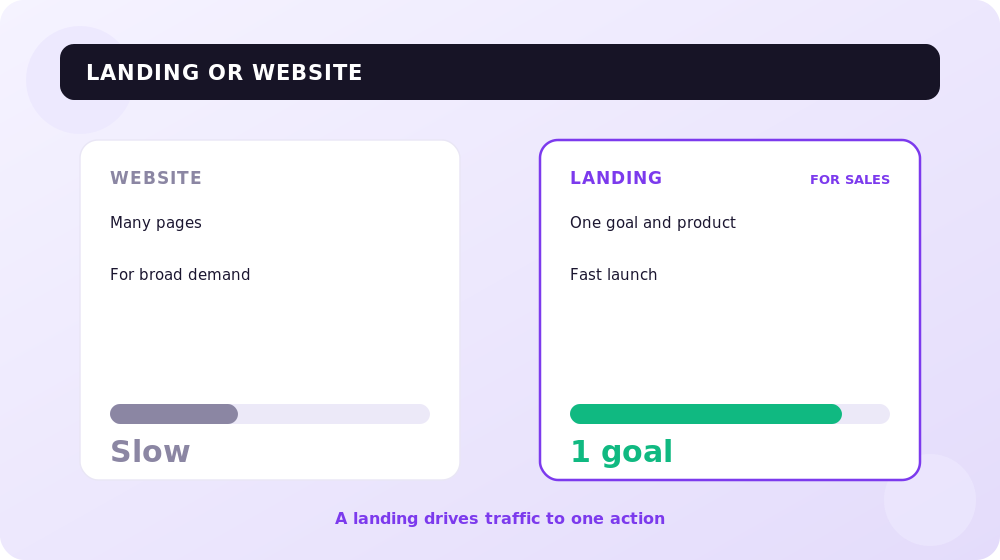
The main question is not "which is better" but "which solves your task".
A landing page is stronger when you have one product or promotion, specific paid traffic and one goal — a request, a signup, a call. It launches faster, is easier to test and is measured more precisely. That's exactly why the median conversion of dedicated landing pages stays around 6.6%, while an average website page converts at about 2.35% (Unbounce data).
A multi-page website wins in the long run: dozens and hundreds of pages cover broad semantics, grow organic traffic and close the whole customer journey. For search promotion a website is almost always stronger than a landing page.
In practice, in 2026 businesses rarely pick just one. The working combo is this: a multi-page website collects organic traffic and holds the brand, while a separate landing page is built for each ad campaign or product. For paid traffic from contextual advertising it is almost always more effective to drive to a purpose-built landing page rather than the site's homepage.
If you need both in one system — that's already a question of website development with a well-thought-out architecture.
An effective landing page structure: 10 essential blocks
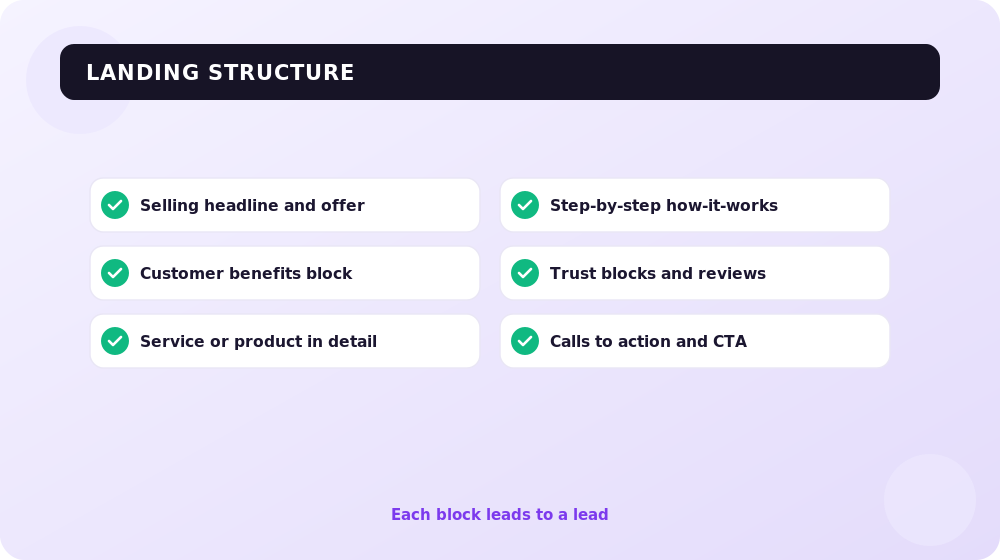
Structure is not design — it's the logic of persuasion. Below is the framework that works in 2026. Not every block is mandatory for every project, but the first six are needed almost always.
1. Hero block (above the fold)
The most important block. In one or two seconds the user should understand what you offer, why it matters to them and where to click. The first screen holds a headline with your USP, a short subhead or 3 benefit bullets, and a single prominent CTA.
It is the headline, hero image, primary CTA and form that drive most of the conversion variance — A/B tests on these elements produce a winner roughly 24% of the time, nearly double the overall rate. So start your optimization with the first screen.
2. Social proof above the fold
Client logos, a counter like "chosen by 5,000 companies", a rating or a short testimonial above the fold lift conversion by 12% on average. A named-customer counter delivers about +22%, a single testimonial card +14%, and a logo strip about +8%.
Specificity matters: a faceless "trusted by thousands" in 2026 works no better than having no social proof at all. And here's the paradox: about 77% of marketers place no social proof on their landing pages at all — that's lost conversion.
3. The client's pains and problems
The block where you show that you understand the user's situation. Phrase 3–5 pains in their own words — that's how the visitor recognizes themselves and keeps reading.
4. Solution and benefits (not features)
Here you tie the product to the pains. Write about benefits and outcomes, not specs: not "10 GB of cloud storage" but "you won't lose a single client file".
5. How it works
A simple 3–4 step diagram removes the fear of complexity and confusion. The clearer the process, the higher the trust.
6. Extended social proof
Full testimonials with a name, photo and job title, case studies with numbers, video reviews, industry certificates. One strong, specific testimonial works better than ten generic phrases. Altogether, well-built social proof delivers a 19–34% conversion lift.
7. Objection handling and FAQ
A question-and-answer block closes doubts like "what if it doesn't fit", "what if it's expensive", "what about guarantees". A removed objection is a saved request.
8. Offer, price and guarantee
A clear offer with a transparent price (in UAH), a guarantee or a refund. Price transparency lowers anxiety and the number of drop-offs at the final step.
9. Capture form
The shorter the form, the higher the conversion. Cutting fields from 5 to 3 raises conversion by about 50%, and every extra field beyond four roughly halves the result. The optimum is 3 fields. Ask only for what you can't process the request without.
10. Final CTA
A closing call that repeats the offer. A specific CTA instead of an abstract "Submit" lifts conversion by up to +161%, and adding relevant urgency (a limited-time offer) does noticeably more. Keep one target action on the landing page: a single-CTA page converts at about 13.5%, a two-CTA page at 11.9%, and three or more CTAs at 10.5%.
Technical conversion factors: speed, mobile-first, AI
In 2026 structure is only half of success. The other half is technology and personalization.
Mobile-first as a foundation, not an adaptation
Mobile traffic dominates, and Google's indexing is already fully mobile-first. Design the landing page for the phone first: important blocks (social proof and CTA) must not drop down when columns collapse into a single stack. On weak pages, it's exactly the proof and the button that slide off the screen. An animated, high-contrast CTA on mobile delivers a +52% conversion lift on average.
Speed and Core Web Vitals
Speed affects both rankings and money directly. Target Core Web Vitals thresholds: LCP under 2.5s (Google is tightening the bar), INP under 200ms, CLS under 0.1. Moving a site from the "poor" zone to "good" across all three metrics lifts conversion by 11–19% on average. In the Rakuten 24 case, a good LCP delivered +33% to conversion and +53% to revenue per visitor. Only 62% of mobile pages pass the LCP threshold — a huge competitive edge for those who optimize speed (Core Web Vitals thresholds by Google).
AI personalization and dynamic content
The main trend of 2026. Dynamically swapping the headline, hero and testimonials based on traffic source, geo and device delivers +9–18% conversion on average, and up to +25% on mobile. AI-personalized landing pages that adapt the headline, image and CTA in real time outperform static ones by about 87% on average. And personalized CTAs convert 42% better than generic ones.
A/B testing is a must
A landing page is never built "once and for all". A/B tests lift conversion by 49% on average, yet only about 44% of companies test regularly. Test one element at a time, starting with the headline, hero, CTA and form. Remember: a statistically significant winner appears in only about 1 in 8 tests — so testing has to be continuous. Brands running continuous multivariate testing convert 3.4 times higher than those who don't test at all.
How to build a landing page and tie it to SEO and ads
The step-by-step launch order in 2026 looks like this:
- define one page goal and one target action;
- describe the customer avatar, their pains and the language they speak;
- assemble a prototype from the blocks above — logic first, design second;
- write copy from benefits, not from features;
- design mobile-first and bake speed in at the markup stage;
- connect analytics (GA4, Search Console, click maps) before launch;
- launch traffic and start A/B tests.
A separate word on SEO. A landing page for paid traffic and a page for organic search are often different entities. A narrow selling landing page ranks poorly in search because it has little text and narrow semantics. If you need a page for both ads and Google, build a hybrid: a selling top section for conversion plus an extended informational block and FAQ for semantics. Before launching paid traffic it's worth running the page through a usability audit so you don't burn budget on UX mistakes.
For contextual advertising, drive traffic to a dedicated landing page with a message that matches the ad — this raises Quality Score and lowers the cost per click. And handle organic traffic and content strategy through search promotion of a multi-page website.
Frequently asked questions about landing page structure
What landing page conversion rate is considered good in 2026?
The median across all niches is about 6.6%. A good result is 10% or higher (the top 25% of pages), and the top 10% of landing pages already convert above 14%. But always compare with your niche: events sit at 12%+, SaaS at about 3.8%, and e-commerce at about 2.35%.
How many blocks should a landing page have?
There's no fixed number. The base framework is 6 essential blocks (hero, social proof, pains, solution, testimonials, form with CTA) plus extra ones for your task. What matters is logic and one path to one target action.
How many fields should the form have?
The optimum is 3 fields. Cutting from 5 to 3 raises conversion by about 50%, and every extra field beyond four roughly halves the result. Ask for the minimum data needed to process a request.
Landing page or multi-page website — what to choose?
A landing page is for a specific promotion, product and paid traffic with one goal. A multi-page website is for organic traffic, broad semantics and a long-term brand. In 2026 the combo is more common: a website for SEO plus separate landing pages for campaigns.
Does landing page speed affect conversion?
Yes, directly. Good Core Web Vitals (LCP under 2.5s, INP under 200ms, CLS under 0.1) lift conversion by 11–19% on average, and by a third in some cases. Speed is a requirement, not an option.
Does a small business need AI personalization?
At a minimum — yes. Even a simple headline swap based on traffic source or geo delivers +9–18% conversion. Full real-time AI personalization pays off at large traffic volumes, but basic scenarios are within reach for almost everyone.
Conclusions
A high-converting landing page in 2026 is not a "pretty single-pager" but a calibrated system: a clear hero with one offer and one CTA, social proof with specifics, a short 3-field form, mobile-first layout and Core Web Vitals-grade speed. On top of that — AI personalization and constant A/B testing, which separate the top 10% of pages converting at 14%+ from the market average.
Build the structure around the logic of persuasion, measure every block, and don't be afraid to test. If you want your landing page to work in tandem with SEO and ads and bring in requests 24/7 — the SEOquick team will help with development, audits and promotion.
How to Write Sales Copy: Structure, 8 Formulas, Ready-Made Templates and Examples
Sales copy without fluff: the structure of a page that sells, 8 formulas (AIDA, ODC, PMHS…), a real first-screen breakdown, ready-made templates and prompts, SEO logic and metrics. SEOquick’s experience: a ×7 traffic case built on commercial pages.
Read →
Website speed in 2026: how to check LCP, INP, CLS and what to fix first
Why site speed affects SEO, UX, and conversion: Core Web Vitals, PageSpeed Insights, Search Console, technical causes, and optimization plan.
Read →
Image SEO Optimization: alt, Dimensions and Weight for Core Web Vitals
How to optimize images for SEO in 2026: why alt text matters, how width and height stop layout shifts (CLS), which formats (WebP, AVIF) to use, and how not to break LCP with lazy loading. A guide from SEOquick.
Read →Want to apply this to your site?
We will review the current situation, find the first growth levers, and suggest a practical working format.