Facebook Targeting 2026: Step-by-Step Setup Scheme and Strategy
A 2026 guide: Advantage+ audiences, the Andromeda AI algorithm, post-ATT privacy, placements, and budgets — how to set up Meta targeting without burning your budget.

In short: in 2026, targeting on Facebook and Instagram is built not on manually picking interests but on the quality of your data and creatives. Meta has switched to the Advantage+ AI audience system and the Andromeda ad-selection algorithm, so your job is to feed the system a clean conversion signal (Pixel + Conversions API), a broad audience suggestion, and 15–30 different creatives per month. Below is a step-by-step campaign setup scheme that is current for 2026.
Targeted advertising still lets you show ads to people with the right characteristics and interests. But over the past two years the rules of the game have changed: you decide who sees your ad less and less, and increasingly hand that over to Meta's AI.
Out of all Facebook and Instagram users, the system picks those most likely to take a target action — a purchase, a request, lead generation, or an app install.
You can set up a campaign for a specific goal: traffic, reach, leads, sales. According to current statistics, Facebook accounts for a significant share of monthly social-media visits worldwide, and together with Instagram, Messenger, and WhatsApp the Meta ecosystem remains a key paid-traffic channel.
Let's break down how to set up Meta advertising properly in 2026 — from strategy to performance tracking.

WOW, TRAFFIC! What, you need it too? Then look what SEOquick offers here
No time to explain – we'll quickly set up contextual ads for you on Google AdWords and clients will pour in. And not just any, but targeted ones!
We'll help you choose advertising relevant to your business with a high return on investment.
Clients are already tired of waiting for you to announce yourself!
Preparing to set up targeting
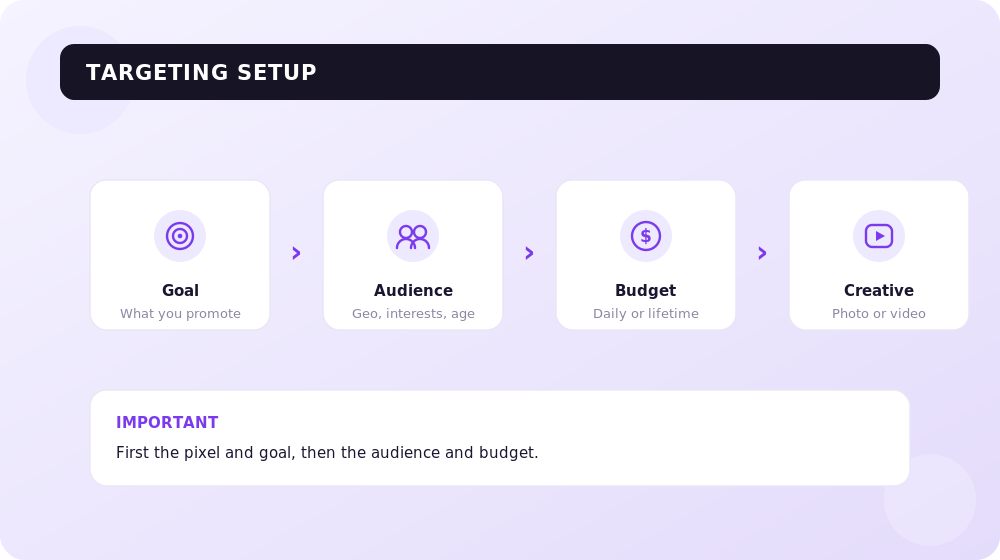
Like any marketing activity, launching ads on Meta should start with strategy. For that you need a marketing plan — otherwise the AI algorithm will optimize blindly.
The marketing plan
This is a planning tool that holds the strategic information for launching a campaign. What goes into it:
- the campaign goal and the target action (what exactly counts as a conversion);
- target audiences (customer personas, collected first-party databases, site traffic);
- the offer and propositions for different segments;
- creatives: video, statics, UGC clips, carousels;
- budget and target cost per acquisition (CPA);
- analytics and tracking setup (Pixel + Conversions API).
The key difference in 2026: the marketing plan must rely on your own first-party data — customer databases, on-site events, offline conversions. These have become the fuel for the algorithm after the privacy restrictions.
Setting up audiences in the Advantage+ era
A targeting specialist used to assemble an audience by hand from dozens of interests. Today the main tool is Advantage+ audiences — Meta's AI system that uses signals from across the entire ecosystem (Facebook, Instagram, Messenger, WhatsApp, Audience Network).
Here is how it works: you provide "suggestions" — age, geo, interests. But the only hard constraints are location and minimum age; everything else the system treats as a starting signal and will go beyond those limits if it finds higher-converting segments. According to industry experts, for 11 of the most common optimization goals detailed targeting is now always used only as a suggestion.
That said, the classic audience types haven't disappeared — their role has changed:
- Custom Audiences. Customer databases, site visitors, people who engaged with your content. This is the most valuable asset of 2026: email lists with purchase history give a deterministic signal that Meta matches with confidence.
- Lookalike audiences. After the ATT restrictions their accuracy has dropped, so they are used not as the main scaling tool but as a mid-funnel layer between broad prospecting and retargeting. The 2026 working practice is to test broader lookalikes at 3–5%, not just 1%.
- Detailed Targeting (interests). As of January 2026 Meta stopped supporting deprecated narrow interests, merging them into broad groups. Pinpoint interest "stacking" is now largely a thing of the past.
A typical 2026 budget split: 70–80% on broad Advantage+ campaigns, 10–20% on retargeting, and 5–10% on test campaigns with interests or lookalikes.
Andromeda: why creative now decides, not the audience
The main technological change is the Andromeda algorithm, Meta's new ad-retrieval system. By October 2025 it had been rolled out across most objectives and placements. Where you used to define the audience and the system filtered it down for conversions, Andromeda now "reads" the creative itself (format, hook, tone, subject) and predicts on its own who to show it to.
The practical takeaway: in 2026, creative is the targeting. Andromeda doesn't pick "the one best ad" — it matches different creatives to different people. So it needs many variants: experts recommend keeping 15–30 active creatives with different hooks and formats and refreshing them weekly to fight fatigue.
Setting up targeting: step by step
Creating the campaign
In February 2026 Meta merged the manual and Advantage+ flows into a single interface, making AI optimization the default for every new campaign. At the campaign level you choose a goal — for sales-driven businesses that's most often "Sales" (Advantage+ Sales) or "Leads."
According to global testing, Advantage+ Sales campaigns deliver on average 32% higher ROAS and 17% lower CPA compared with fully manual campaigns. So for core conversion goals in 2026 it makes sense to start with them.
Setting up the ad set
At the ad-set level you define the audience, placements, and budget.
Placements. The 2026 recommendation is a hybrid. For conversion campaigns, enable Advantage+ Placements (Meta itself distributes impressions across Facebook, Instagram, Messenger, and Audience Network): per the statistics, new advertisers using automatic placements get 47% fewer "failed" campaigns. Keep manual placements for niche tasks, brand safety, and narrow tests.
Budget and the learning phase. The algorithm needs about 50 conversions per ad set per week to exit the learning phase. Hence the minimum daily budget formula: (target CPA × 50) ÷ 7. For example, at a target lead cost of UAH 200, the minimum daily budget per ad set is about UAH 1,430. Don't split your budget across a dozen small ad sets at UAH 200–300 a day — none of them will exit learning. Scale your budget by no more than 20% every 3–4 days so you don't reset the learning phase.
Setting up the ad and creative
At the ad level you upload the creative. Depending on the placement, the format changes: video, image, carousel, collection.
What works in 2026:
- UGC video has become the default format for top advertisers. Users have learned to scroll past polished ads, while UGC blends into the feed naturally.
- Short vertical clips (under 15 seconds) consistently beat statics.
- A working creative mix: ~40% "talking head"/creator testimonials, 25% product demonstration, 20% "before/after" format, 15% trend-based/native formats.
If you have video production — great; if not, a simple 10–15 second live clip will already deliver results. More on this in our video marketing guide.
Beyond Meta's own capabilities, you can use third-party analytics services that help you understand who your audience is, how it reacts to different formats, and when it is most active.
How to track performance
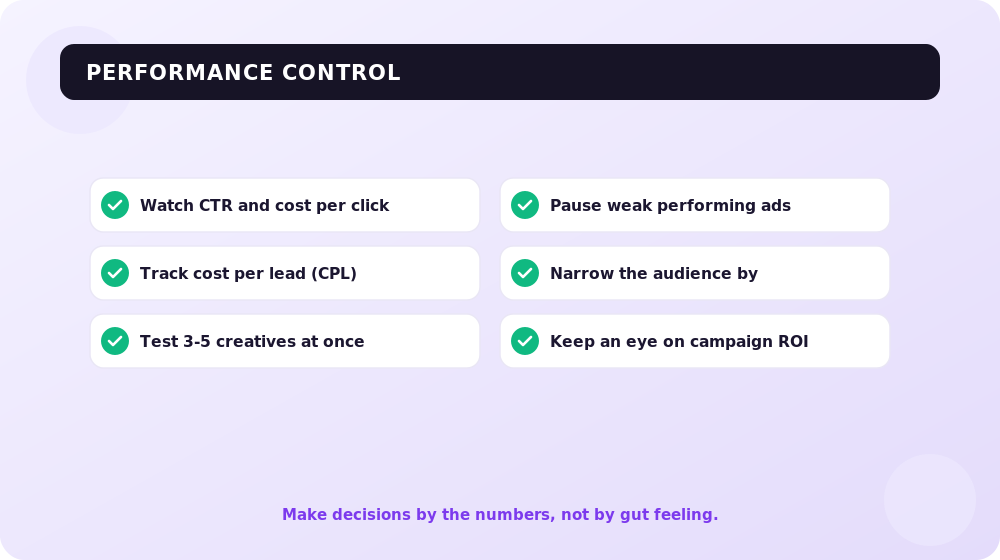
In 2026, ad performance on Meta is determined not so much by budget or targeting as by signal quality. So the first thing to set up is correct conversion tracking.
Conversions API and Event Match Quality
After the iOS ATT privacy restrictions, the browser Pixel no longer "sees" every user. The solution is the Conversions API (CAPI): server-side event delivery straight from your server to Meta. You should run Pixel and CAPI simultaneously.
The key metric is Event Match Quality (EMQ), a 0-to-10 score of how confidently Meta tied the event to a specific user. Aim for an EMQ above 7–8: the more parameters (email, phone, external ID) you send, the more accurate the attribution. According to industry data, pairing server-side and browser-side event delivery recovers on average about 38% more attributed conversions compared with pixel-only.
Which ads perform better
Look at the bottom-line business metrics: CPA, ROAS, cost per lead — not just CTR and reach. Since creative is what decides, test it: run several hook and format variants, turn off the burned-out ones, add new ones. A good way to check what's actually driving lift is a 4-week A/B test: Advantage+ versus your current manual targeting, with the same creative and budget.
Don't forget that paid advertising works in tandem with organic and other channels — for example, with search engine promotion and contextual advertising in Google.
Frequently asked questions about Facebook targeting in 2026
What are Advantage+ audiences, and do you still need to specify interests?
Advantage+ is Meta's AI targeting that finds a converting audience on its own using signals from the whole ecosystem. You can still specify interests and age, but they act as suggestions rather than a hard filter (the hard ones are only geo and minimum age). For most conversion goals this is now the recommended approach.
Do lookalike audiences still work after the privacy restrictions?
Yes, but their accuracy has dropped because of users opting out of tracking (iOS ATT). In 2026 lookalikes are used as a mid-funnel layer, tested at broader 3–5%, and must be fed with first-party data and the Conversions API.
What is the minimum budget for Facebook advertising in 2026?
For conversion campaigns, aim for the (target CPA × 50) ÷ 7 formula per ad set per day so that you collect ~50 conversions in a week and exit the learning phase. For traffic and reach tests you can start with smaller amounts, but stable optimization requires a meaningful volume of data.
What is Andromeda, and how does it change ad setup?
Andromeda is Meta's ad-selection system that predicts who to show an ad to based on the creative itself. Because of this, creative has become the center of strategy: you need many different variants (15–30 in rotation), not one "perfect" banner for a narrow audience.
What matters more in 2026 — targeting or creative?
Creative and data quality. The algorithm will find the audience itself if you give it a clean conversion signal (Pixel + CAPI, EMQ above 7) and enough creative variety. Manual interest micro-targeting has given way to broad audiences + strong creatives.
Do you need to set up the Conversions API if you already have the Pixel?
Yes. The browser Pixel loses some events because of privacy and ad blockers. CAPI sends data from the server and raises Event Match Quality, which directly improves CPA and ROAS stability. The 2026 best practice is Pixel and CAPI at the same time.
Conclusions
Targeting on Facebook and Instagram in 2026 is no longer the manual assembly of audiences from interests, but working with AI: Advantage+ audiences, the Andromeda algorithm, and hybrid placements.
Your area of responsibility has shifted to three things: a clean conversion signal (Pixel + Conversions API with high EMQ), first-party data (customer databases and site events), and creative variety.
Give the algorithm a broad audience suggestion, a sufficient budget to exit the learning phase, and a regularly refreshed stream of UGC video — and Meta will find your buyers on its own. And if you want to build a turnkey link between paid and organic traffic, the SEOquick team can help with setup and strategy.
Instagram Targeting in 2026: Advantage+, AI, and Ads Manager Setup
How to set up targeted Instagram ads in 2026: Advantage+ campaigns, the Andromeda AI engine, audience types, Reels, budgets, and privacy after iOS ATT.
Read →
SEO Case Study for Binary Options Affiliate Sites
A practical guide to promoting sites that earn from binary options broker affiliate programs (Quotex, Pocket Option and others). Up-to-date strategies, geo-targeting nuances and link cloaking for maximum revenue in 2026.
Read →
How to Become an SEO Specialist from Scratch in 2026: SEOquick Guide
How to become an SEO specialist from scratch in 2026: a step-by-step learning plan, real salary benchmarks, AI-era skills, and resources to start your career.
Read →Want to apply this to your site?
We will review the current situation, find the first growth levers, and suggest a practical working format.