SEO Promotion of ROZETKA
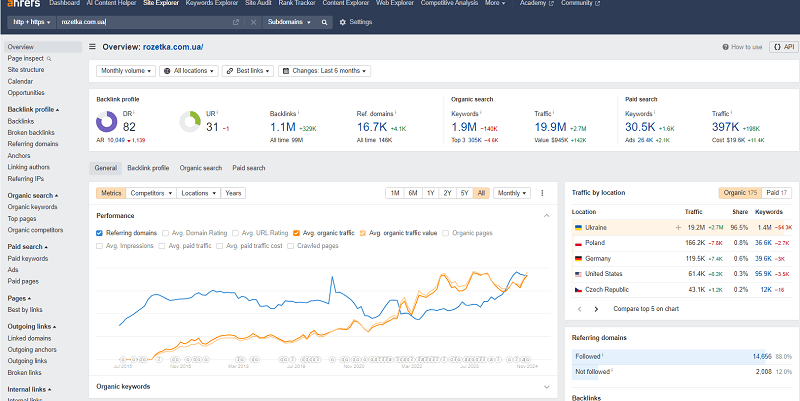
Rozetka is Ukraine's №1 marketplace with 48 million visits from Google a month. I broke down its catalog structure, its semantics across 1.4 million keywords, its schema markup and its link building piece by piece to find the real secret behind its SEO success. And that secret can be repeated.


Most large stores are perceived today as serious players on the world stage. They made their websites better than anyone else, creating the impression of monstrous projects.
We want to look at whether the sites were always this successful, and at what point they became well known. We will analyze the steps these huge sites took to achieve greatness: why they became great, what they bet on, and what exactly led them to success.
Why does nobody analyze Rozetka?
Have you ever wondered why SEO agencies, when they analyze competitors, avoid such monsters?
And maybe in vain?
Analyzing such a million-traffic site means burning through a ton of service limits. Scanning it with some third-party utilities is impossible. The sitemap is closed for viewing. Schema markup services do not let you inspect it properly.
Analyzing such a site takes a huge amount of time
The site has 1 million backlinks, 1.4 million keywords — even the basic Ahrefs limits simply will not let you export all of that. And other services cost an outrageous amount of money.
But I solved this problem for all SEO specialists and analyzed it. Yes, I spent a lot of time on it, but I found what I was looking for. Namely the secret of its SEO success.
My analysis of Rozetka is available in video format, in a visual but more condensed form.
In the article I described everything in detail, so I suggest you read on to get into the specifics.
The history of the Rozetka brand
Rozetka is a Ukrainian marketplace, the largest online store, which opened in 2005, has many branches and pickup points across Ukraine, was the third most visited in Ukraine in 2021 (KANTAR Center), and ranked 11th in 2024 (SimilarWeb).
According to AHREFS, Rozetka is a site that has been growing steadily in search since 2015, starting from a mark of 4,200 users per month (the service's data begins from those dates) — and over that period the traffic from Google grew 4,774 times!
According to Ahrefs, as of 2024 the value of Rozetka's traffic reaches 1 million dollars!
Today the traffic of the Rozetka online store from Google search alone amounts to 48.2 million visits per month. The site confidently ranks among the TOP 1000 sites in the world, which earns it a place in our case study today.
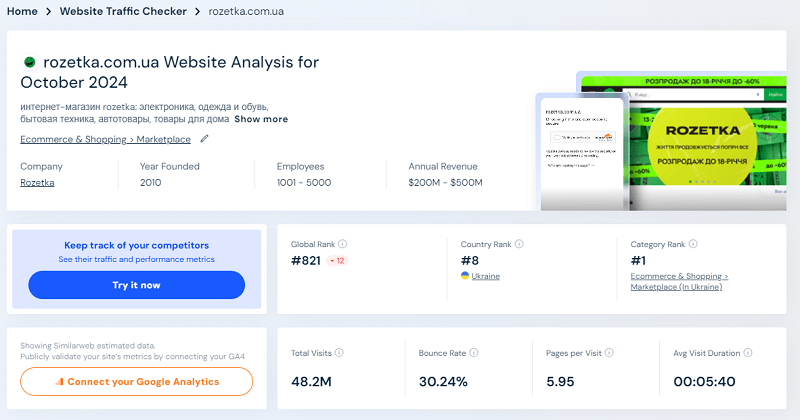
But how can we look into the history of its creation? Into the year 2005?
Here a service like the internet archive will help us. Those in the know are aware that Google Cache was discontinued and officially replaced by the internet archive — a non-profit organization. This organization stores information about the entire internet, in particular the data it managed to collect and save.
This is what the application interface looks like. It shows the history of a specific page over time. And its countdown starts from 1996.
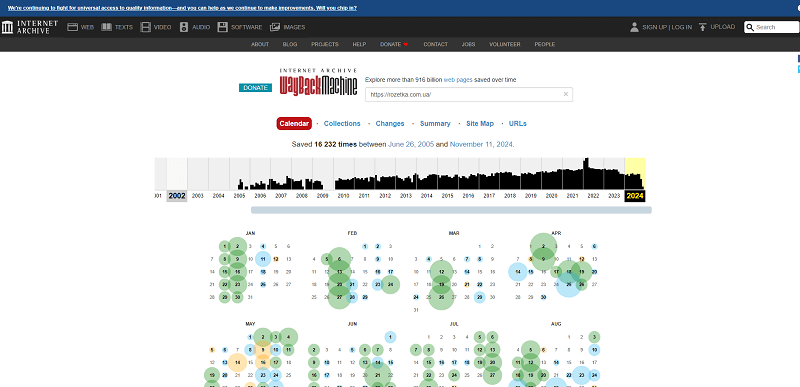
The interface of the site https://web.archive.org/
If you need to find pages that were deleted or changed in the past, the internet archive will be an indispensable tool. It remembers everything it managed to record, and this can be extremely useful for analyzing the evolution of websites.
The first design
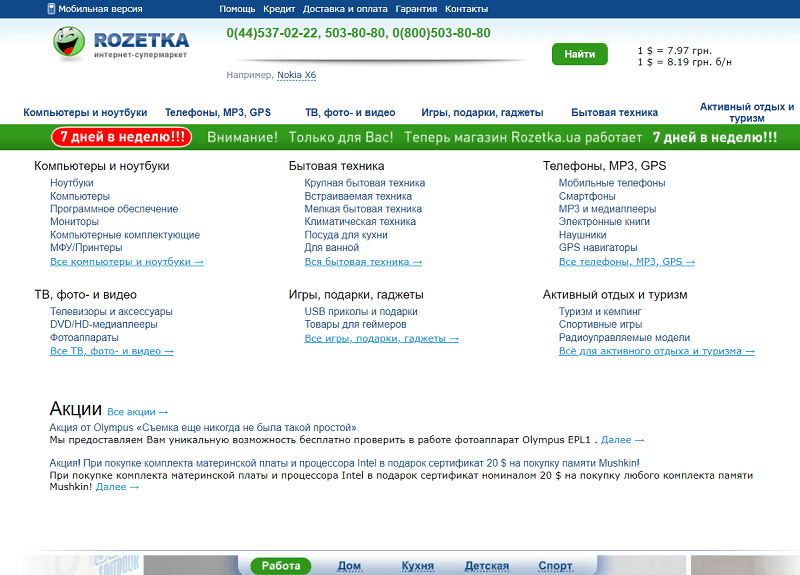
And of course, as we will see, Rozetka started in 2005, specifically on July 1. Back then the store looked nothing like it does now.
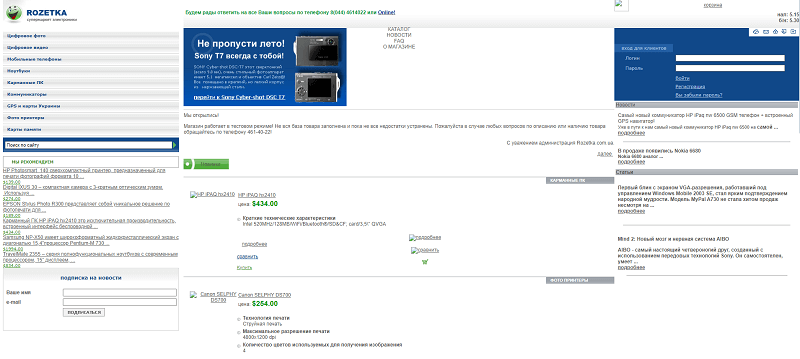
What the site Rozetka.com.ua looked like in July 2005
Don't pay attention to the broken images you see — these are caching problems, since the cache does not always save pictures completely.
Then in 2010 there was an engine change — Rozetka switched the engine to OWOX and the development studio xt-labs.com (the site does not open now), with which it cooperated for 5 years. And it did its first redesign, a change of the link structure.
Later the OWOX company would split off after three years and become a separate software solution for large stores, with complex eCommerce solutions and analytics services.
The logo
You can catch the general structure of the online store at the moment of its launch. It did not seem like a big giant, but already at that point its name and logo were designed, which is the first step you need to understand. This is the brand and the name you go to market with.
Comparing now with the existing brand, you can notice changes, including in the Rozetka logo. They made changes to their logo and corporate style, which became more modern. But today Rozetka keeps its logo unchanged.
The evolution of the logo simply did not undergo any changes: you can even see a return to the original font in 2020, the stylization of the mascot (that same smiling emoji). It became recognizable — and is now associated only with the ROZETKA online store.
The logo consists of three components:
- the logo (the image by which it is clear without words that it's you);
- the written company name (lettering that can be either with an image or without it);
- the slogan as part of the brand.
The logo is drawn taking into account such aspects:
- the positioning of the logo and the text;
- the logo, text and slogan;
- how to correctly and with which colors you can combine the logo and the text;
- how the logo looks inverted (on a black background for example);
- how to combine the logo and different colors — where to use the color version, where the inverted one.
I talked about this in my podcast, I recommend listening before we move on.
Do you think the name Rozetka is revolutionary? No. Like the name of the company Apple — it arose by chance. Rozetka did not invent anything. It simply took a word with low competition, not occupied by anyone, and named the store that way. Without inventing anything.
The brand
The name was also chosen wisely. It simply did not compete with anything. Unfortunately, the 2005 search results cannot be reproduced, but I am sure there was Wikipedia and a couple of online stores that sold "rozetki" (electrical sockets).
In my podcast I explained perfectly how to choose a name for your company. So, using the example of Rozetka, let's study these very naming rules from scratch.
Step 1. Naming
- The name should be easy to read in three languages the same way and transliterate without nuances. For example rozetka, asus, asbis. Bad examples: comfy, foxtrot. Brands like apple, reebok, nike were purely Western brands by default, and did not aim at two or three languages.
- Avoid certain hard-to-transliterate letters and combinations at the start of the name.
- Fit within 7-8 letters.
- Consist of one word (no hyphens!).
- Not evoke negative associations.
- Be somewhat meaningful, BUT not always necessarily. It can also be an acronym, an abbreviation.
Step 2. Check availability
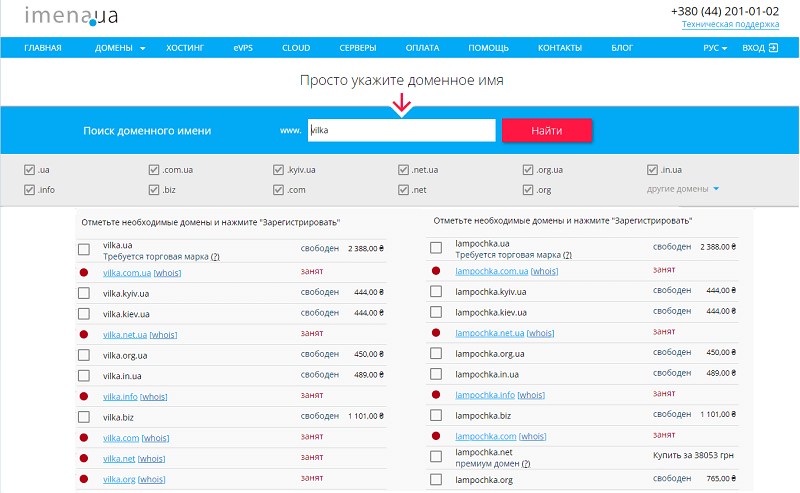
With this understanding we go to imena.ua or godaddy.com and sort through beautiful names.
- Check availability — type it in and press OK. See whether it is taken or not in our domain zone.
- If it's taken, search again. If it's free, check other domain zones — free or not.
- Also check the name of the future site in the Google search results.
- If you see ANOTHER site there with the same name (even if the URL is different), repeat the process.
An example of the routine check of a future site name and its availability
Step 3. Decide on the type of site
We decide whether we will have a regional site or not. This is determined by the type of site. We study more precisely all the second-level domains — national and regional. We take into account the nuances (and there can be some). I recorded a series of TikToks and Shorts on this topic, I advise you to check out the channel. I left the links in the article for convenience.
Examples of regional versions of domains using imena.ua as an example
If you want to buy a domain in another country, domain registrars may not sell it for your region. So it's good to check several at once.
Step 4. Check whether this domain existed before
There can also be a situation where a domain is bought in one country but not in yours. Check so as not to embarrass yourself. Or the other way around — you think it's taken, but it's just being sold on another registrar?
The supposedly sold vilka.com is being sold on Godaddy for 3 million hryvnias today
And we check the domain in the web archive — to see whether it has a negative trail behind it. And simply, why buy something that already existed. And even worse — if the niche does not match.
The supposedly free vilka.kiev.ua — was already on the internet at some point!
Because if you open an online store for moms on the site of a former porn site, that will definitely not be the best start. The domain must be clean. Check that there is nothing in the web archive.
Step 5. Buy the name and several needed second-level domains at once
Did you manage to find a cool name? BUY several of its versions at once. And don't be lazy about setting aside money for a TRADEMARK. Otherwise someone will manage to buy up these domains after you. Believe me, this always happens once you've grown a bit.
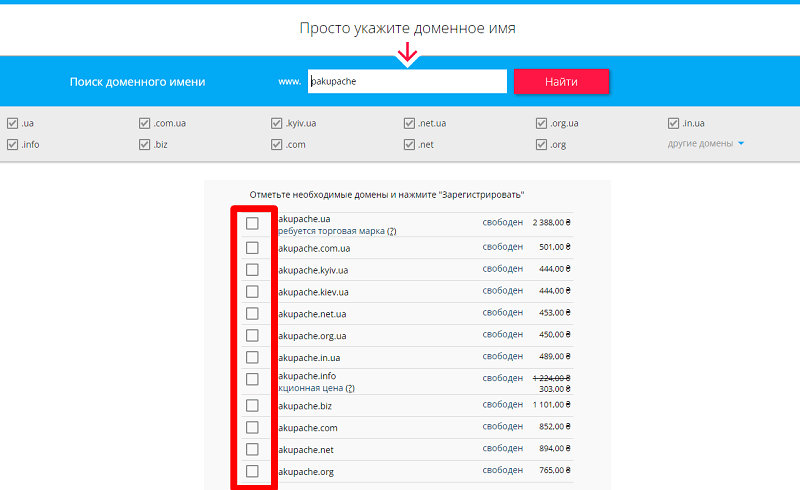
Excellent! No one has taken this not-bad name yet!
An important nuance. Rozetka HAS a trademark. And it has the right to the domain rozetka.ua. At the same time the Rozetka domain has its classic second-level domain .com.ua
Although in fact, if you go to Rozetka.ua, which also belongs to them as a trademark, Rozetka, you will be taken via a 301 redirect to the main domain rozetka.com.ua.
Why didn't they redirect to .ua, specifically the Rozetka.ua version? Because people remembered Rozetka.com.ua. Because historically this very domain, in that form, without the trademark, was the one remembered.
In fact, market leaders usually do not change the domain. And changing the domain can cost you very dearly — you can just estimate how much money was spent on changing SLANDO to OLX. So, they kept the domain for themselves. They didn't change anything else in it. And we will move further through the history and look at the key changes.
That's why you need to set the corporate style in advance, before you plan to move forward. And Rozetka set the trend here. It created that very brand and, of course, the domain.
How much do you think the Rozetka brand has grown? In 15 years — the traffic of the homepage from the branded query amounts to almost 2 million visits from search per month!
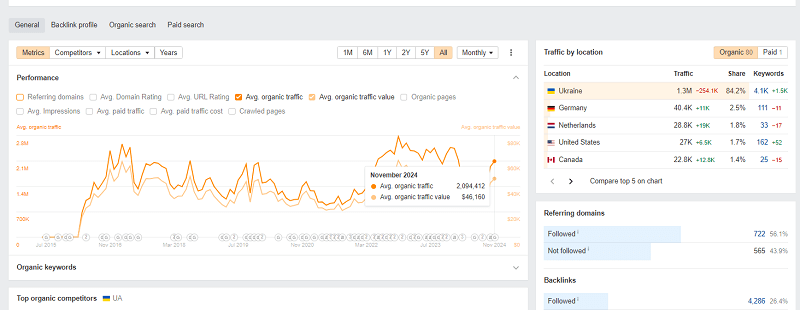
I calculated the average traffic for Rozetka from branded queries and it amounts to 1.67 million visits per month (this falls across all pages — both the homepage and the branch pages). The homepage collects 1.43 million traffic from branded queries, the rest falls on the other 693 pages.
How did Rozetka develop its brand like this? The secret is simple, and I think everyone knows it.
- Long and painstaking work in the market.
- Accumulating a loyal audience.
- Mobile apps.
- The fight for the consumer — prices, convenience, installment plans.
- Building newsletters, chatbots for the convenience of informing customers.
- Reducing delivery costs. Their own branches.
- Creating the ideal store from a UX point of view.
- Internal SEO optimization.
- Turning itself into a marketplace.
If you ask about link promotion, I will shake my head and say: no. Even the development of social networks turned out to be unnecessary overall. They are followed rather by buyers, who watch there for sales.
Just think about the numbers:
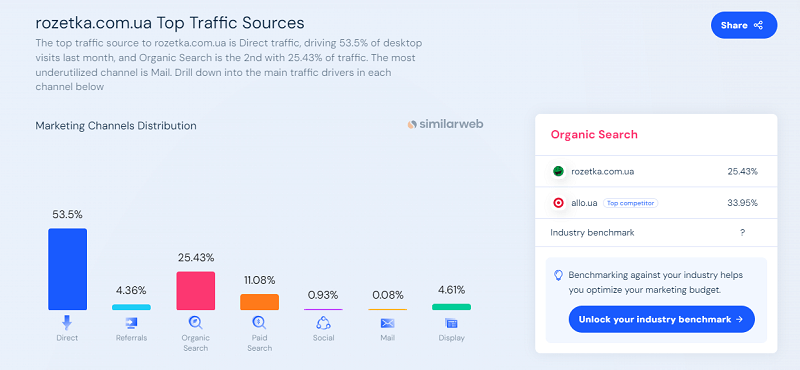
- More than half (53.5%) of users go to Rozetka via a direct link (which the browser already suggests from history).
- SEO makes up only a quarter of traffic (25.43%).
- Paid advertising provides a tenth of the traffic (11.08%). Banner advertising provides another 4% additionally.
- Social networks bring less than 1% of traffic.
- Email at Rozetka returns, of course, far weaker — less than 0.08%.
With all the abundance of social networks, at Rozetka they develop and focus on only one — and that is YouTube. More than half of the traffic falls on this channel. And they pull from there
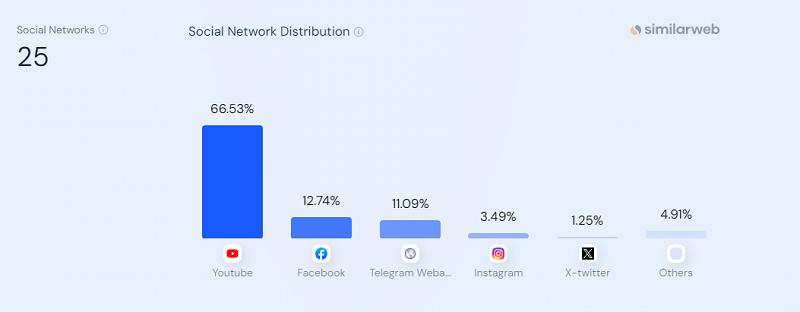
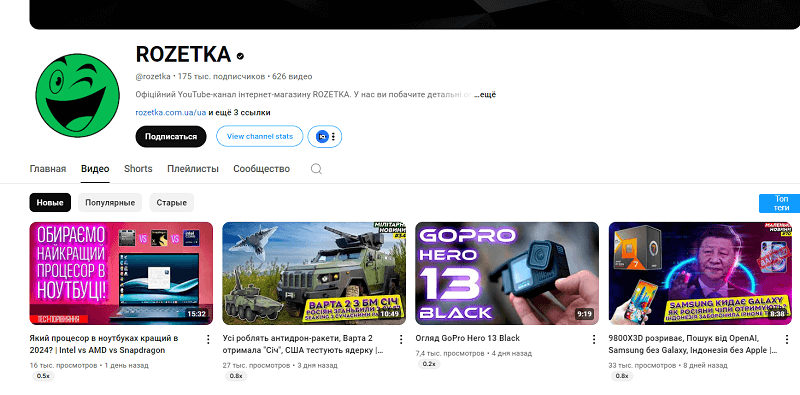
Rozetka's YouTube channel provides figures of half a million views per month, while with a certain regularity (12 videos per month) fresh clips come out, collecting from 10 to 16 thousand views.
They concentrated on the main social network for getting traffic and do not spread themselves across others. They wisely threw Instagram out of the priorities.
The link structure
Let's start with the fact that initially the number of product categories on the Rozetka site was small. Now let's open the sections of digital photography, video, mobile phones, laptops, pocket PCs and communicators. You will see that some of these devices today may seem outdated to you, for example photo printers or memory cards, which at the beginning of their existence were something new.
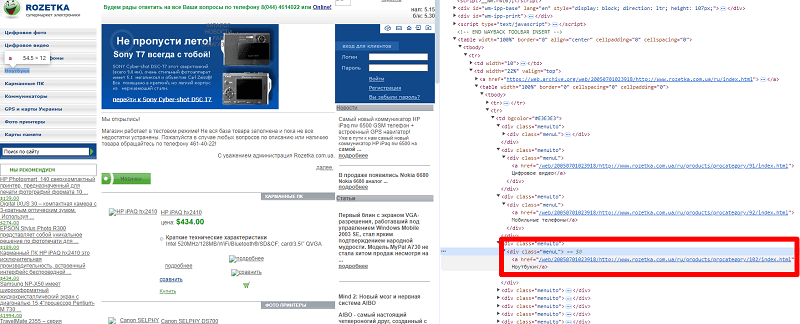
The URL of the laptops page –
<a href=”http://www.rozetka.com.ua/ru/products/procategory/102/index.html“>Laptops</a>
Pay attention to the URL structure:
- initially it did not use SEF (search-engine-friendly URLs);
- it was based on simple numbers;
- the domain was without HTTPS;
- the old domain itself was with WWW.
Such an approach to the URL structure made the site less memorable, but at that time it was a generally accepted standard. It used to be that way, the times were harsh.
Old redirects
The first thing I checked was whether all the catalog URLs were preserved. I checked the redirect paths of the old URLs and where they lead.
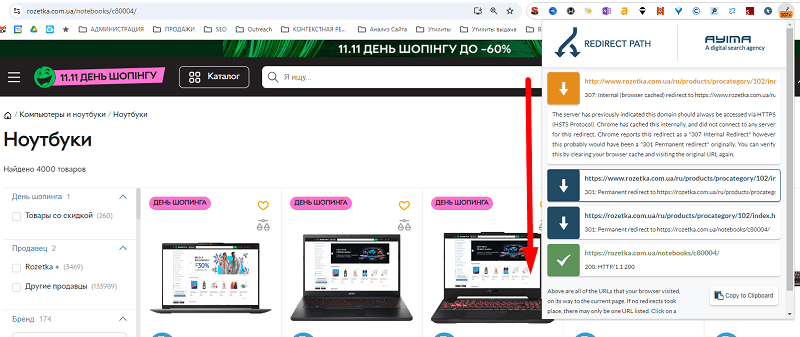
Yes, they did redirects, and I decided to check the oldest laptop category by the redirect paths.

As we can see, the classic two redirects that exist in the .htaccess file are written here (don't forget to replace example.com with your actual domain).
Below I will leave the code on how to set it up yourself.
RewriteEngine On
# Redirect from www to non-www with the HTTPS protocol
RewriteCond %{HTTPS} off [OR]
RewriteCond %{HTTP_HOST} ^www. [NC]
RewriteRule ^ https://example.com%{REQUEST_URI} [L,R=301]
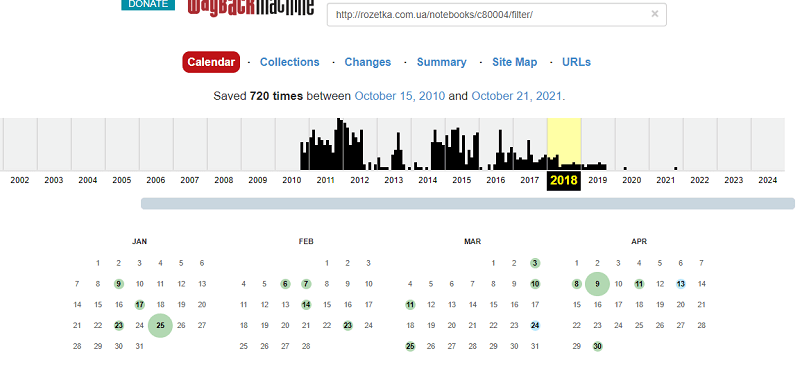
When did they do the catalog change? I checked via the web archive. The complete abandonment of the old structure happened in September 2013.
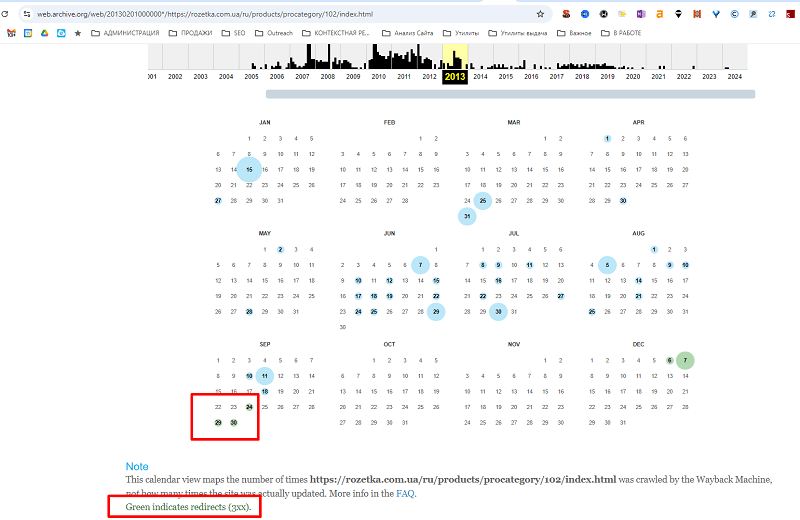
In green you can mark when the URL started redirecting to the new page
And from this moment the next page of the history of Rozetka's catalog begins.
The hierarchy of the main catalog
If we go to the web archive to the 2013 laptops page, which moved to a new URL, we will discover very interesting links inside:
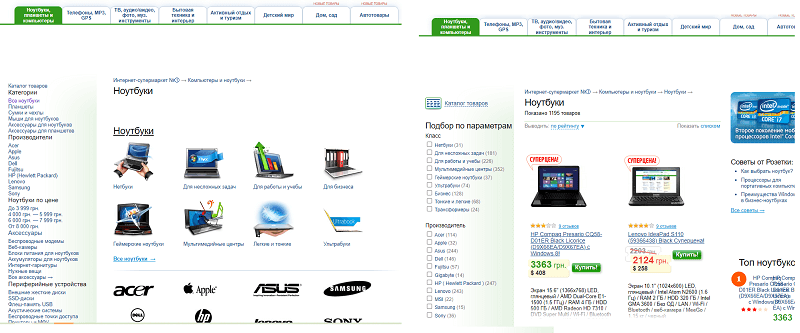
Two laptop pages with different URLs
So we have two pages:
- /notebooks/c80004/ — which is in the screenshot above — where there is navigation to the subsections of laptops;
- and the page /notebooks/c80004/filter/ — which simply displays "all laptops".
And if you study their Title, Description, Canonical — we will of course see what is now called cannibalization in SEO.
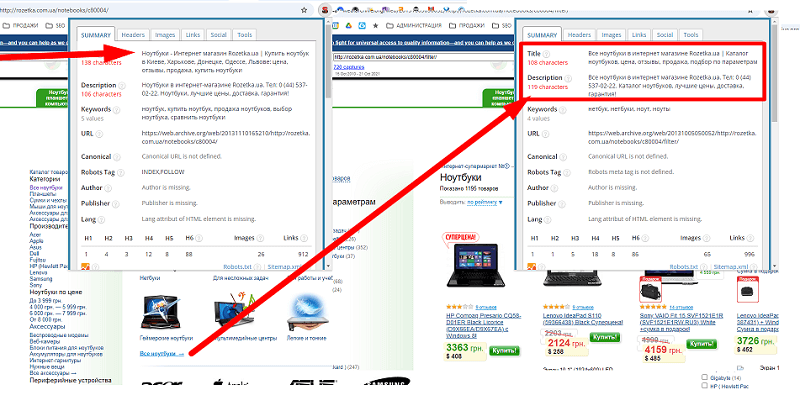
The metadata of these cannibal pages
Many SEO specialists made such mistakes, and in 2013 even more so. Back then the Canonical tag was not well known yet (or rather, it was not applied).
Then I noticed that they paid attention to the cannibalization problem and decided to keep the link structure (yes, in the old structure there is still a page, but now for all /filter/ pages a Canonical will be set).
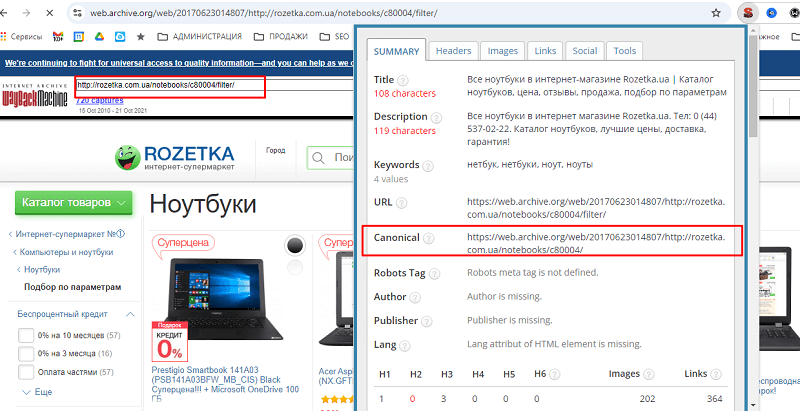
Then in 2017 this cannibal page would be eliminated, and a redirect would be made. And you will no longer reach this page in any way.
Catalog landing pages
And we come to what still works in Rozetka, is alive, and is simply the quintessence of good internal optimization — the subcatalog structure.
In 2005 their structure was simple and clear.
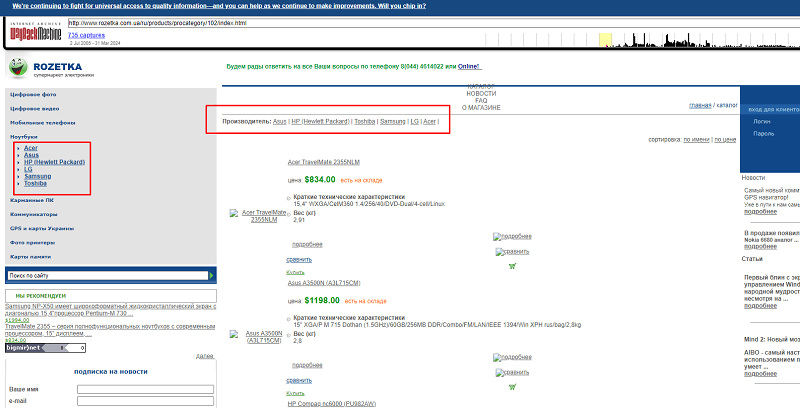
The subcatalog pages were represented by individual brands, and conditionally the whole hierarchy was built on the principle of category / brand. And no complex semantic structures.
- Laptops – /ru/products/procategory/102/index.html
- ASUS laptops – /ru/products/procategory/102/p191/164/index.html
But that's only at first glance.
If you scroll down to the footer, all the SEO-significant filters were lower, where you could select all the characteristics of your laptop.
I painstakingly went through most of them, many were clearly poorly indexed — but I noticed that the filter pages had a parameter substitution in the Title, which clearly did not always work.
In general the Title and Description got uniqueness by appending the parameter to the main one.
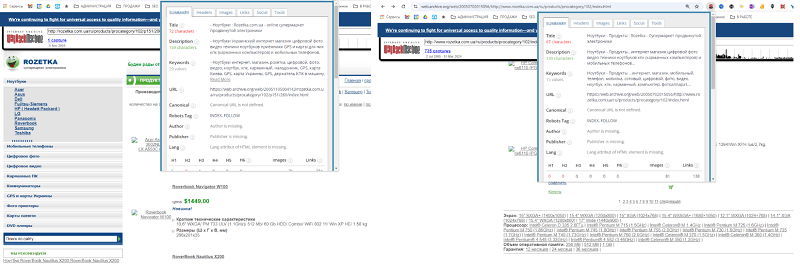
On the left — the URL of the parameter selected on the right (1GB RAM). Apparently it was substituted into the Title
After the engine change the system would change drastically. But in general the foundation would remain as it is
If you select a filter from the new laptops page — a new landing page will open, with a completely unique Title, Description, H1 and an indexable URL.
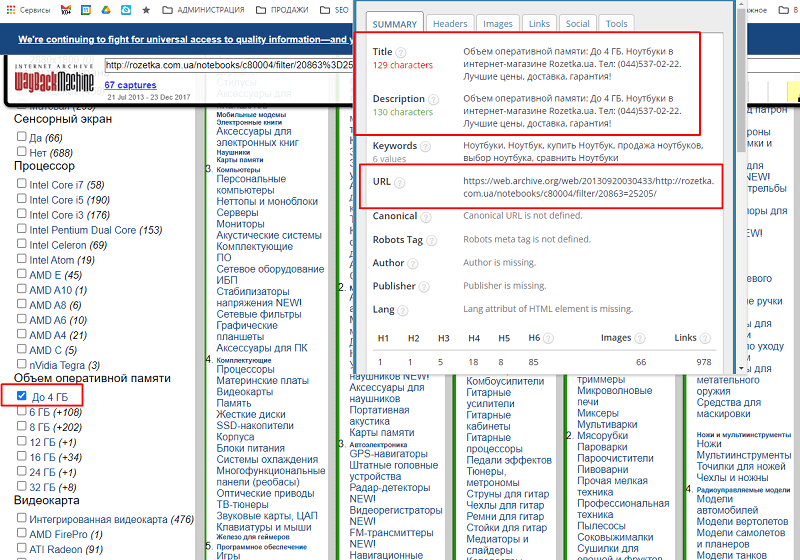
But if you select composite page filters, you may end up with a combined page — for example let's take 4GB of memory and an Intel Core i7 processor.
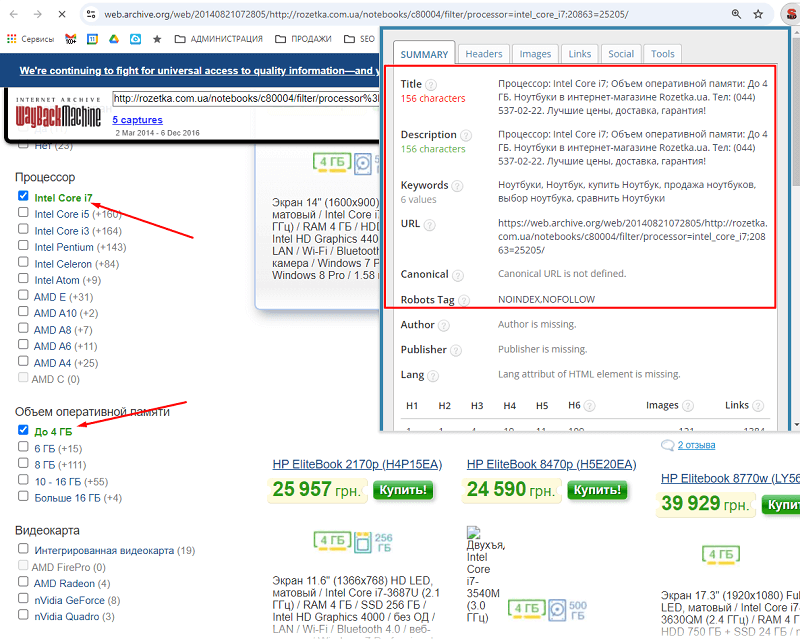
Such a page got a unique combination, but it was closed in the index.
I decided to check — are such URLs still alive? And I was surprised!
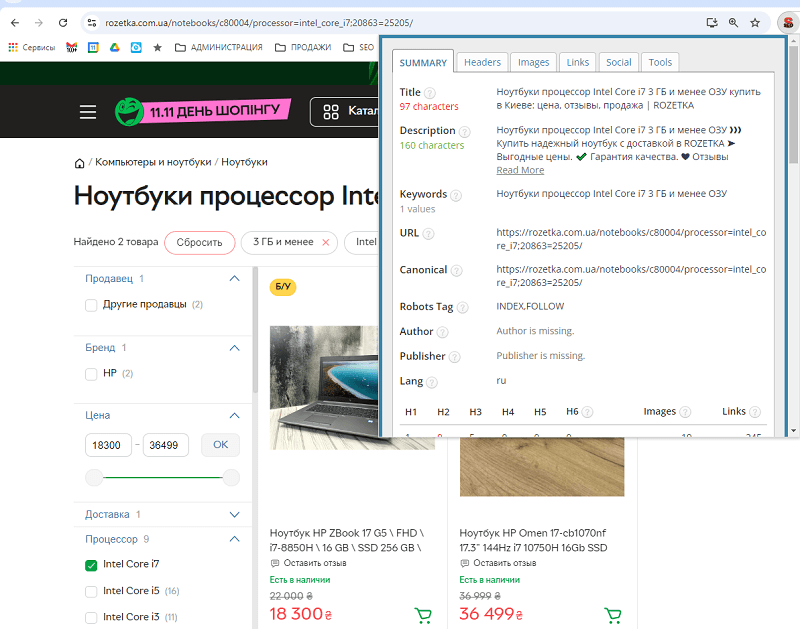
Automatically generated pages opened manually and still work
In the future they would make them open, by setting a Title, Description and H1 for them practically MANUALLY.
What will remain eternal? It is the basic principle of how Rozetka's catalog works.
- All filter pages will have their static URL address.
- And no matter where I click, in the code they will always work. Because in the code they are set through the <a href> tag. And no URLs via scripts — this is probably the disease of 85% of sites today!
- All filters will be formed by their own logic without using the "?" parameter. This is the disease that 90% of store sites suffer from today.
- To list parameters in the URL, a semicolon sign is added (more on this below), to indicate values — an equals sign.
If you need details on how this works, study my article on the ideal online store structure. I wrote this article as a lesson to developers, so they would learn from the best market leaders.
In this article I will show how the laptops category looks, and the subcategory, where I will select the filter page for 3GB of RAM.
| Parameter | 1. Category | 2. One filter item selected |
| URL | /notebooks/c80004/ | /notebooks/c80004/20863=25205/ |
| Indexation | INDEX, FOLLOW | INDEX, FOLLOW |
| Canonical | /notebooks/c80004/ | /notebooks/c80004/20863=25205/ |
| Title | Laptops – ROZETKA | Buy a laptop in Kyiv: price, reviews, sale, choice of laptops in Ukraine | Laptops 3 GB and less RAM buy in Kyiv: price, reviews, sale | ROZETKA |
| Description | Buy a laptop in the online store ⏩ ROZETKA. Prices for 【Laptops】, high quality, ✍️️ reviews, ⚡ fast delivery across Ukraine, ✨ 【WARRANTY】! | Laptops 3 GB and less RAM ❱❱❱ Buy a reliable laptop with delivery at ROZETKA ➤ Favorable prices. ✔️ Quality warranty. ❤ Customer reviews. |
| H1 | Laptops | Laptops 3 GB and less RAM |
In the second variant you can see that they did not label the RAM filter in the SEF URL in any way, and it has the code "20863", while the RAM value of 3GB has the value "25205". Although the URL could have been made as /notebooks/ram=3gb/, I will explain later why they did not change the link structure.
Pages with one filter selected make up 39.7% of Rozetka's traffic (7.9 out of 19.9 million traffic according to Ahrefs) and that is more than 85,000 traffic pages!
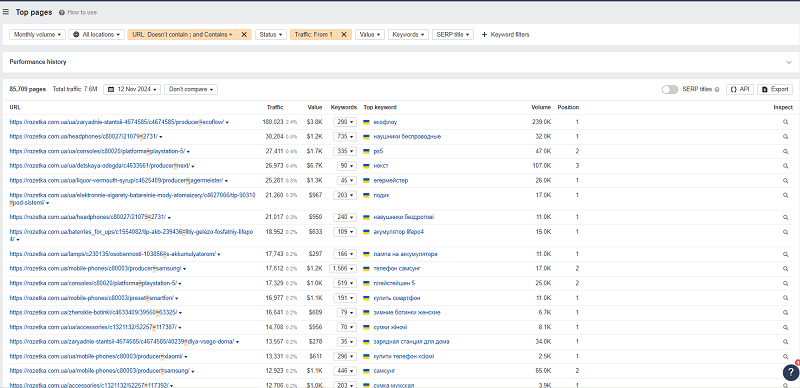
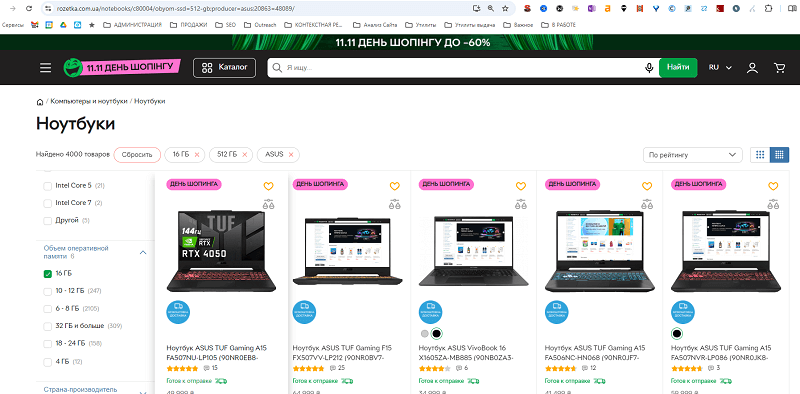
If combined filters are selected. In the first case I selected the Acer brand and the same 3GB RAM filter. In the second case I selected Acer and Asus as two brands simultaneously.
| Parameter | 3. Two filters selected from different sections | 4. Two filters selected from one section. Or three filters from different sections |
| URL | /notebooks/c80004/producer=acer;20863=25205/ | /notebooks/c80004/producer=acer,asus/ |
| Indexation | INDEX, FOLLOW | NOINDEX, NOFOLLOW |
| Canonical | /notebooks/c80004/producer=acer;20863=25205/ | /notebooks/c80004/producer=acer,asus/ |
| Title | Acer laptops 3 GB and less RAM buy in Kyiv: price, reviews, sale | ROZETKA | Laptops – ROZETKA | Buy a laptop in Kyiv: price, reviews, sale, choice of laptops in Ukraine |
| Description | Acer laptops 3 GB and less RAM ❱❱❱ Buy a reliable laptop with delivery at ROZETKA ➤ Favorable prices. ✔️ Quality warranty. ❤ Customer reviews. | Buy a laptop in the online store ⏩ ROZETKA. Prices for 【Laptops】, high quality, ✍️️ reviews, ⚡ fast delivery across Ukraine, ✨ 【WARRANTY】! |
| H1 | Acer laptops 3 GB and less RAM | Laptops |
I even tried to select three filters from different sections — and got the effect as in case 4. That is, the page is not in the index. Except for certain combinations. More on them later in the article.
If in the third case we still get a unique page, which will be indexed and even give traffic (pages with ";" in the URL, according to Ahrefs, make up 3.5% of the entire site's traffic).
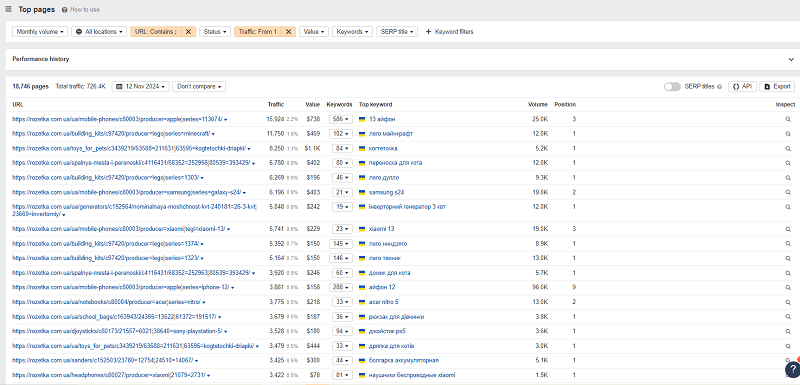
If you study the list of all the landing pages from case 2 and case 3 — we come to the conclusion that Rozetka simply burned through all the semantics it could. Thanks to a convenient catalog, it went through all the links, and then brought the ready links into human form. And where there is no traffic yet — it left the template generation.
So let's break down the conclusions about how the catalog works:
- Selecting one filter and two filters in different sections creates an indexable page.
- Indexable filter combinations still work — the redirects are alive to this day for filters.
- By default, filter combinations are closed from the index, but some are then opened manually.
Pagination and the "More" button
Yes, pagination existed at Rozetka as early as 2005. And it was even set up interestingly.
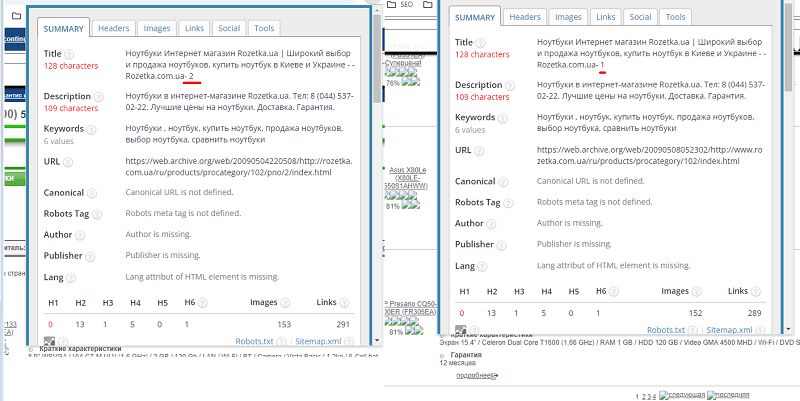
More precisely — in no way. The pages were all indexed, and to avoid duplicates there were prev-next tags (which are no longer used now).
But in 2010 that very "More" button would appear, which loads products onto the existing page.
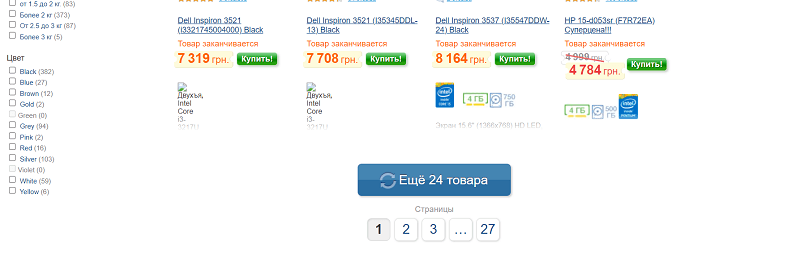
Today pagination looks like this:
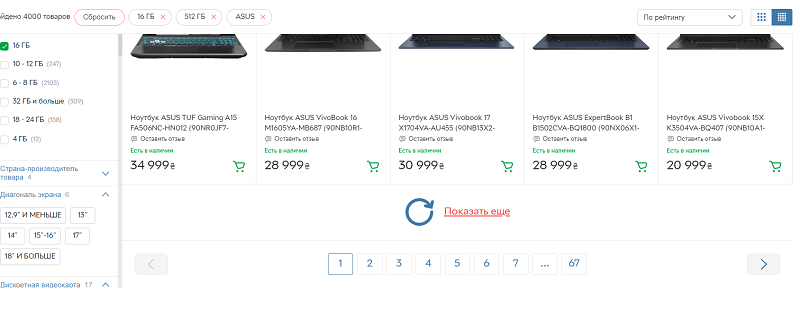
The "More" button simply adds more products to the current display. But its effect works very interestingly — you move to a pagination page further on. If you click twice — you'll land on the third page, for example.
But let's look at the SEO.
| Parameter | Main page | Pagination listing page |
| URL | /notebooks/c80004/producer=asus/ | /notebooks/c80004/page=2;producer=asus/ |
| Indexation | INDEX, FOLLOW | INDEX, FOLLOW |
| Canonical | /notebooks/c80004/producer=asus/ | /notebooks/c80004/producer=asus/ |
| Title | Asus laptops – ROZETKA | Buy an Asus laptop in Kyiv: price, reviews, sale | Page 2. ASUS laptops section (asus, asys, asyus, fcec) | ROZETKA |
| Description | ASUS laptops in the online store ⏩ ROZETKA ⭐ best prices, ⚡ fast delivery, ✅ warranty! | ASUS laptops (asus, asys, asyus, fcec) in the ROZETKA online store. Prompt delivery ✈ Quality warranty ☑ Best price $ |
| H1 | Asus laptops | ASUS laptops |
Rozetka's pagination page is closed in a very unusual way, which even goes against Google's recommendations. What Google actually asks of pagination today, and what it costs you on a large catalogue, is covered in a separate article.
- Pages 2, 3, N are closed with a Canonical tag pointing to the first main page.
- The Title for the numbered page in the template uses an entirely old Title (you can write anything).
- The H1 should match the main page.
A bit further, when breaking down the semantics, you will see what other types of pages Rozetka creates in order to collect traffic.
Semantics
I analyzed all 1,379,369 keywords and verified that they receive traffic from only 538,701 keywords. That is, 39% of the keywords bring the main success.
And for each type of query Rozetka chose a sometimes very unusual tactic.
Almost three quarters of the traffic falls purely on category pages, which we talked about above. If you ignored the previous chapter about the catalog structure, you lost from half to three quarters of the traffic on your site.
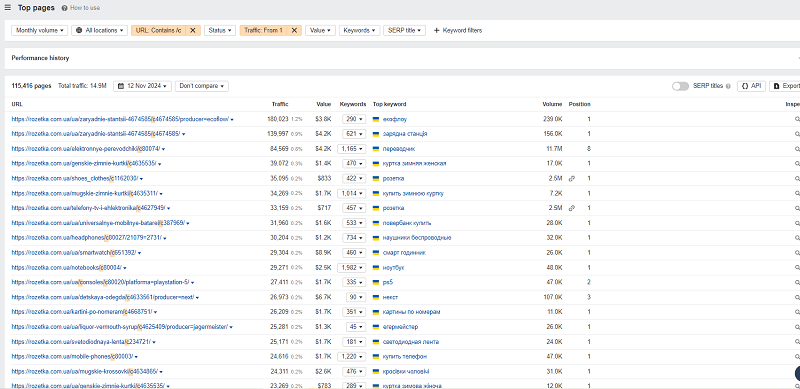
74.8% of traffic falls not on products, but specifically on categories
I studied all the keywords by type and highlighted the following points.
- Branded category queries make up a third of the main queries — 126 thousand keywords against 248 thousand non-branded.
- The basis of the traffic is precisely the category pages.
- The number of branded traffic pages is 49,000 (the total traffic of branded pages — 12.5%).
- Product queries bring only 7.5% of traffic.
- Of the branded queries there are 2,510 keywords for 759 pages, which lead not to category filter pages, but to manufacturer pages.
- For its branded queries (Rozetka Odesa) Rozetka created special pages.
- Rozetka cunningly stuffed geo-queries into pagination.
- And Rozetka abandoned the blog as an unnecessary source of traffic.
Let's break it down in detail.
Non-branded category queries
Queries like charging station, air dehumidifier, thermal underwear, smart watch — these, by the way, are queries that Rozetka collects in the TOPs today. Just these four already bring 150,000 visits from search. Just four queries! And in total there are 248,969 non-branded category queries!
We won't break it down in detail, but we already discussed that the filter combinations of Catalog + one element are worked out here as thoroughly as possible and bring 75% of all of Rozetka's traffic.
And for each keyword they worked out all these combinations in advance, creating a page for everything that could be googled. While avoiding self-duplication and cannibalization.
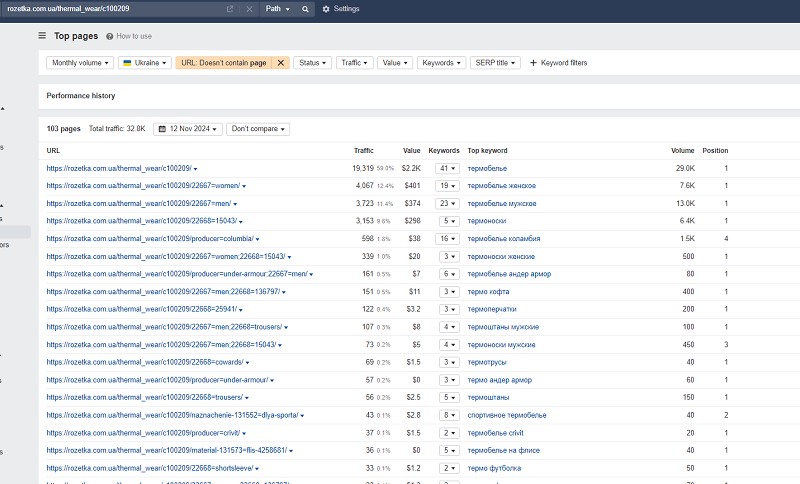
An example of worked-out semantics for the Thermal Underwear category. 103 pages
At the same time each cluster ranks for the right bundle of queries. And there is no unnecessary competition of pages with each other.
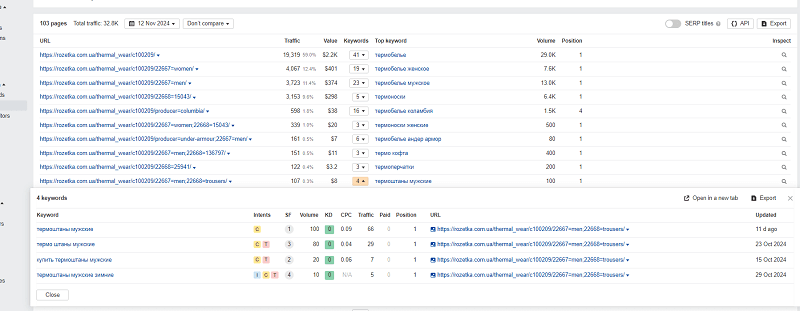
Just four queries per page. All targeted. All in one position
How did they achieve this?
Today an SEO specialist can do this without going far into the weeds.
- Go to Ahrefs
- Select keywords explorer. Enter the main word.
- Go to the Clusters by Parent topic tab.
- Export the table.
- Keep everything that has traffic.
- Create pages in our structure for each such found cluster.
Today you just need to take 1 query per main category and you'll collect such semantics in an evening.
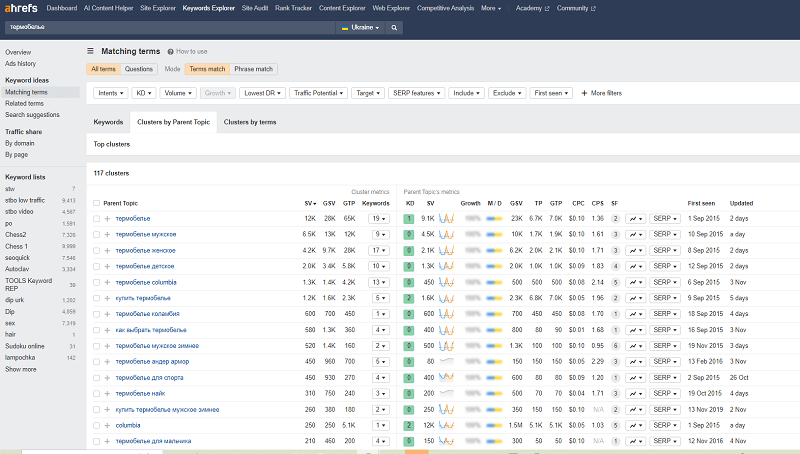
Clustering semantics with Ahrefs
And if you don't have access to Ahrefs — use our free clusterizer, downloading the same keywords from the keyword planner.
All the brand-free category pages (that is, the basic category pages) are additionally interlinked in several places:
- Through the main menu.
- Through the sitemap (which they wisely closed and made available only by login and password).
- Through the special page https://rozetka.com.ua/all-categories-goods/
And one page that interlinks them all. Or an HTML sitemap
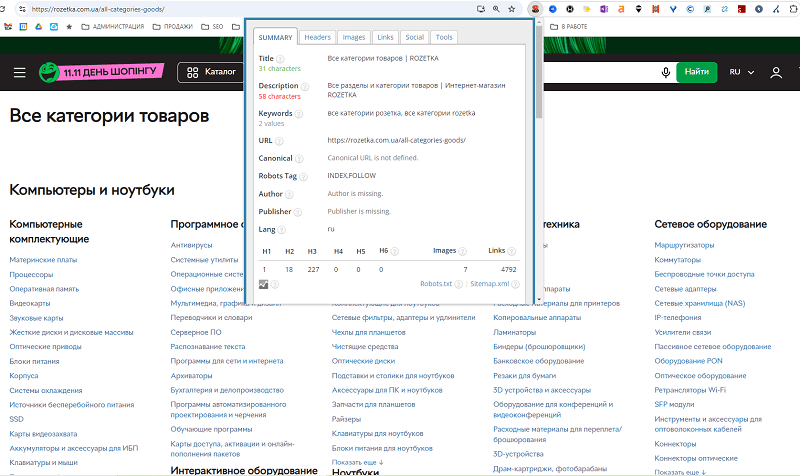
We wrote about the HTML sitemap earlier — and large stores and media still use it. It is precisely the one that allows the search engine to be reminded which categories are important.
Branded category queries
The familiar Apple iPhone, Asus laptops pages are combinations of category filters and the Manufacturer section. They came back from 2005, and have not undergone changes.
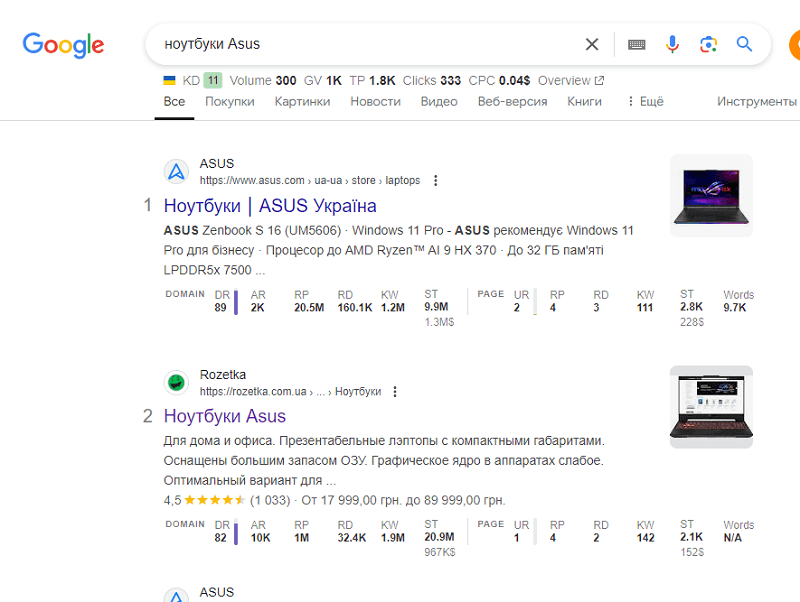
As you can see, such pages rank excellently in the TOP 10. This is achieved thanks to the following technical features:
- The heading in the snippet was taken not from the Title, but from the H1 (or og:title, which matches) due to its excessive length.
- The Description is simply taken from the text.
- The image was taken from the Opengraph schema markup, marked with the og:image tag
- The favicon is set in the site's code at the link /favicon.ico. You can check your favicon, whether it's done correctly, on Favicon Generator.
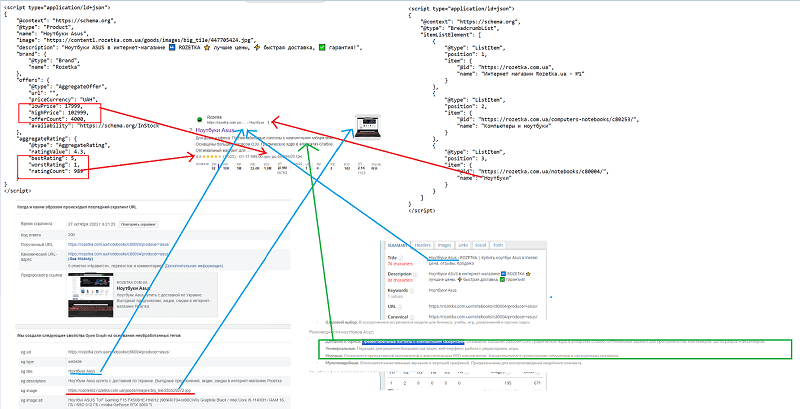
- The rating stars, the price display — are automatically calculated based on the Product schema markup. I'll describe them below.
- The breadcrumb is set thanks to the BreadCrumblist schema markup.
Google forms the snippet from different components
Branded queries without a category
For these queries there are special pages — and they are represented as pages of the type
<<https://rozetka.com.ua/producer/sinsay/>>
Instead of Sinsay — any other brand
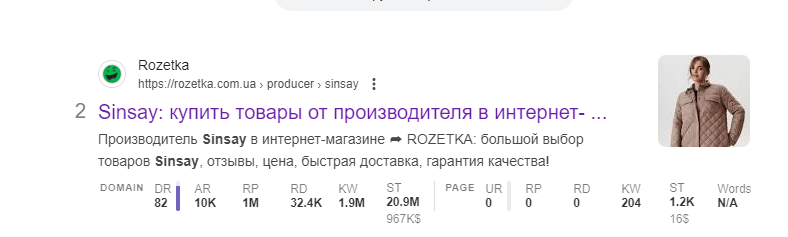
Their snippet can differ considerably, because here the key is simply the brand name. Some look very unusual.
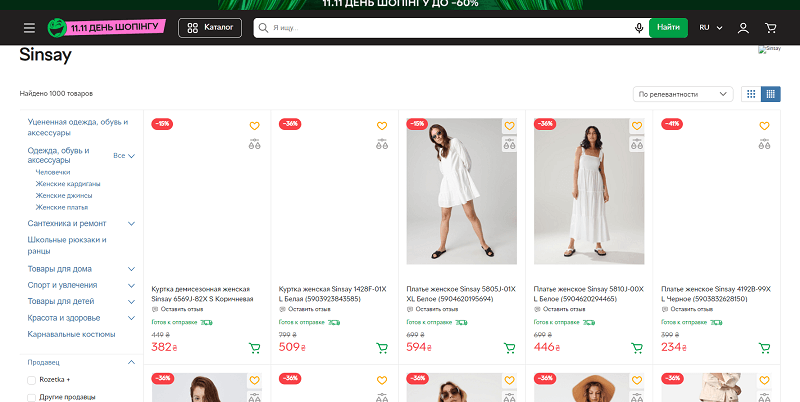
This page, according to Ahrefs's estimate, brings 140,000 traffic per month
And Rozetka takes first place here not for nothing:
- Rozetka is most often in the TOP 1-3 if this manufacturer does not have its own site in Ukraine. Examples would be the queries Priorin, Hello Kitty, Gillette, Delimano.
- And if a site exists, that does not prevent it from taking 2nd-3rd place for a number of manufacturers.
- The pages themselves have their own block of categories for a specific manufacturer, each of which ultimately leads to a branded category page.
Marked in red — the page is canonically closed, the green ones — lead to the familiar categories with a brand filter
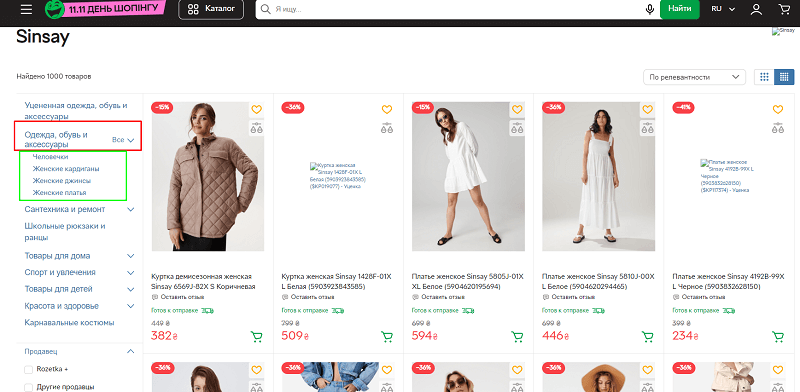
If you go to the page marked in red — it has no place of its own in the typical category of the site. Such pages are closed from the index in three ways:
- A URL with a parameter is used.
- A NOINDEX/NOFOLLOW tag is set.
- A canonical to the main manufacturer page is set.
| Parameter | Main page | Filter page |
| URL | /producer/sinsay/ | /producer/sinsay/?section_id=1162030 |
| Indexation | INDEX, FOLLOW | NOINDEX, NOFOLLOW |
| Canonical | /producer/sinsay/ | /producer/sinsay/ |
| Title | Sinsay: buy goods from the manufacturer in the online store ➦ ROZETKA | Sinsay clothing, footwear and accessories: buy goods from the manufacturer Sinsay in the online store ➦ Rozetka.UA |
| Description | Manufacturer Sinsay in the online store ➦ ROZETKA: a large selection of Sinsay goods, reviews, price, fast delivery, quality warranty! | Sinsay clothing, footwear and accessories in the online store ➦ Rozetka.UA: a large selection of goods, reviews, price, fast delivery, quality warranty! |
| H1 | Sinsay | Sinsay clothing, footwear and accessories |
But if you go to the page marked in green in the image, you land where we have already looked.
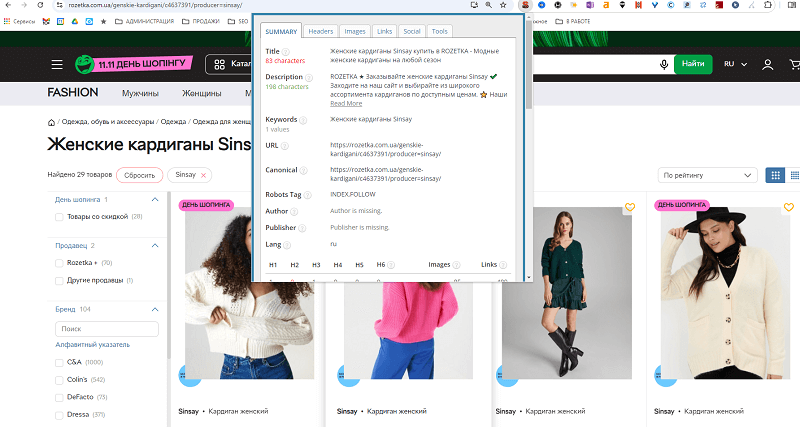
A typical catalog page where one filter element is selected — by manufacturer
The schema markup on these pages was completely absent in the usual form. There is neither Opengraph nor Schema.org.
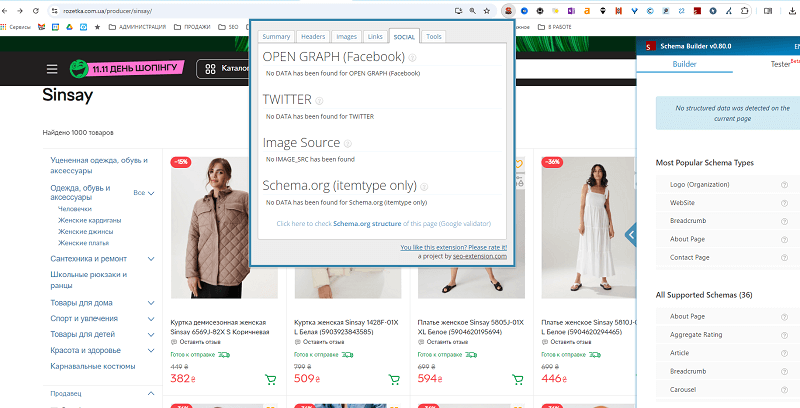
No schema markup on the pages
Which is, rather, an oversight than a necessity. Here you can definitely set schema markup similar to Product, and also implement a Breadcrumb and, of course, interlink the pages in a special HTML sitemap.
It turned out to be difficult for me to find the location of these pages.
In the search results they take traffic even from large brands.
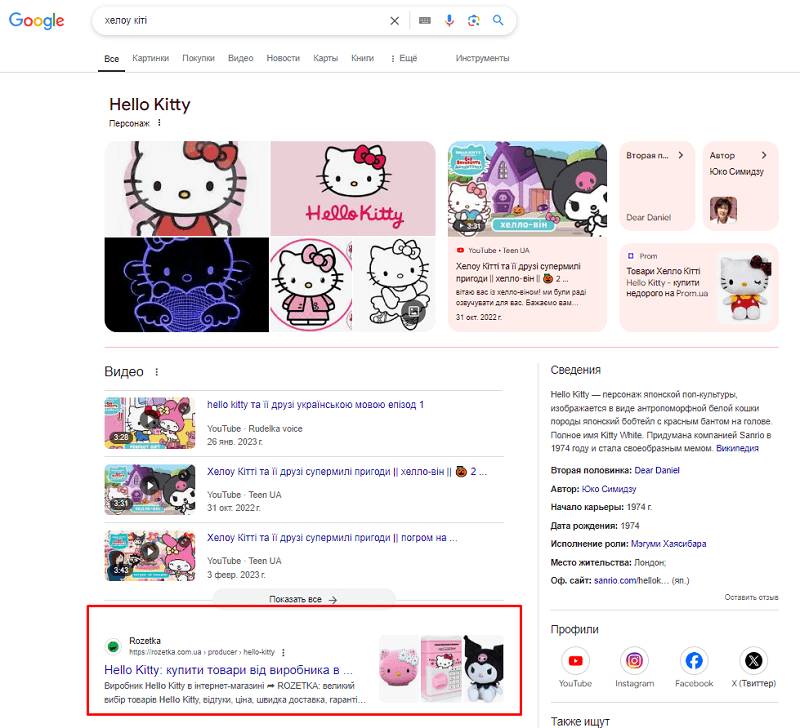
Hello Kitty, not having a site, ultimately gives traffic to Rozetka
Product queries
Although the product cards at Rozetka are optimized, they bring far less traffic. Yes, the cards of individual items bring less than 10% of the site's main traffic.
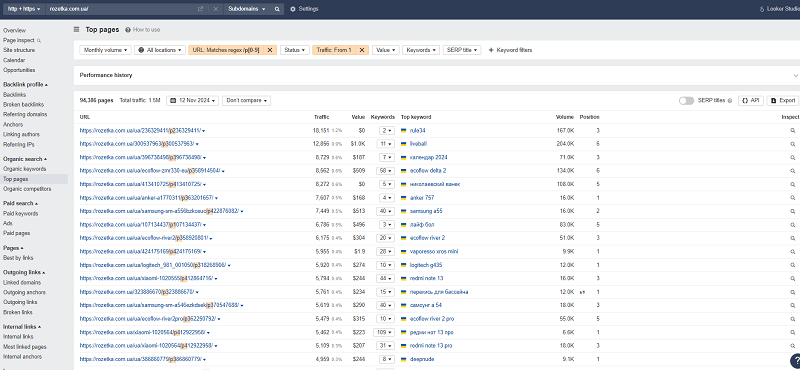
Product pages, for example, make up only 7.5% of traffic
But here's what's interesting. Their classic product queries are created for very unusual combinations of pages that are open for indexing.
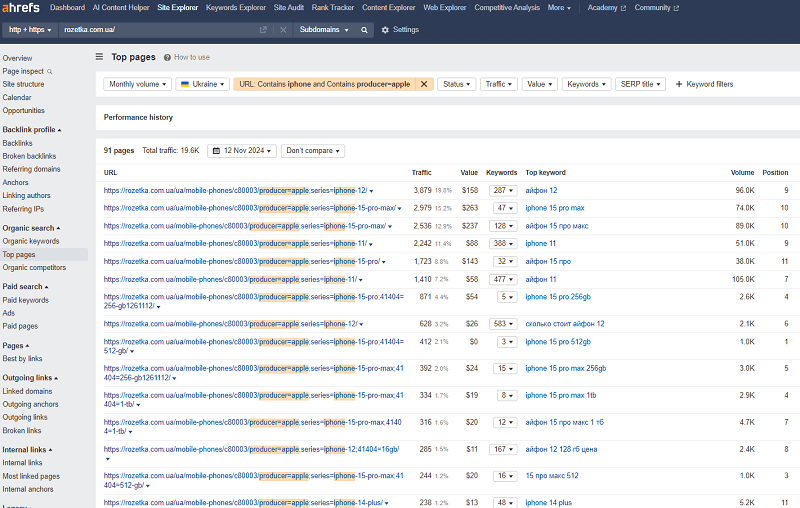
An example of how pages with a product intent — ultimately lead to a category
For example, for the query "Apple iPhone 15 Pro 256 GB" you will land not on a product page, but on a category page of the type https://rozetka.com.ua/mobile-phones/c80003/producer=apple;series=iphone-15-pro;41404=256-gb1261112/ and still open for indexing!
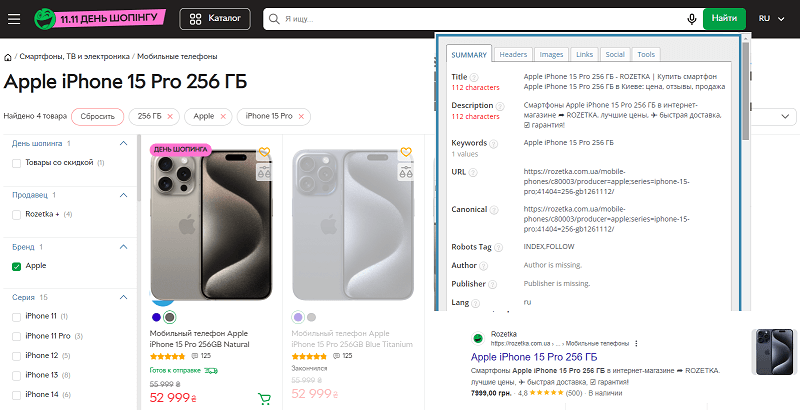
Complex filter combinations also go into the index
I'll say right away — there is no easy path here. All such pages are created strictly manually, interlinked where needed in the content, and opened in the index manually. For them the H1 is written very correctly, and the rest of the metadata is built around it.
And what if there isn't a series, as for iPhone? Tags come into play. A vivid example is pages of the type https://rozetka.com.ua/mobile-phones/c80003/producer=xiaomi;tegi=xiaomi-redmi-note-12/. Here the tegi parameter is added to the URL and any version of a tag can be created for it.
How is this implemented?
- On a specific manufacturer's page, tags with the needed sections are created at the bottom of the site. Such a section is located at the bottom of the page. Right away old SEO specialists will recall "tag clouds" from the past.
- When you click on it you land on a page that already contains the needed URL. Some tags led to pointless versions of pages, but I found the ones that led where needed.
Tag clouds according to Rozetka — ways to adapt product semantics
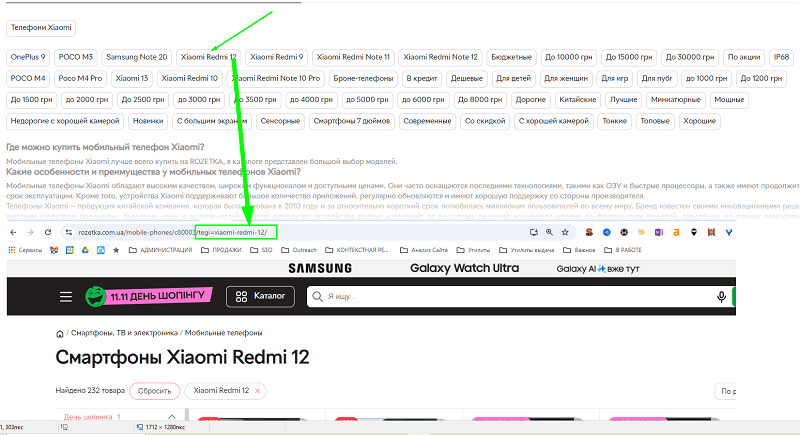
Why tag clouds? Why not let product cards collect traffic normally? Well, there's a little problem — more precisely, three problems.
- Product cards are not eternal. What do you do with a page if the product is no longer sold under this code?
- Moreover, one and the same product can be represented in two positions.
- Product cards can have colors, sizes, many other special differences.
For which query do you display this? Here you have the query "Apple iPhone 15 Pro 256 GB". And you have 4 new products, a couple of used ones. Some of different versions. What do you show? Mess around with Canonical? Rozetka simply went forward, and if a product conditionally has traffic and is being googled, it created for it either a series page, or a complex filter combination, or — a tag page.
But let's look at classic product pages. And they exist at Rozetka. Let's take, for example, the sales page of the Ecoflow Delta 2. And let's see what is indexed for it and brings traffic.
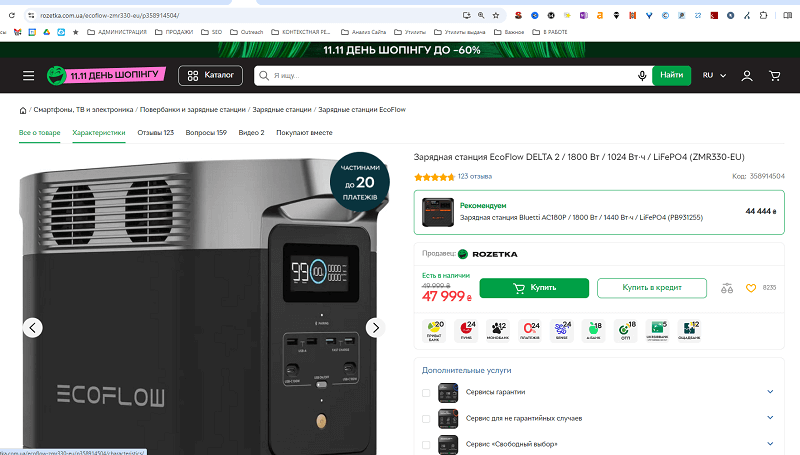
You see 6 tabs. An SEO specialist — 4 URLs. Google – only two pages
In fact we have not one page, but a whole four:
- The main product card page.
- The specifications page with the URL /characteristics/.
- The reviews page with the URL /comments/.
- The questions page with the URL /questions/.
At the same time the Video, Bought together tabs do not have links, but are purely script-based.
But only two pages have a canonical to themselves and are open for indexing. These are the main card and the card with the URL /comments/, the rest are closed from indexing with a very original combination of tags NOINDEX, FOLLOW. Why is this needed?
Because it's necessary for Google not to keep this content in the index (because it is non-unique, stolen), but yet all the links in the category section — it crawled them and took into account the pages it would reach.
Namely, on the Specifications pages of each product card you can reach filter pages. For example, if you go to the section "for refrigerators" from our Ecoflow Delta 2 charging station, we land on the page "Charging stations for refrigerators". This is exactly how Rozetka, through products, solves the interlinking problem. More products — more internal links to the needed and important categories.
An SEO specialist sees an elegant way of internal interlinking bypassing the uniqueness problems
In the end, all of Rozetka's product pages rank for two types of queries:
- General transactional queries (the ones people buy the product through).
- Informational queries (the ones where people write reviews, ask about the product).
And they are traditionally split for them into two types of pages.
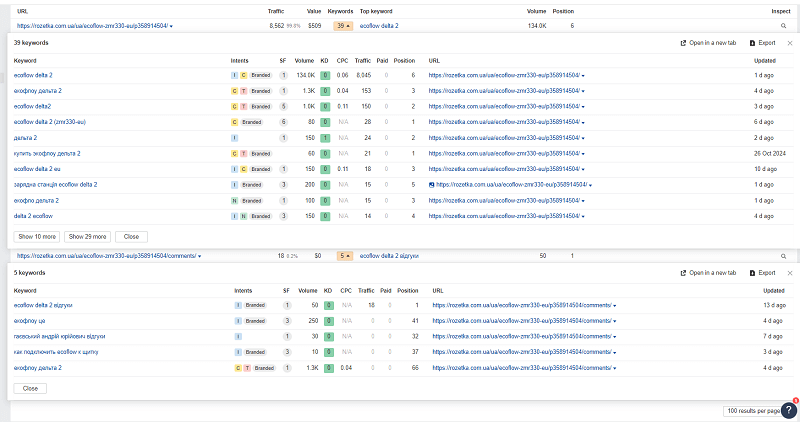
One page sells, the other — collects questions about the product
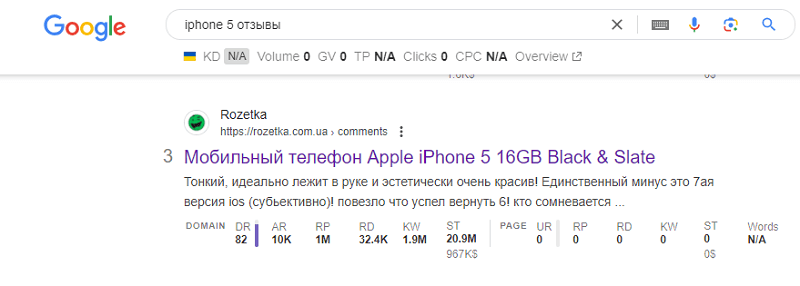
This system has been working for more than 15 years. I checked on pages that have remained on the site to this day — and they are alive. I checked the query "iPhone 5 reviews" and landed on a page where the phone had been discussed since 2015.
Geo-dependent queries
Have you noticed that on the Rozetka site there are no problems with pages when a region or something else is sewn into the URL?
I tried to work with sites where for categories they additionally sewed a city into the URL to create corresponding pages:
- for example /noutbuki/ — would sell across all of Ukraine, the H1 — simply Laptops.
- /noutbuki/kiev/ – would have the H1 Laptops in Kyiv, and so on.
Comfy has a similar URL system
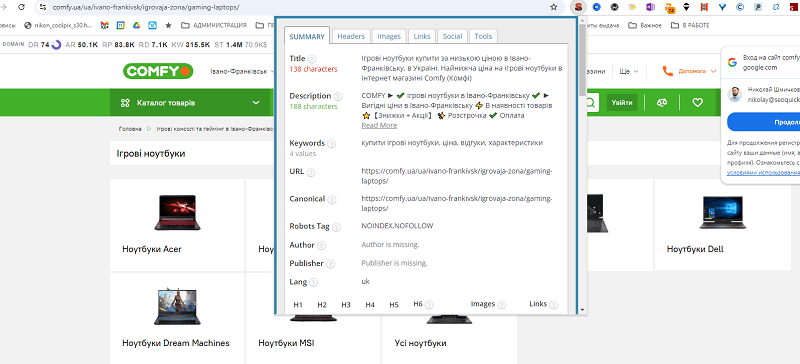
This is fraught with the fact that you will have very low-frequency pages created in huge quantities, which it is easier not to create and to close from the index. Which is what Comfy did. The lion's share of its pages is closed from the index.
And all because they didn't figure out how to do it differently!
The thing is that pagination at Rozetka for categories is done very originally. If we looked at the pagination for filter+category pages, it worked quite standardly — they hid the page from the search results with a canonical and that's it.
But for the category page — the canonical in the pagination pages already leads to itself.
| Parameter | First page | Pagination page 2 |
| URL | /blenders/c80155/ | /blenders/c80155/page=2/ |
| Indexation | INDEX, FOLLOW | INDEX, FOLLOW |
| Canonical | /blenders/c80155/ | /blenders/c80155/page=2/ |
| Title | Blenders — buy a blender in Kyiv, Ukraine: price, reviews | ROZETKA | Buy a blender in Kharkiv – ROZETKA | Prices, delivery in Kharkiv and the region |
| Description | ROZETKA™ ⏩ Blenders at the best prices. Promotions and Discounts. Convenient installment plan. ⚡ A large selection of professional and household blenders, ⚡ fast delivery, ✨ warranty. | Buy ᐈ Blenders inexpensively with delivery to KHARKIV at ROZETKA ✔️ A large selection ⚡ Quality warranty. ⭐ Customer reviews. ➤ Fast delivery. |
| H1 | Blenders | Blenders |
| H2 | What kinds of blenders there are Popular questions and answers | Wish to purchase a blender in Kharkiv Types of blenders in Kharkiv on the ROZETKA site |
| Word count | Kyiv – 0 | Kharkiv – 9 |
And if you walk through the pagination pages, then in the end:
- on the main page the Title will have Kyiv;
- /page=2/ – Kharkiv;
- /page=3/ – Zaporizhzhia;
- /page=4/ – Odesa;
- 5 Kryvyi Rih;
- 6 Mykolaiv;
- 7 Vinnytsia;
- 8 Dnipro (in other categories – Ivano-Frankivsk);
- 9 Zaporizhzhia;
- 10 was again Mykolaiv.
I didn't see any clear hierarchy of cities. But for the numbers from 2 to 10 the TOP cities by the semantics of geo-queries were clearly selected.
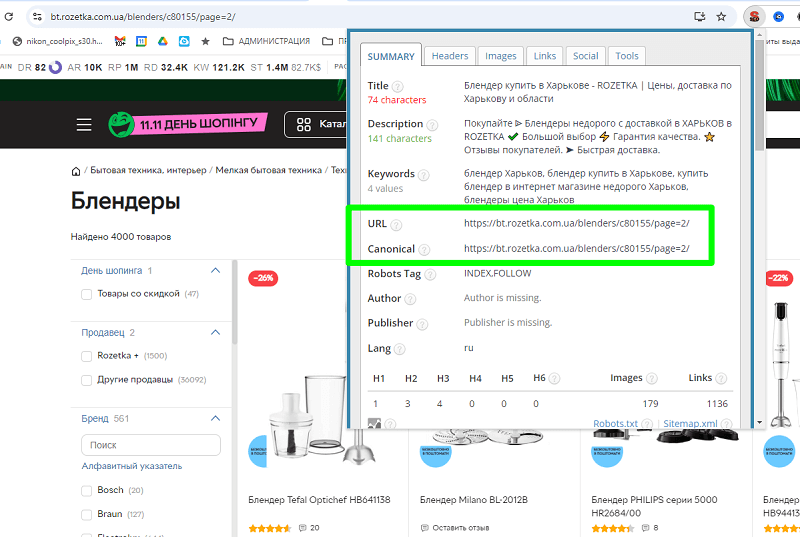
City number 2 – Kharkiv, Number 3 – Zaporizhzhia. And the main page — on Kyiv
Semantically — this is quite a lot of queries, and thus, through the simplest optimization of metadata and text (yes, for each of the TOP 10 top-level pages, texts were written), we get 16,460 keywords with traffic of 62,000 per month!
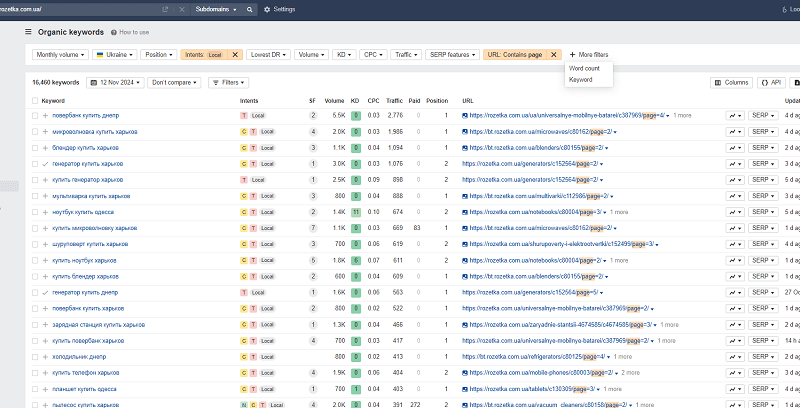
How, with the help of pagination, to solve the eternal SEO problem of ranking geo-queries
But Rozetka also has its own branded query. And it has many geo-variants.
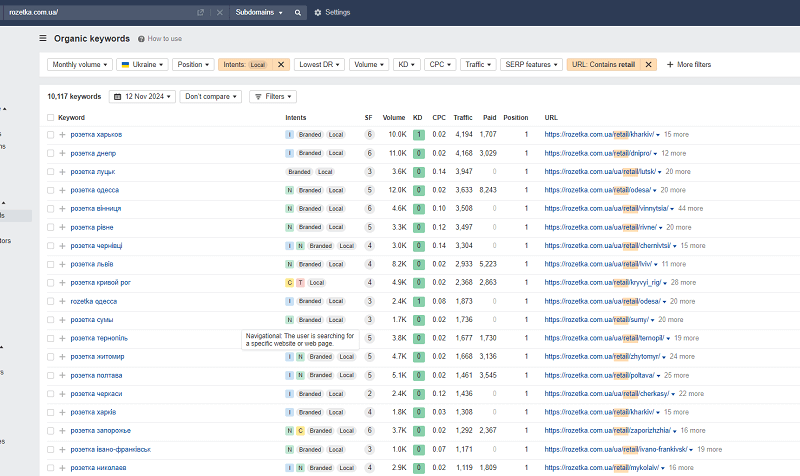
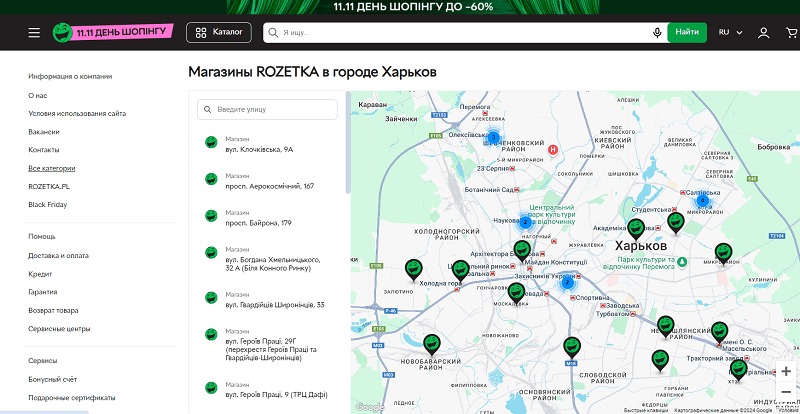
But these URLs lead to store map pages — for each city there is its own URL with its own map. This allows you to grab on excellently if you have a huge number of branches, in order to catch traffic.
Another site that I analyzed would go further and create a more extensive structure using this method.
But for the interlinking of cities, Rozetka of course did not forget to add a cloud of link tags.
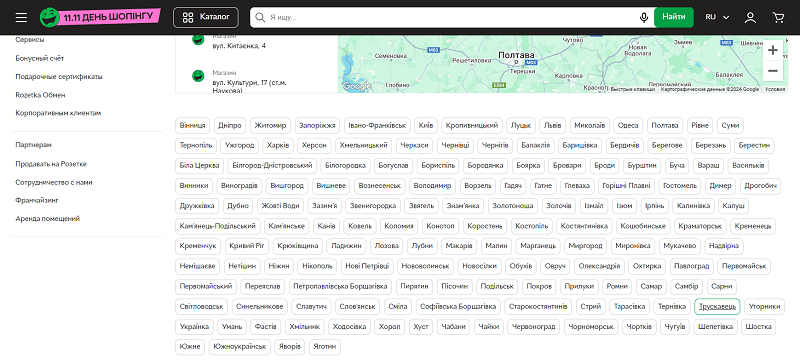
Interlinking of city pages on Rozetka
As we can see, everything that can bring money, Rozetka worked out in the semantics.
Along the way I also found a special tag at Rozetka in the Laptops section, where those cities that did not make it into the general pagination bundle were added. Apparently it is quite old, and migrated from the ancient link structure.
And here were cities that did not make it into the top 10 — such as Kropyvnytskyi, Chernivtsi, Rivne and others.
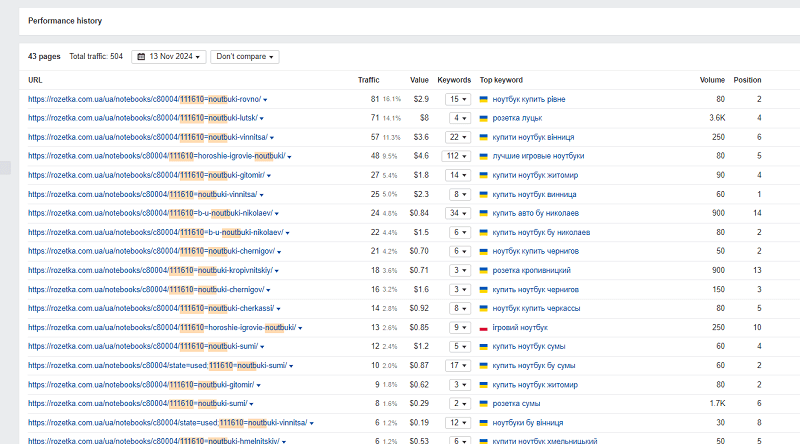
Tag 111610 — where there are also geo-queries
I tried to find similar pages in other categories and failed. Apparently this experiment was conducted purely for laptops, since this tag also contains other sections, like Netbooks, Ultrabooks and other categories.
Informational queries
If you noticed, I did not mention the informational queries on the Rozetka site.
By the way, Rozetka no longer has a blog. At all. It has already moved to a separate site https://journal.rozetka.com.ua/, and we will not consider it in this article. Because this blog section has simply been abandoned since May 2023.
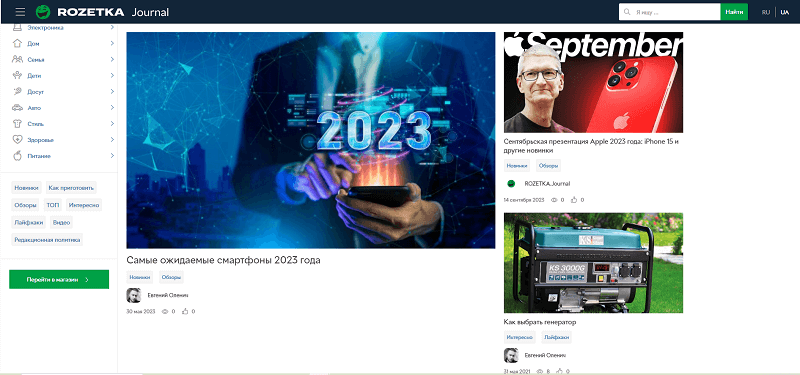
Rozetka's blog moved to a subdomain and quietly died there
I tried to find some sense in creating blogs for online stores, and tried to do it for more than 6 years. After all, when I started promoting an online store, my articles raised our site's traffic very high. But today I can confidently say: you can forget about a blog on a commercial site. If you need the informational part of the site, attach it to specific categories, making a "help" section. And it should be maximally integrated with the site.
Otherwise there is no point in a blog at all.
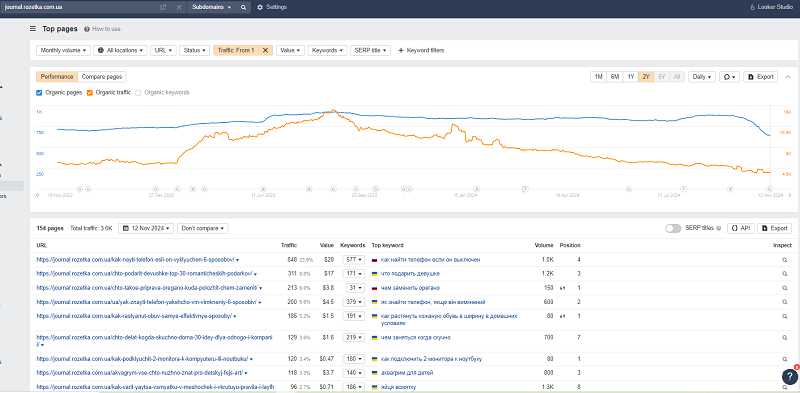
Rozetka's top article from three years ago collected 2,000 views
But how to better drive informational traffic on a site? How to work with a blog? Rozetka will tell you only through its past history.
In the web archive you can dig up an old article about a rugged camera. And it still looks decent even now. No copywriting tricks for inflating content, an excellent author's review, no stolen photos. Such informational content is a real merit. Rozetka's reviews in the past were a benchmark to aim for, for me and my colleagues.
A fragment of an article from Rozetka
In the future this style would be forgotten, photos would be taken for the sake of "photos", and the blog would simply become boring.
Technical optimization of the site
Of course, being in my right mind, I did not conduct an audit of the site. It is closed from any scanning, to even check for broken links on it. No crawler will scan it, unless you allow it in its settings.
But we will go through certain points and discuss them further.
In this block we will go through:
- Site speed.
- On-Page optimization.
- Content quality.
- Schema markup.
- Interlinking.
Site speed
If you think Rozetka is in the green zone — you are mistaken. The site's average indicators stay in the yellow zone across many pages.
In general the site has 4 JS scripts that eat up 1.4 ms of loading, a number of images are used in JPG (and uncompressed), 2 of the loaded scripts are not used on the homepage, and caching, as I understood, is not enabled everywhere.
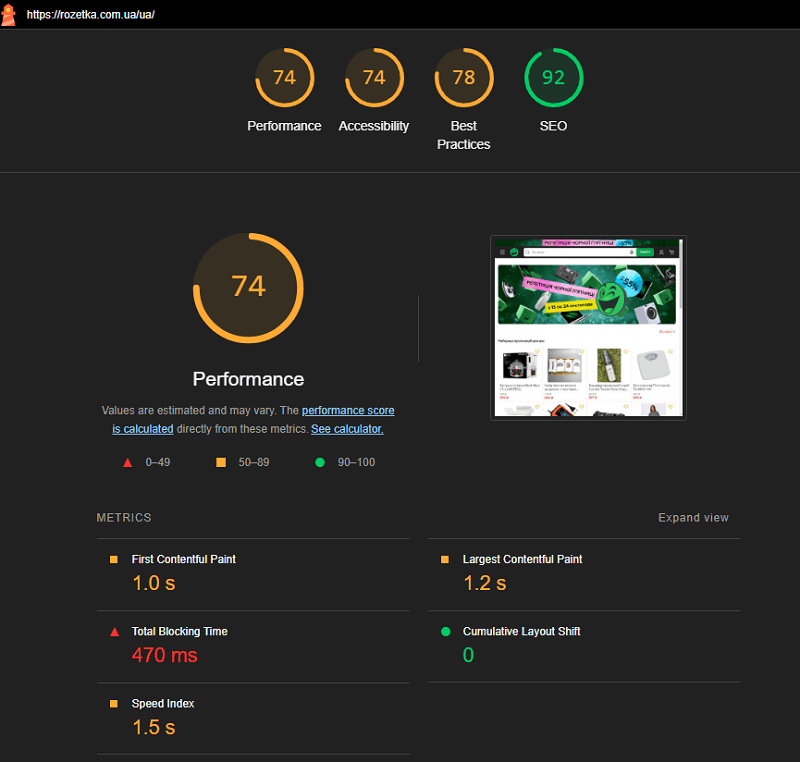
The speed of the homepage via Lighthouse
I also have complaints about the site's adaptation: those same login and cart images do not have captions and ALT tags.
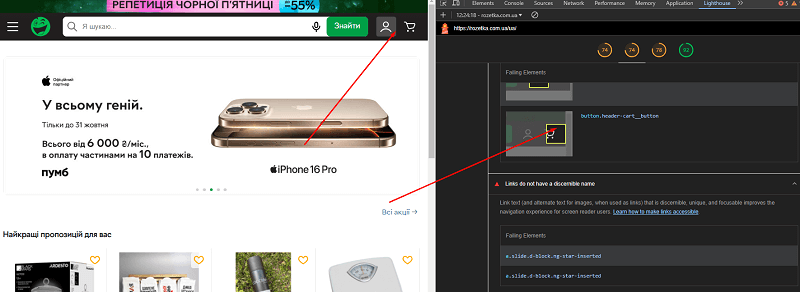
But in terms of SEO indicators the page passes in every sense — all the tests are passed positively:
- The needed pages are not blocked from indexing.
- Almost all indexable pages have a <title> set.
- Also there is no missing Description meta tag in the pages.
- The needed pages have HTTP — 200.
- The links have descriptive text — that is, the links have anchors set.
- robots.txt is valid and accessible for search.
- The image elements have [alt] attributes.
- The document has a valid hreflang (according to the encoding rules).
On-Page SEO
Now let's move on to how the meta tags are written and which ones are on Rozetka.
Above I went through with examples what is done in the Title, Description and even the H1. But it's better to remind once more.
The Title and Description meta tags are most often generated automatically. There are a number of templates, and they differ depending on the product category. So, for laptops and for clothing the meta template differed — apparently it was generated at different times and by different teams.
For wine, bicycles and laptops — different templates
Therefore, if you are going to develop templates for the metadata of an online store, think through as many templates as there are main categories in your store.
I remind you, the traffic pages at Rozetka are given special attention.

For example, the differences in the metadata for laptops and the netbooks category
On product category pages the H1 is located in a visible place on the first screen, right under the breadcrumb. Its location is fixed in the page design.
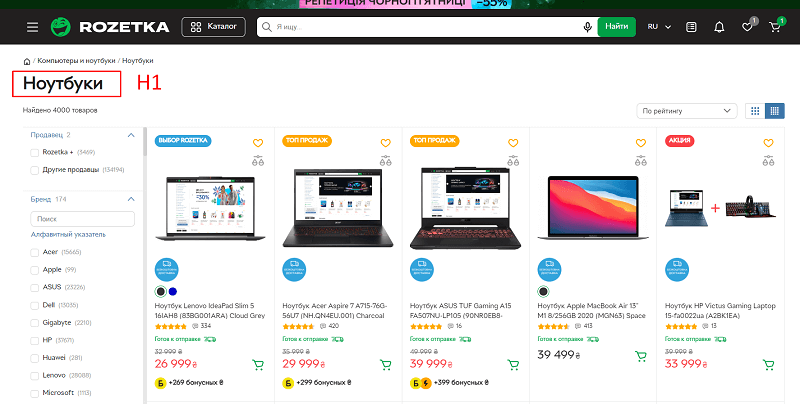
For online stores the H1 should always be here
For the H1 at Rozetka a simple rule is followed:
- The H1 is always unique and is not repeated across the whole site.
- For pages open to the index, the H1 is checked and edited for the sake of readability.
- For pages that are closed with a NOINDEX tag, the H1 may be generated not very visually beautifully.
- The Title and Description metadata for generated pages use the H1 in the nominative case.
- All H1s are used in the plural for the convenience of the template, in the nominative case.
- For traffic pages, the manual work in writing the metadata is visible.
At the same time the main text of the page is located at the bottom and is hidden by default. But it is hidden in such a way that the page's code already has it loaded in advance, and only a script allows it to be hidden/revealed by a shade (rather than loading the text).
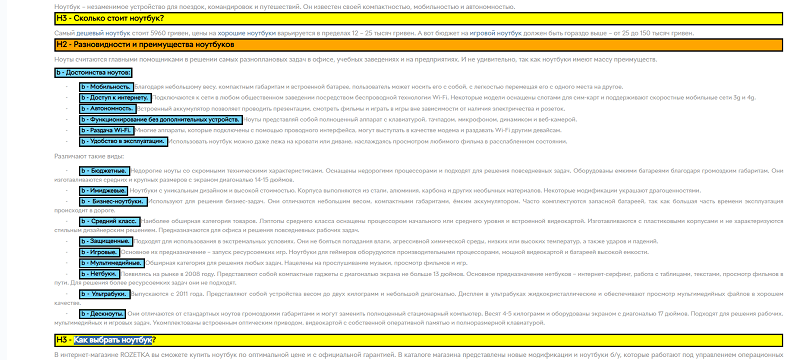
The structure of the text at the bottom of a category page
Among the advantages of the text I will highlight the following:
- The text has interlinking to the site's category sections (up to the three most popular).
- The text is divided into a structure of H2 and h3 headings.
Language versions and HREFLANG
It is also worth mentioning the correctly set HREFLANG — in our link to the group on Telegram I left an instruction on how to set it correctly.
The file presents the differences in how we set the HREFLANG and LANG tags.
- The lang tag is usually written through the language code.
- The Hreflang tag, however, consists of two components — the language code and the country code, written with a hyphen.
- The language code is usually written in lowercase.
- The country code — in uppercase.
For example:
- ru-UA = Russian language in Ukraine;
- en-AE = English language in the UAE.
Rozetka, on the other hand, has several versions on its site. Let's break them down.
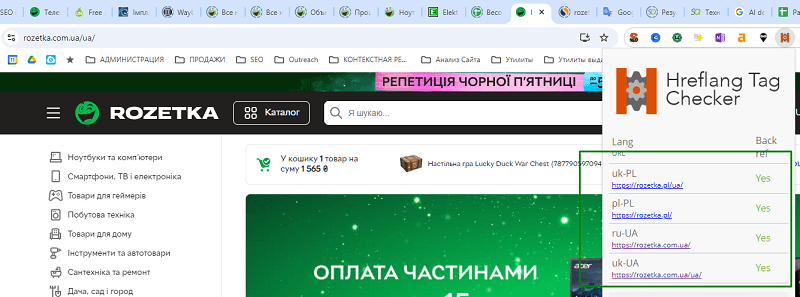
| Site version | HREFLANG | Lang |
| Ukrainian, Ukrainian language | uk-UA | uk |
| Ukrainian, Russian language | ru-UA | ru |
| Polish, Ukrainian language | uk-PL | uk |
| Polish, Polish language | pl-PL | pl |
And accordingly, on each page a rel alternate tag is set for each of the versions. How to set it — I talked about in my podcast
Schema markup
Rozetka traditionally uses schema markup — Schema.org in JSON-LD format, as well as Opengraph markup.
First let's break down the main schema markup, since there is a lot of it and it is set practically everywhere.
For convenience we will consider which types of pages we have:
- The homepage.
- The category page.
- The category page + selected filter.
- The product page.
- The search page.
- The manufacturer page.
Now let's run through each of them in more detail.
On the homepage the following schema markups are set:
- Website schema markup. Sitewide across all pages:
- name — Rozetka;
- alternateName — "Розетка";
- url — the current link.
- SearchAction — schema markup for search. Separately in the Potential Action subitem:
- target — the search page is specified — https://rozetka.com.ua/search/?text={search_term_string}
- search_term_string — the value required is set
- query-input — the following code is set, "required name=search_term_string"
The search results of Rozetka's category pages look quite stylish: there are stars, the price is displayed, and there is a number of reviews. There is also a visual breadcrumb.
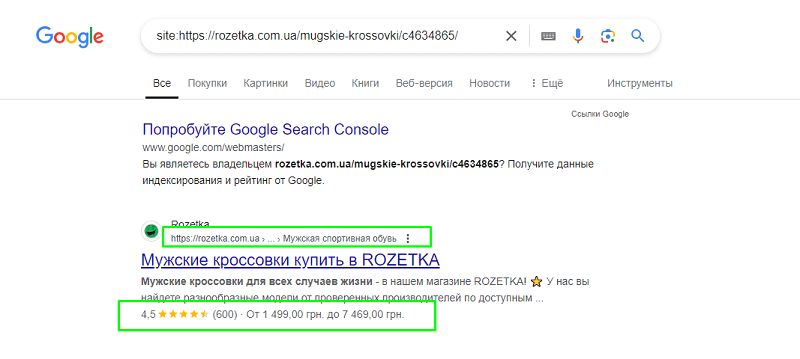
What the search result of a catalog page looks like
Two kinds of schema markup were spotted on the category page.
- BreadcrumbList schema markup:
- Here are the classic ListItems with numbers 1, 2, 3.
- Each item has position, @id (here the link from the breadcrumb) and name (how to label the category in the breadcrumb).
- The number of elements in the Listitem reaches 7 and more. For example, for sneakers — the order is as follows: Rozetka.ua online store – №1 -> "Clothing, footwear and accessories" -> "Footwear" -> "Men's footwear" -> "Men's sports footwear" -> "Men's sneakers".
- For pages with selected filters the Breadcrumb schema markup is not set further. So, on the Adidas filter nothing changes further.
- Product schema markup. We stopped on it — thanks to it they get in the category that very snippet with the price:
- name — here the H1 is used from the category;
- image — similarly the first image of the first product in the feed;
- description — here the data is taken from the Description meta tag;
- brand — here the field is set — Rozetka;
- in the offers section there is an AgreggateOffer field;
- the url field is left empty;
- priceCurrency — the hryvnia (UAH) is set;
- lowPrice and highPrice — the prices of the in-stock products are taken — minimum and maximum;
- offerCount — the number of products in the selected URL is counted programmatically;
- availability — one value is set "https://schema.org/InStock";
- there is separately an aggregateRating field;
- bestRating — equals 5, worstRating – 1 (these are the default values);
- ratingCount — the number of reviews for the selected sample of products by URL is calculated;
- ratingValue — is calculated internally by the average rating for the sample (the fraction value through a dot!).
The product page in the search results looks similar to the catalog, only the price is now shown as one (rather than a range).
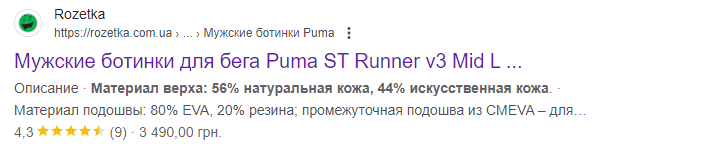
An example of the search result for an individual product
The schema markups that are on the site are the same Product and Breadcrumblist. But there are a number of serious differences.
- The Breadcrumblist schema markup has a last Listitem that leads to the product card URL
- The Product schema markup has the following sections:
- sku — here the product code is set;
- gtin — the product barcode;
- url — the product URL;
- name — the product's H1;
- image — here in square brackets all the URLs of the specific product are enclosed in quotes;
- description — here simply "ALL" the description is inserted in one line, without any complications;
- itemCondition — here the string "https://schema.org/NewCondition" for a new product;
- we separately highlight the Offer section;
- price — here;
- availability — "http://schema.org/InStock";
- priceCurrency — here always "UAH" for hryvnias;
- priceValidUntil — the date is automatically displayed a year ahead, the date format like 2025-11-14T14:44:4;
- there is a separate Brand field, it is on each product;
- for the brand there is a name subitem — we take the brand from the product description, it is on the product card;
- at the same time the nested url in the brand field — the link leads to the brand page, for example, the brand "Tommy Hilfiger" leads to https://rozetka.com.ua/producer/tommy-hilfiger/
- The reviews are set quite interestingly. Here the schema markup includes them too. They are nested in Product. They are nested in the review section. The 3 latest reviews are added to the schema markup.
- Each review has an author field. Inside are nested 2 variables — @type with the value Person and name — with the review author's name.
- The datePublished field is set in the format 2024.1.15.
- In the description field the whole text of the review is set without abbreviation.
- If there are reviews, the aggregateRating mark is also displayed, its parameters are similar to the category, except that the reviews are taken from the current reviews on the product card
Opengraph schema markup
This schema markup shows itself in full force on social networks, as well as in messengers — when you share a product, the data is collected exclusively from this markup.
Since Rozetka communicates with customers via Viber, Telegram, chats on Instagram — it is precisely here that they paid maximum attention to product cards.
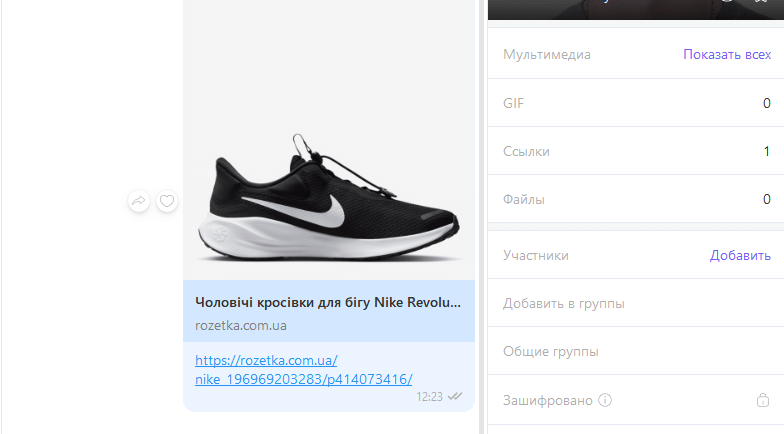
When sending links to messengers, everything you need – is displayed in the snippet
To check the schema markup we traditionally use Facebook Debugger (you need to log into FB to view).
Which fields are set for product cards?
- og:site_name — the name of Your site (in particular ROZETKA).
- og:product:brand — here the data from the Brand field is set.
- og:type — product.
- og:url — the link to the product page.
- og:title — the product name.
- og:image — the link to the first photo.
The rest of the fields are not set.
For categories the schema markup is set as follows:
- og:site_name — the name of Your site (in particular ROZETKA).
- og:type — website.
- og:url — the link to the needed category.
- og:description — simply created by a template <h1> + "buy with delivery across Ukraine. Favorable offers, promotions, discounts in the Rozetka online store".
- og:title — simply the category H1.
- og:image — the link to the first photo from the list of products in the category.
A simple template on all pages, indexable or not
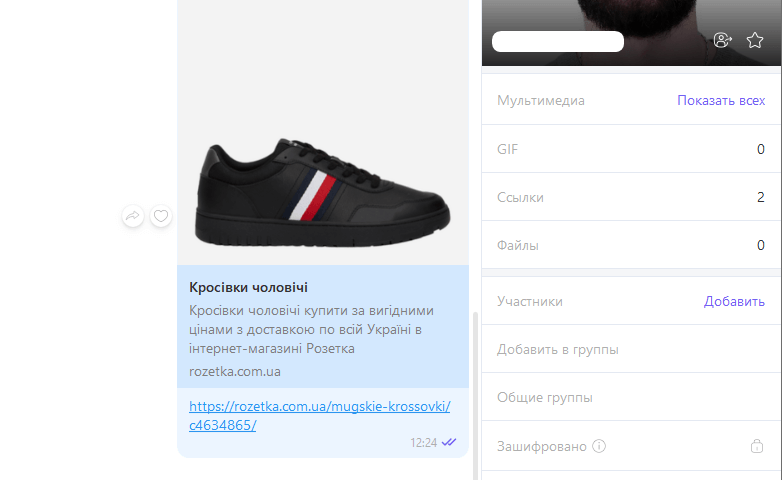
Moreover, the schema markup is generated without any problems even on pages that do not need to be indexed. What is closed from the index is not deprived of schema markup.
But social schema markup was not found on the separately created brand pages. Apparently — a temporary oversight.
Interlinking
What is implemented at Rozetka is competent interlinking. It is simply everywhere here. On average a catalog page contains more than 680 links with the FOLLOW tag and only 6 — with the NOFOLLOW tag (the latter lead to social networks).
Links without anchor text turned out to be only three: to the personal account, to comparison, and to contacting the administration.
The anchors on the links did not turn out to be complex, but only supplemented the main query of the page.
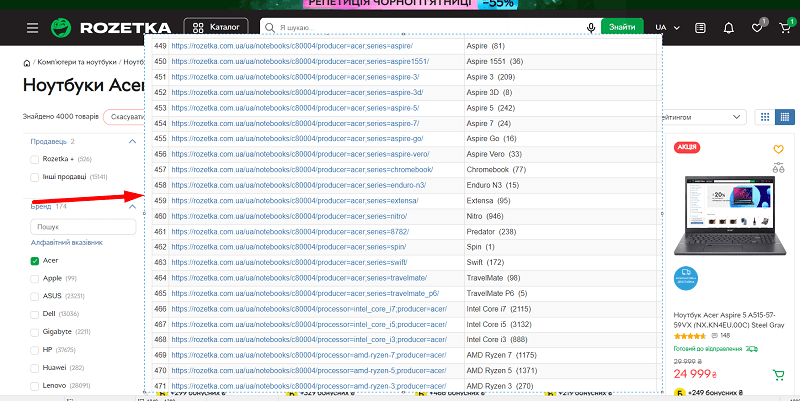
That is, since they made their menu clickable, where an element with the number of products is displayed, on the Acer laptops page (and I was on it) it logically suggested to me an additional anchor Aspire or the anchor Aspire 3, or the anchor Nitro.
From the point of view of semantics, these anchors do not even require any additional text around them — and with this simple method they strengthened the semantics of the whole site.
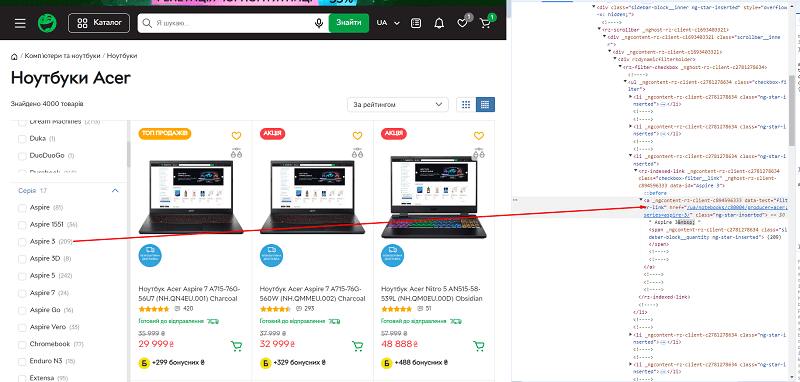
<a href=”/ua/notebooks/c80004/producer=acer;series=aspire-3/” “Aspire 3”</a>
The next method of interlinking we discussed, and it is a simple method — adding a tag cloud. By default it is collapsed, but when expanded it leads to specially created tags in the category that is located one level higher (for the parent category).
But due to the peculiarity of the engine, the filter, for you as a user, is not removed — and you land on a page where not one but two filters are already selected (your previous one is kept).
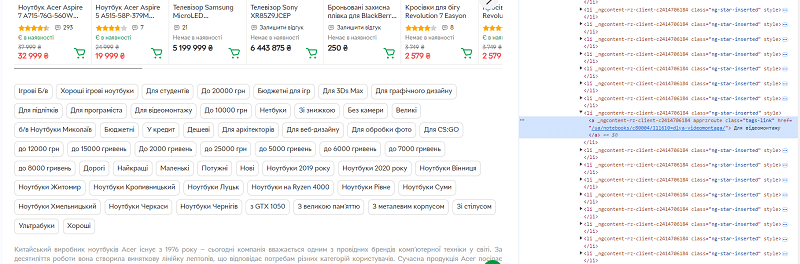
But sometimes such combinations can be closed from the index, and the search engine moves to the lone version of the page, where there are no problems with the filter.
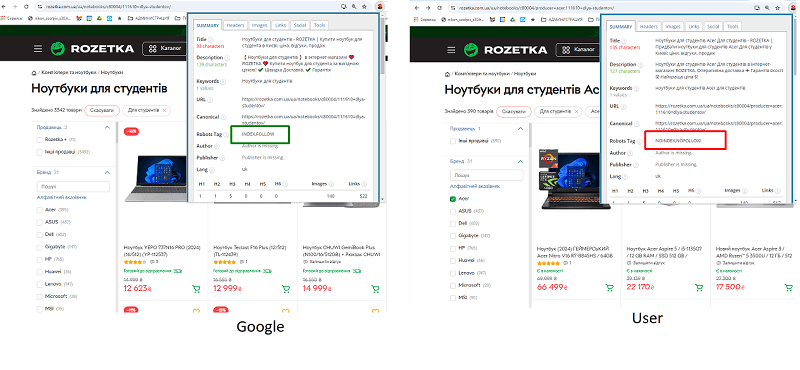
Google and the user will visit different pages
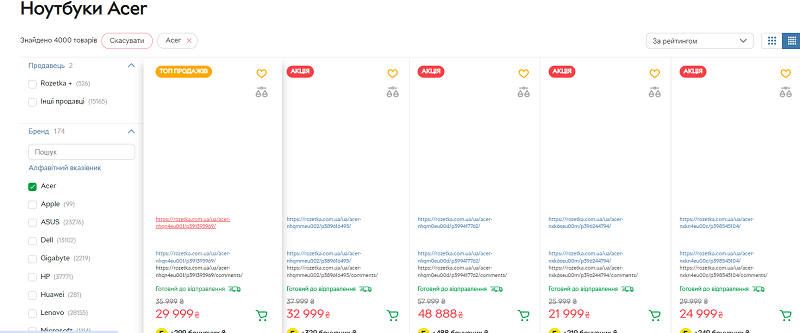
If you replace the images with links, you can see that on each product card there are two types of links:
- Some lead to the product page.
- Others lead to the comments page.
For a product card — only two pages
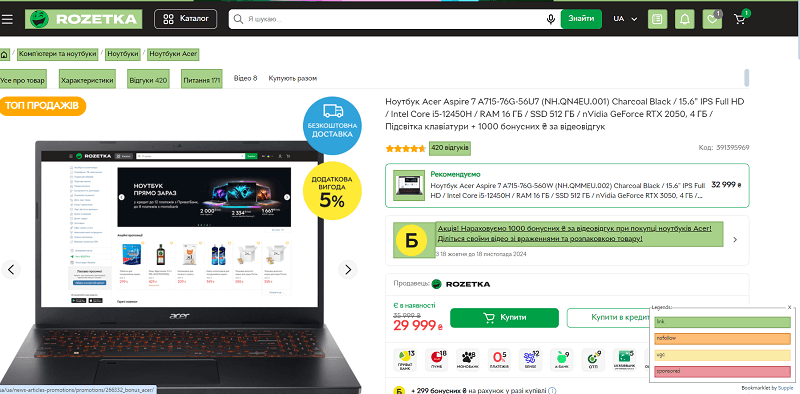
Although the site also has specifications, photo and video pages — they are not included on the card in the catalog, since there is no point in them from an SEO point of view.
There are enough links on the product card, and all of them are not closed. There are simply no NOFOLLOW links on the main card.
As we talked about the Specifications section, all the links there lead to the level of category + 1 selected filter.
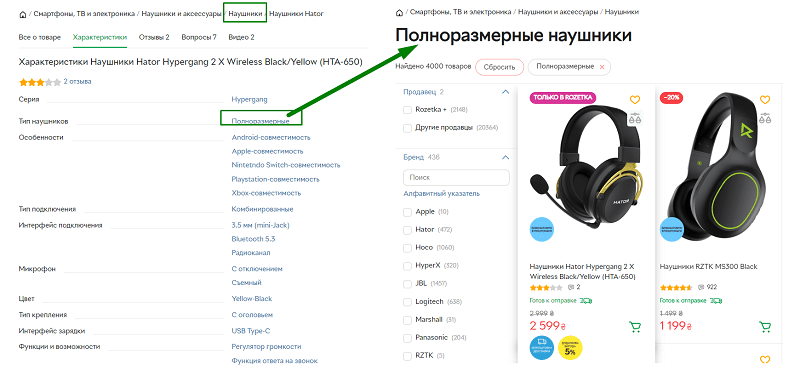
Simple navigation if you need to go to such a rubric
The anchors in this section are similarly simple — since the category URLs they have are SEF, it is clear without problems where the user will land. So, by the link it is clear where it leads.
<a href=”/headphones/c80027/21078=polnorazmernie/” “Full-size” </a>
By the way, did you notice why relative links are used (the ones with the domain removed from the path)?
And it's simple! If you use absolute links anywhere (the ones that contain the full domain name or full path in the URL) — with any change of domain you will have to hunt down mentions of old domains and replace them with the new one. Here, however, you are protected, so as to be easily ready to update the domain in the future.
In short, the rule can be written like this:
- We make all internal site links relative.
- We make all outgoing links from our domain absolute.
How to implement interlinking for your online store? Easy as pie!
- Take a category, work through all the long tails in it, and check whether you have a page for all the traffic queries.
- Then don't forget to make it so that from the pages of this cluster there is the possibility to reach the pages you created. For this use anchors in the navigation block, anchors in the text, and simply anchors by queries in the form of a tag cloud. All means are good.
ALT tags
In analyzing the content of pages it is very important to look at the ALT tags and the Title tags. Rozetka sets them on every picture where it can and where it sees the point.
So in my audit I looked with interest at the ALT tags. I was interested in how several photos for each product were labeled.
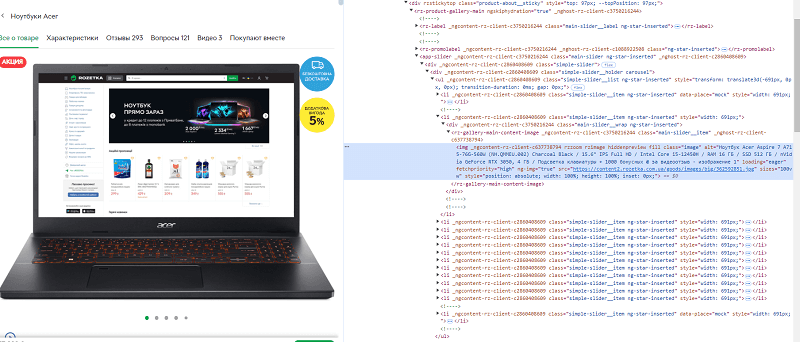
And… I didn't see anything special!
For this product the ALT tag was set like this:
<img _ngcontent-rz-client-c637738794="" rzzoom="" rzimage="" hiddenpreview="" fill="" class="image" alt="Laptop Acer Aspire 7 A715-76G-560W (NH.QMMEU.002) Charcoal Black / 15.6" IPS Full HD / Intel Core i5-12450H / RAM 16 GB / SSD 512 GB / nVidia GeForce RTX 3050, 4 GB / Keyboard backlight + 1000 bonus ₴ for a video review - image 1" loading="eager" fetchpriority="high" ng-img="true" src="https://content2.rozetka.com.ua/goods/images/big/362592851.jpg" sizes="100vw" style="position: absolute; width: 100%; height: 100%; inset: 0px;">
The second image, on the other hand, was set with the following differences
<img _ngcontent-rz-client-c637738794="" rzzoom="" rzimage="" hiddenpreview="" fill="" class="image" alt="Laptop Acer Aspire 7 A715-76G-560W (NH.QMMEU.002) Charcoal Black / 15.6" IPS Full HD / Intel Core i5-12450H / RAM 16 GB / SSD 512 GB / nVidia GeForce RTX 3050, 4 GB / Keyboard backlight + 1000 bonus ₴ for a video review - image 2" loading="lazy" fetchpriority="auto" ng-img="true" src="https://content.rozetka.com.ua/goods/images/big/372795220.png" sizes="100vw" style="position: absolute; width: 100%; height: 100%; inset: 0px;">
That is, in fact the difference was only that all the picture ALT tags are set very crudely — simply the H1 is taken + the text "Image N" is added.
In the catalog, however, the image was set differently
<img loading="lazy" class="lazy_img_hover ng-failed-lazyloaded ng-lazyloaded display-none" alt="Laptop Acer Aspire 7 A715-76G-560W (NH.QMMEU.002) Charcoal Black / 15.6" IPS Full HD / Intel Core i5-12450H / RAM 16 GB / SSD 512 GB / nVidia GeForce RTX 3050, 4 GB / Keyboard backlight" title="Laptop Acer Aspire 7 A715-76G-560W (NH.QMMEU.002) Charcoal Black / 15.6" IPS Full HD / Intel Core i5-12450H / RAM 16 GB / SSD 512 GB / nVidia GeForce RTX 3050, 4 GB / Keyboard backlight" src="https://content.rozetka.com.ua/goods/images/big_tile/372795220.png">
In the catalog the Title and ALT — are simply taken from the H1
An interesting fact — on the Ukrainian version of the site the ALT and Title are written in the Ukrainian language for the same picture. That is, for each picture there are ultimately two different ALT tags and ALT Title in different languages.
If you were worried about what to do — simply output a different ALT tag depending on the site version.
Other companies, like Autodoc, use the ALT to embed low-frequency semantics into the product card, but we are not talking about them right now.
Content
I decided to check the text using our utility, an AI detector, and for the quality (readability) of the text.
And I was madly surprised when the texts on most of the pages failed the AI test.
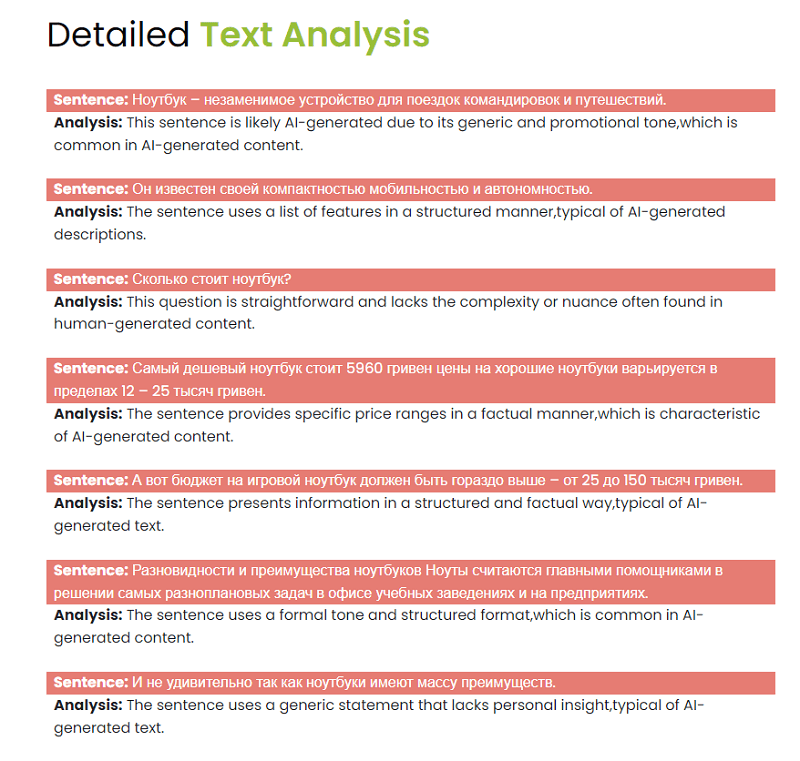
The result of the scan on Unmiss AI Detector
I decided to recheck on another tool — and in general it was confirmed: the quality of the content on the site leaves much to be desired, although the structure of the headings from an SEO point of view is excellent.
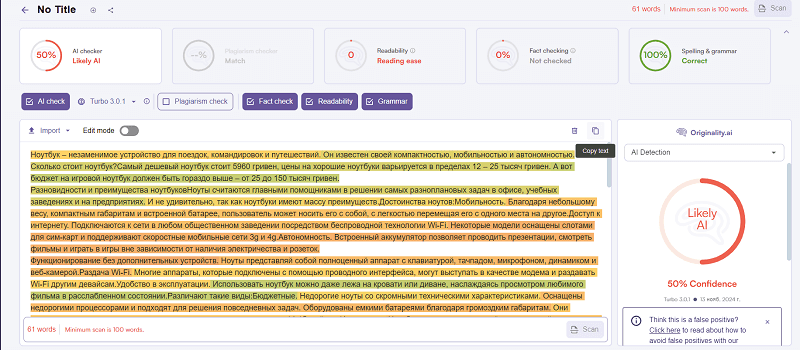
Checking the laptops page
And the conclusions are disappointing. The text in the categories is written structurally, but clearly not without the help of artificial intelligence. Or a very weak copywriter. The very logic of such short sentences.
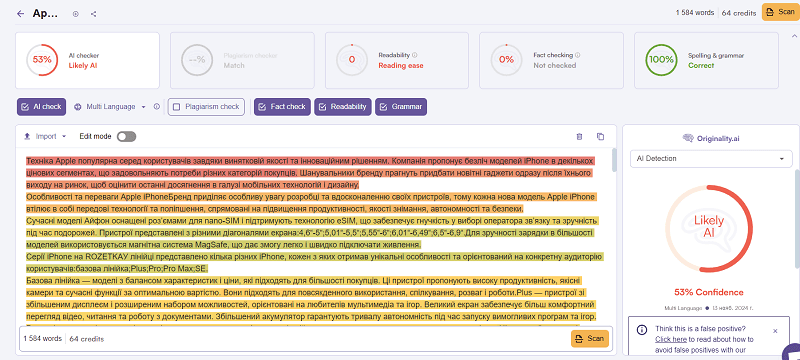
An example of an Apple iPhone page
The descriptions of the product cards, on the contrary, at Rozetka vary from very scant to super-quality. The reason lies in the fact that some of the products are uploaded through the marketplace, where there are almost no descriptions. And some Rozetka uploads, ordering cool and detailed descriptions.
For example, a bottle of wine's description would fit into a tweet (210 characters), while a laptop's, the Acer, would be enough for a small review-article (2,950 characters).
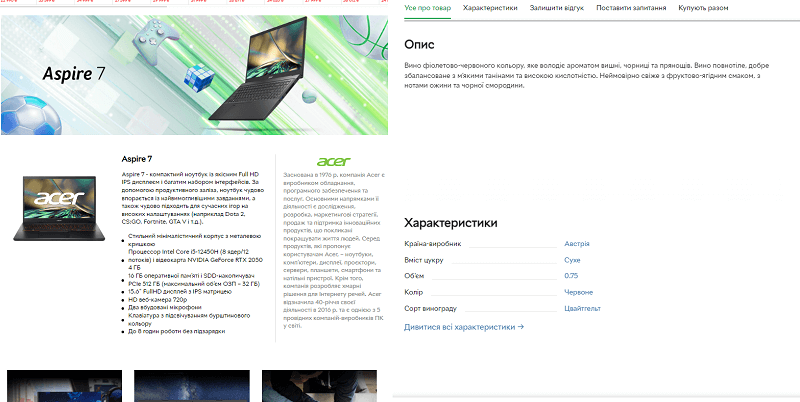
On the left — a fragment of a laptop description, on the right — a wine bottle
Therefore, how much text to write in a product description depends rather on the niche. If in the TOP 3 of your niche the product descriptions are large, write the same. And if it's the opposite — two sentences, write those two sentences.
In the end we come to a conclusion about the content:
- All the content on category pages is rather needed for closing the semantics questions.
- The articles in a category can be written not hyper-quality. In fact you can even use AI, the main thing is to dilute it a bit afterward.
- In product descriptions we stick to the arithmetic-mean length of the competitors depending on the niche, there is no single yardstick here.
- A blog is not mandatory to run, it will in no way raise commercial traffic.
Usability of the site
Probably, the things I will not dwell on in detail in this section are what Rozetka does like everyone else.
But we will try to go through all the strong points in theses.
The catalog menu
A monolithic menu, which on desktop is displayed entirely as a single square.
- There is no adding of blocks — they appear immediately when you click on the catalog.
- By default the rubric Laptops and computers is highlighted.
- For convenience there is a Popular categories block — to strengthen interlinking, and simply for convenience.
- All categories for convenience have two colors: blue — top-level categories, black — internal ones. Easy to understand, no dividers are needed.
- There is that very category from the past "all computers and laptops" — which simply leads to the same place as if you had clicked on the section in the menu on the left side.
The structure of the menu in Rozetka's catalog
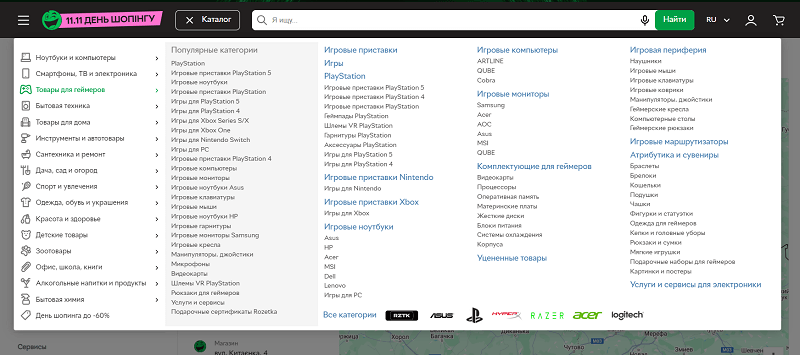
On mobile the menu is implemented on a similar principle — when moving to the Laptops and computers section you landed on a very long menu, which you could scroll down until you reached the needed category.
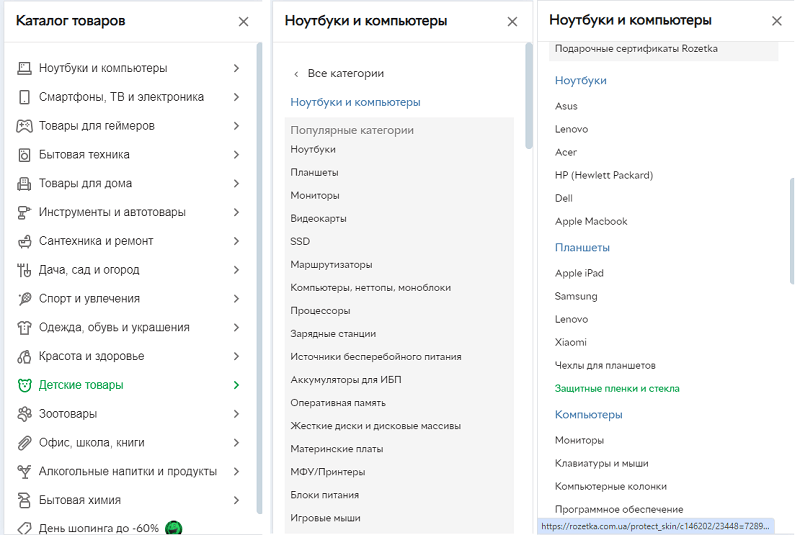
The hierarchy of the mobile menu at Rozetka
All the blocks in the menu lead to landing pages. Each of them is open to indexing.
Search
Here's what we believe Rozetka did magnificently — its own search engine.
Its behavior was refined over years, and over many years they created a single cool search engine.
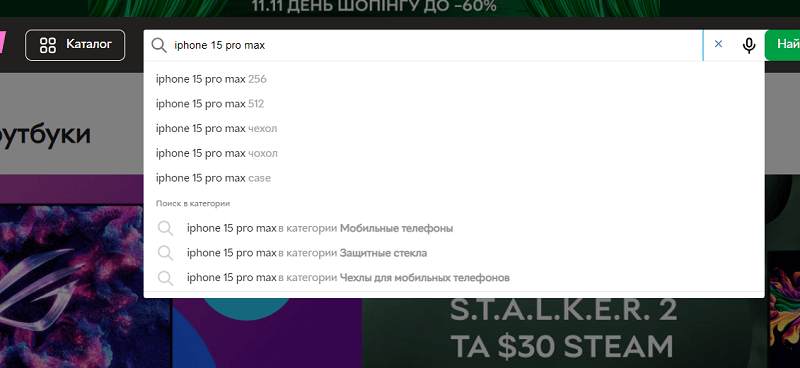
Search at Rozetka, almost like at Google
I will try to tell you the logic of how it works, with simple examples.
- If you enter a query that is similar to an H1, it will give search suggestions, as if a person were typing them in Google.
- When clicking on this word I will land on a search results page (which, of course, does not have indexing).
Search results are closed from indexing
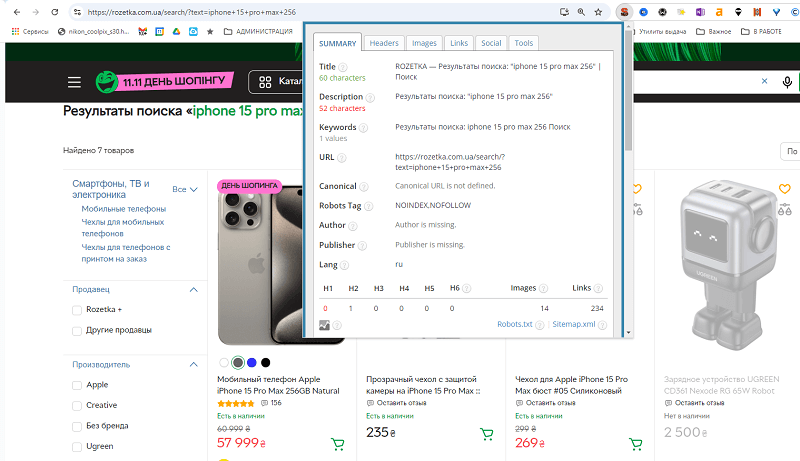
- At the same time if I choose to search for a phrase in the "Mobile phones" category, I also land on a page that is closed from the index.
But what happens if my query is more precise?
Rozetka will show me up to three products that match my search result!
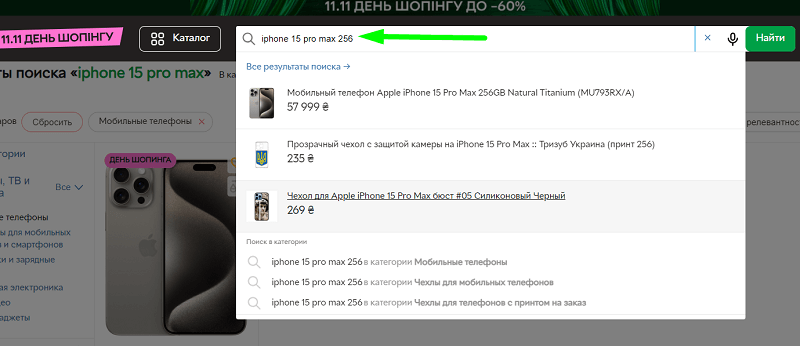
You say Google has a product listing? Not only!
The pages themselves of the type search/?text=<QUERY TEXT> are not indexed, and the search results are directed at the user's UX, so that it is simply convenient for them.
But Rozetka went further, and in it you can move not only to the query result.
- If you enter a query that is specified for a category as a synonym (for example Power bank), you may be shown a "go to category" block, where the URL will no longer be the search query result.
- You can write the same thing with a typo — typos are also taken into account — you will be shown the same result. As I understand it, the dictionary of typos and synonyms is filled in manually based on the search history (it was like that for us).
The listing in the search also has its own snippets
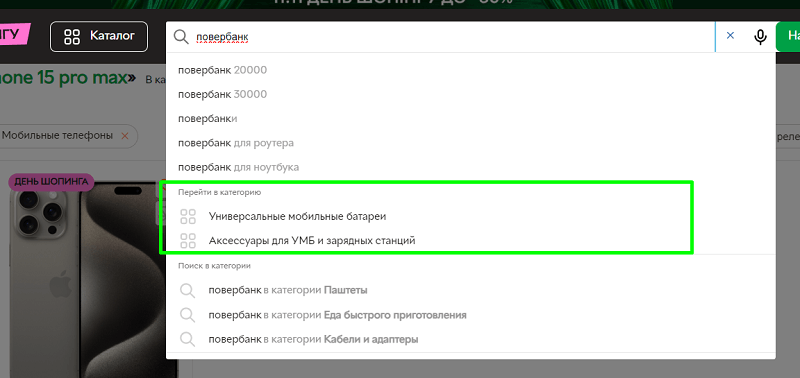
As we can see, the search queries are closed from the index. But there are sites that open this and do it smartly. About them — read in the new articles in the blog!
But there is something else. And there is a nuance hidden under the hood. Rozetka's own search is displayed even in the search results!
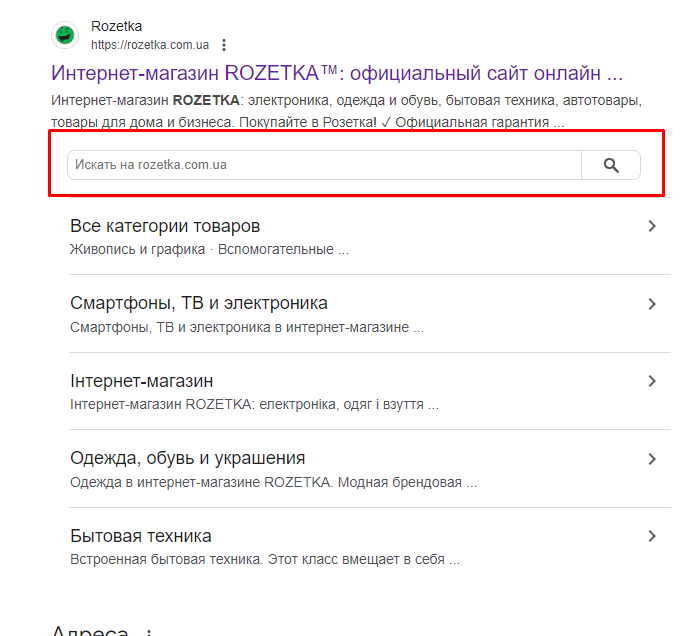
Want your own search in the results? Set up the schema markup!
For this you need to do only two things:
- Make the search in the site header sitewide across all pages (and the homepage).
- Implement a search result page.
- Set up the SearchAction schema markup.
I checked — such schema markup is set, and in JSON-LD format. I will give developers an example of the code here:
<script type="application/ld+json">
{
"@context": "https://schema.org",
"@type": "WebSite",
"name": "Rozetka",
"alternateName": "Розетка",
"url": "https://rozetka.com.ua/",
"potentialAction": {
"@type": "SearchAction",
"target": "https://rozetka.com.ua/search/?text={search_term_string}",
"search_term_string": "required",
"query-input": "required name=search_term_string"
}
}
</script>
I marked which fields you need to set without fail — and if you have a search engine implemented, it will start ranking in search as a special block (such a one is displayed only for the branded query on the site).
The filter system
How the catalog is implemented at Rozetka, I have already described over the previous 5,000 words. But I just want to list what is implemented as of 2024 on the site today.
I will try to list the TOP 8 reasons why Rozetka's filter is cool.
- Highlighting of the filter on mouse hover.
- The filter triggers wherever I click. In the cell or simply on the word of the filter.
- I can find a filter item by search! Have you seen a search by filter sections anywhere? For example, Rozetka has 201 phone brands! How do you find the needed one without search?
- Search, fine. If you're lazy to type — there is an alphabetical index of filter sections.
- Clicking on a filter does not require any confirmations, the page updates practically instantly.
- When selecting different filters I see that with the next selection the number of items will decrease (and down to what number).
- I can conveniently remove an accidentally added filter.
- The URL of a saved filter is kept in the browser history (yes, a scary URL of 6 filter combinations will be in the browser history), which can be saved in bookmarks.
Rozetka's filter
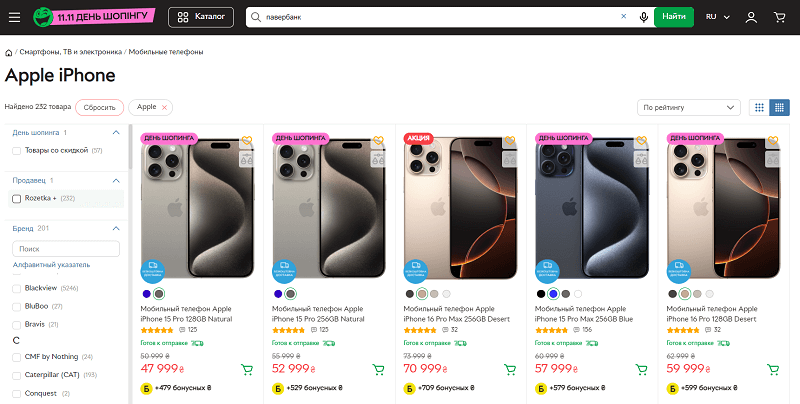
Comparing the functionality of Rozetka's filter with basic stores on Opencart or on other CMSs — is like comparing the engine of a Mercedes Benz with the engine of a Soviet-era Zaporozhets, where everything held on by a thread.
Convenience of the cart, of the purchase methods
Have you never wondered how the Buy button should work?
- Add the product to the cart and write about it on the button.
- Write that the product is added in the corner of the screen.
- Offer to write a phone number for a call.
- Offer to fill in a bunch of fields.
- Show a popup with the product in a horrible design?
If on your site it's implemented somewhat like this, you are definitely losing the lion's share of sales out of thin air.
Rozetka went much further.
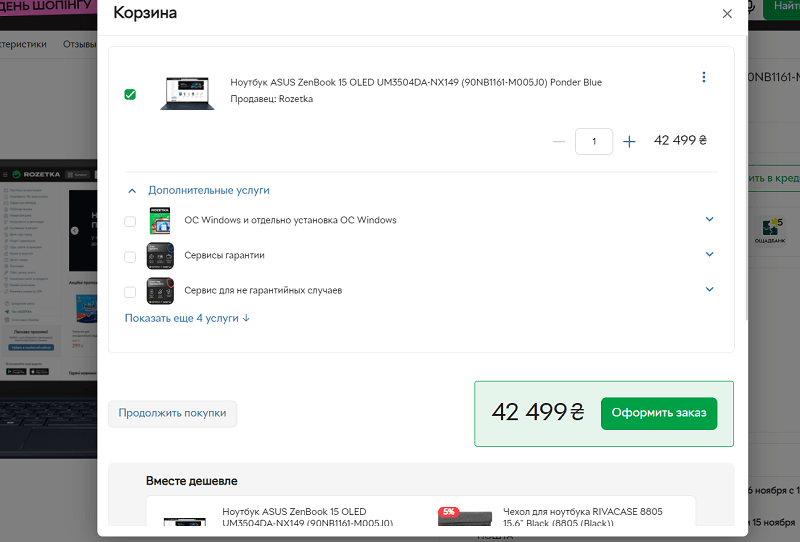
When clicking on the Buy button I see the following.
- My product with the purchase price.
- The possibility to immediately buy additional products and services.
- The possibility to see compatible products for purchase.
Then, when moving to the checkout button, we will see the possibility of buying products through the Login button. Login is supported via:
- email;
- phone number;
- authentication via Google;
- authentication via Apple ID;
- authentication via Facebook.
That is, I can log into my account in a simple and clear way.
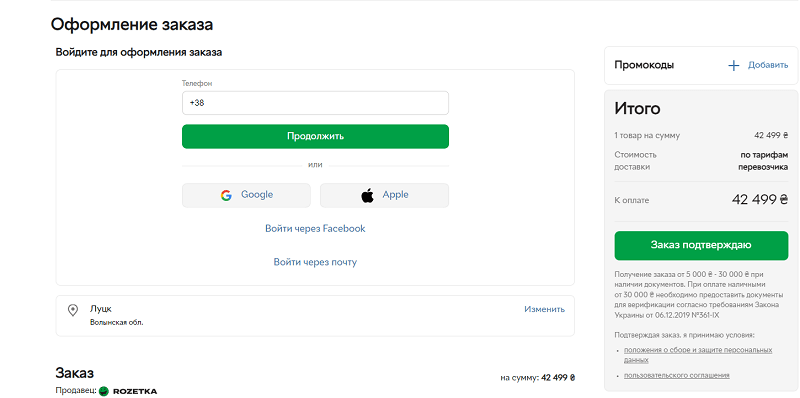
I chose to log in via phone — and a simple authentication via SMS — and I'm already in the account.
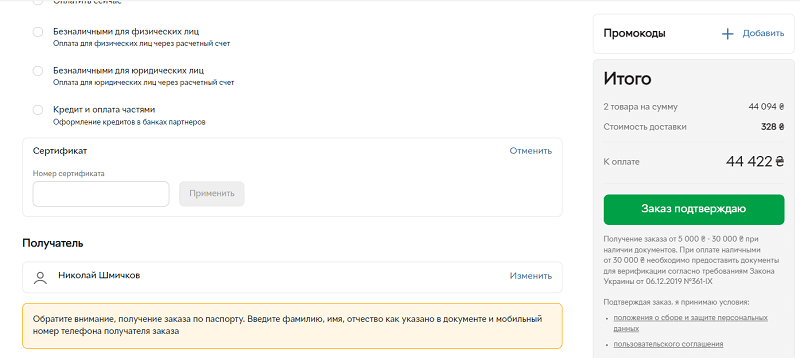
Next — I simply chose delivery, the region — and I see a cool button I confirm the order.
All the needed disclaimers on the body of the order are set, I can specify the recipient. The order amount and delivery are visible without unnecessary questions.
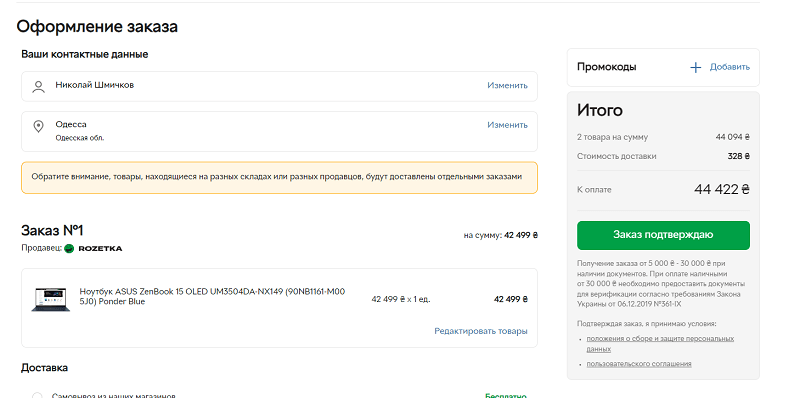
There is a convenient field for adding a gift certificate code. These certificates they both give out and give the possibility to buy and gift to anyone.
Display of product cards
The first thing you can notice is the expanded display of products when you hover the mouse over them. Yes, the mouse! You will say that mobile rules, what desktop? But for mobile Rozetka has separate apps, and so for desktop UX they made a separate and far higher-quality one than anywhere else.
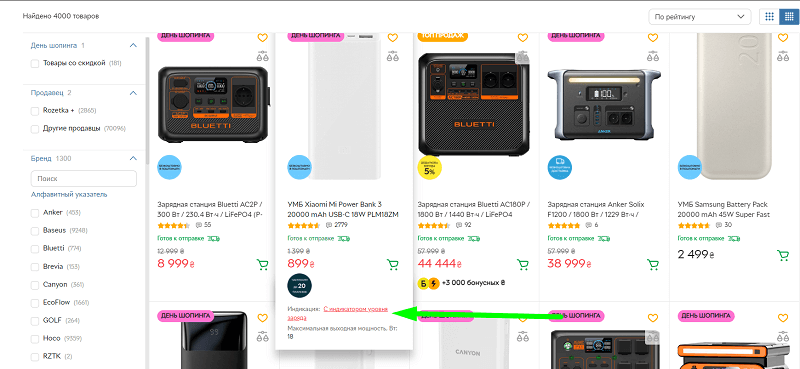
In the dropdown suggestions there are even clickable filters for similar products!
What do you do if on your site there is simply a heap of products that differ in color or size? For example, here are chairs whose only difference is the color.
For each color you have, of course, your own URL, but what to do with indexing?
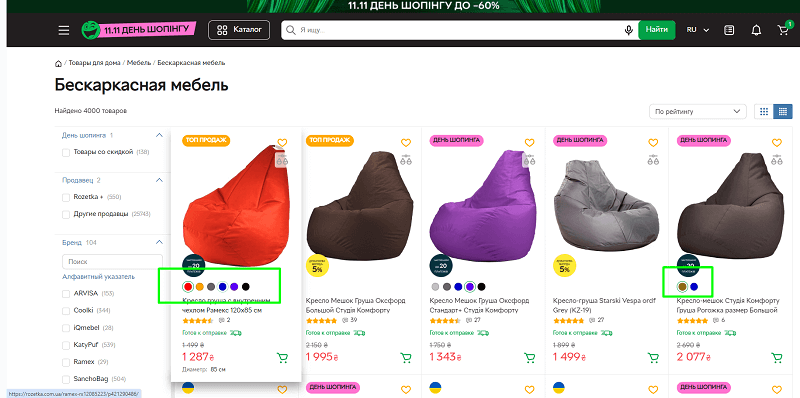
Rozetka did it very simply. One of the colors is selected as the main one. The rest — Canonical to the main selected color. On one hand — this is not entirely correct.
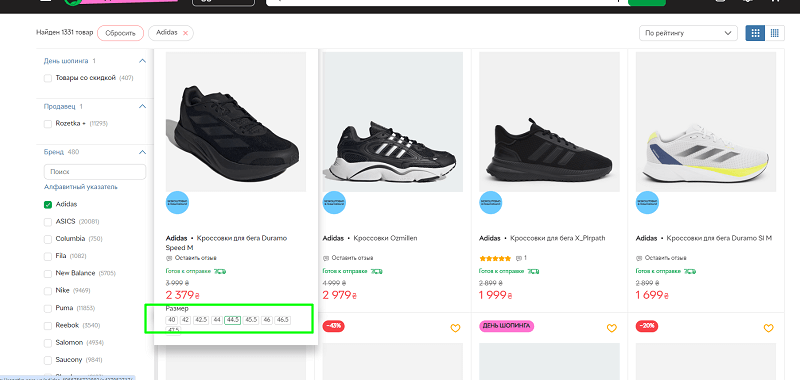
On the other, if I want to be indexed for some queries, I will create a tag page. And I will place a link at the bottom of the page. But Rozetka did this far from for all queries and filters. But all the same, from a UX point of view — their implementation of selecting color, size, memory capacity — is done so that you don't scroll through 30 identical products in the feed.
- From the search engine's point of view — each product is allocated its own URL.
- All of them, except one (the most popular), are closed with a Canonical to the popular version of the product.
- In the search results a "composite" card is displayed, where there are options to click right away on the needed size.
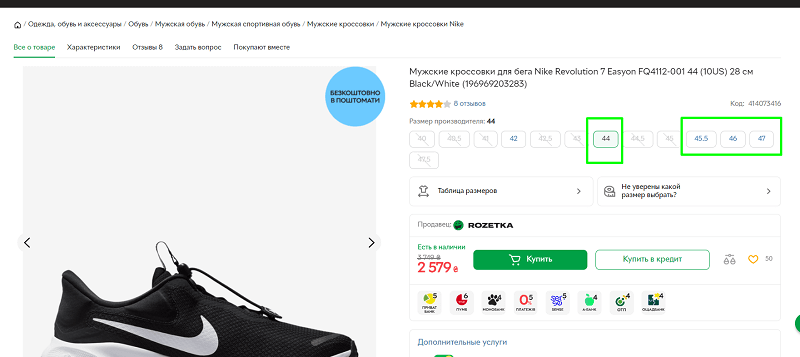
- When sizes run out, the options are visually blocked, closing the possibility to choose the missing sizes and capacities.
And the pages are also implemented excellently when a product is temporarily unavailable.
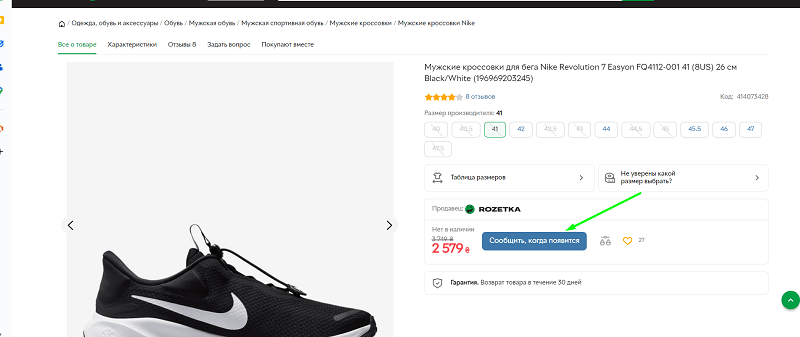
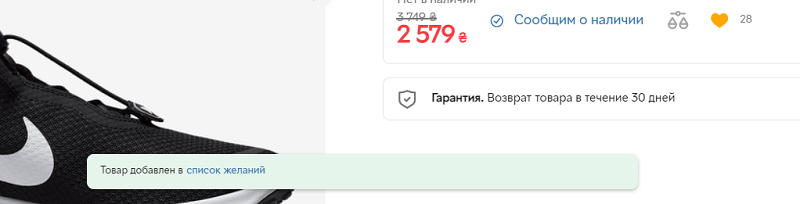
You see the previous price of the product, but the Buy button is replaced with a blue button "Notify when it appears". Automatic clicking for a registered user will add the product to that very "Wish list" (available at the link https://rozetka.com.ua/cabinet/wishlist/), which still works for them.
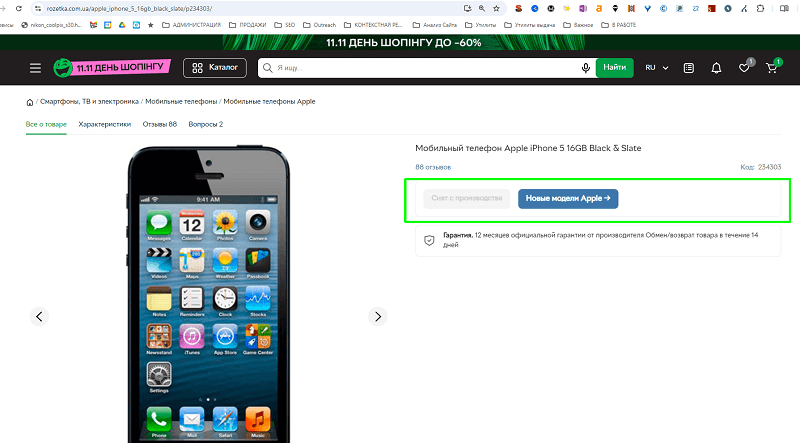
And if a product was once popular, and even has reviews on it, but, for example, it is no longer available, the following rules are applied to it:
- No redirects are configured from these pages.
- Such product cards are not deleted.
- In the design any possibility to buy the product disappears.
- The purchase button is replaced with the button "Discontinued".
- Opposite it a button to the product category to which the item belongs appears, clicking on which you will land where you will most likely find what you need.
Reviews on the site
Reviews at Rozetka are what allowed the site to grow very fast. On the site reviews were left both by dissatisfied buyers and satisfied ones. Some for free, some for a promo code. But the charm of the reviews functionality was that other users could reply to your review.
Some pages (for example this one https://rozetka.com.ua/samsung_mna110ms1acxua/p321131941/comments/ — even became memes).
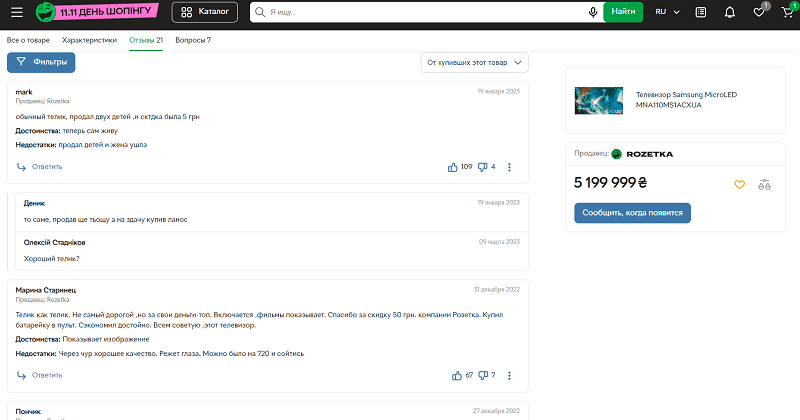
It was precisely the possibility to comment on reviews, to give them likes or even dislikes — that made the site alive, and people willingly left comments under products, commenting especially hotly on those where a discussion began.
Link promotion
And now we move to the tastiest part. After all, if you believe Ahrefs, 16,372 unique domains currently link to Rozetka, 3,117 of which are from Ukraine, 6,092 domains in the COM zone and 1,332 from the RU domain zone (which remained from past link builders).
The war for links at Rozetka was heated — the number of falling-off domains was roughly equal to the number of remaining ones — for example in October 2021, 5,946 domains placed a link to Rozetka, and 5,882 domains fell off.
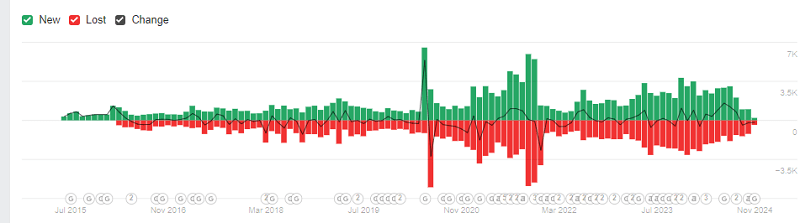
The history of Rozetka's link building is the most contradictory
Which of the links were made manually? Which ones were made automatically? And which ones did users and site owners make of their own accord, without the knowledge of SEO specialists? Let's figure it out!
Spam links
Rozetka simply bought links brazenly on exchanges. link exchanges like Collaborator — everything was bought, and not even looked at. I think, even for the sake of savings, they reached out to webmasters directly (or traded through intermediaries).
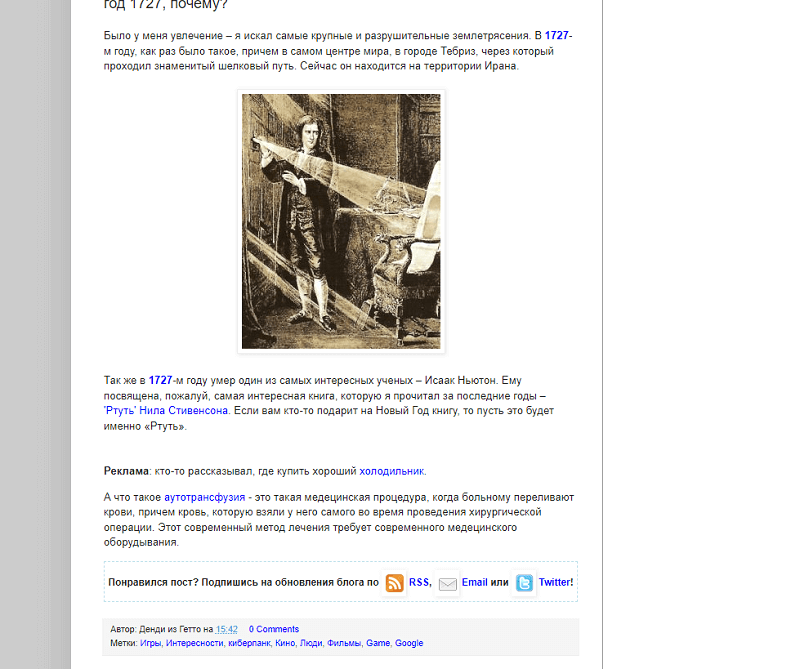
Link building of 2013
How to make spam links? You won't believe it, but this method still works. True, not as crudely as before. The essence is the following:
- We look for sites on the exchange by topics (there are usually convenient filters).
- Then we throw the site into SERPSTAT / or better Ahrefs and look at the report of leading pages.
- Then we find the pages that rank.
- We write through the exchange / or directly — to the site owner and ask to insert (place) our link on a specific page.
- We learned to do this — and it works right away far better than buying links on zero pages!
Ordered articles through exchanges
And there's more. Even back then promotion was conducted through "ordered articles". The essence was the following.
- A site was found.
- It was sent a text written to order. This could be a news item or a written review.
- In the text usually at the end or somewhere in the middle a link was left. It could be anchored and in the past — even anchor-free.
- Sometimes an article was simply found, already written in advance, and a link was placed in the already published text.
In those times this was done mainly through guest-post link exchanges (if the article was to order) or direct placements (if the article was already written).
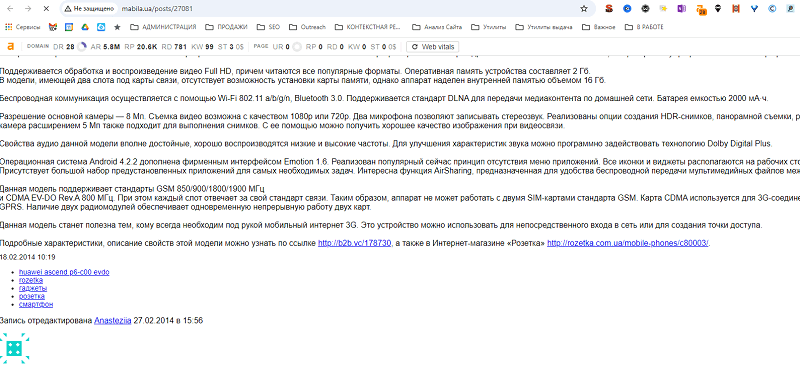
Typical ordered articles
How to buy ordered articles? Easy as pie.
- We take all the competitors, export their links.
- We take the domains, go to the exchanges, add the domains as lists for the project.
- The system will filter out the ones that are on the exchange.
- Then we export what's left — we check the domains for the topic — whether our themes are there and whether they have traffic.
- We then go to the exchange and simply place one after another, choosing domains with DR>10 and traffic according to Ahrefs/SERPSTAT of more than 1,000 per month.
- We write the articles on the topic of thin content (there is an excellent video about this on the channel).
Crowd marketing
Senseless and merciless crowd marketing. A strategy that appeared before the appearance of Ahrefs, and rapidly died off before 2020. Those who still sell links through it are simply happy people — because it's unclear who else is buying this.
What was the point:
- Forums were found. A decent base was collected.
- In them they either looked for hot threads on topics, or warmed up new ones.
- On each forum dozens (hundreds) of accounts were registered. Different emails, names, IP masking and anything went into play.
- Then imitations of communication were launched, the warming up of accounts.
- And then a helpful post is left with an offer to follow a link. The link was usually left anchor-free.
A typical ending of a conversation in an empty thread with a link
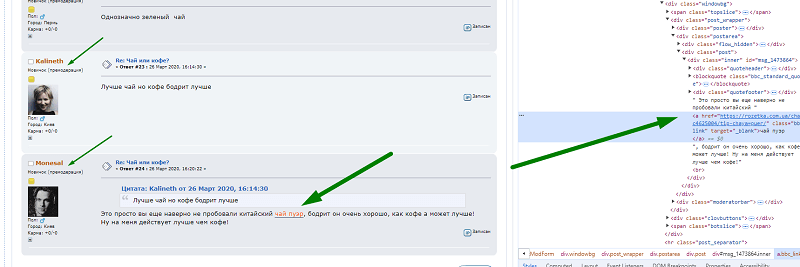
In especially neglected cases point 4 could simply be skipped.
Then, when Your site became popular, people themselves could already quite often discuss Your site, leaving links without your knowledge — and the number of links from forums could grow on its own.
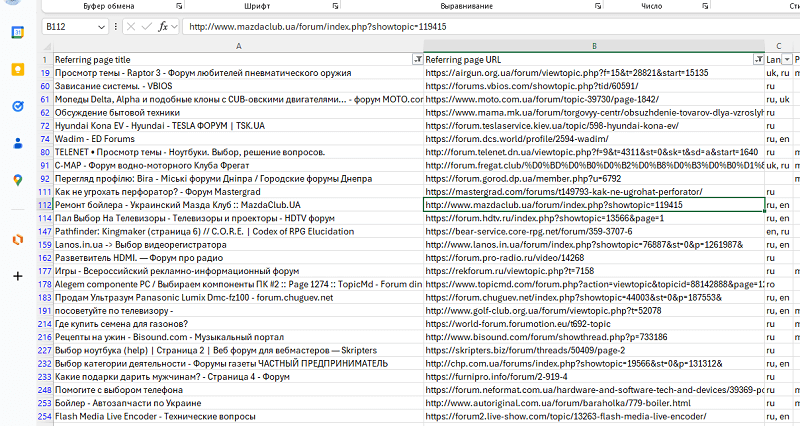
Rozetka still has more than 1,072 active links from forums
This method of link building was more than completely spammy. But, as I see, Rozetka today steadily receives natural links through those same forums, and amusingly — not only in Ukraine, but also in Latvia. The site is becoming far more popular and well known.
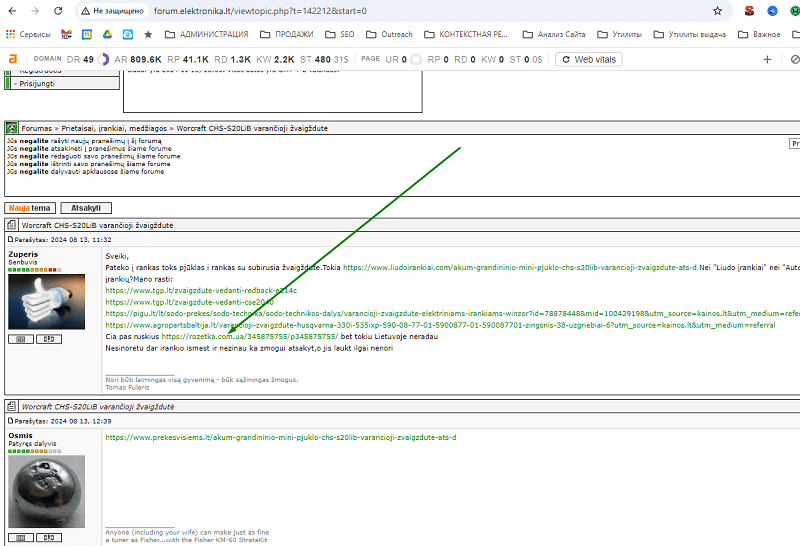
If you suddenly decided to get into crowd marketing, I'll give you a checklist of a "healthy crowd marketer":
- We parse forums through our service, the Search for blogs and catalogs (yes, it also searches forums).
- We clean up the forums by region, keeping the needed ones.
- Then we check that threads on our topic are present on the forums.
- We register accounts on behalf of the store.
- We also register up to 10 new accounts (on behalf of ordinary people).
- First, on the forums we look for topics through site:<forum> for the needed threads (you can parse them in advance).
- We reply to forum threads, not publishing more than 1 post per day on a forum. We build the reply by the structure — praise (without flattery) of the previous speaker, a detailed answer to the speaker's question.
- We make more than 10 posts without links.
- Then, when your rating on the forum changes from "newbies" to any other, we make from the account no more than 1 link in 2-3 weeks. Publishing further 90% of posts without links.
- To speed up the creation of posts, you can use GPT.
Guest publications
But Rozetka was promoted not only with spam alone. Among their articles there are also those they worked on truly thoroughly.
There are also articles where they were clearly linked to as a source of traffic — based on their content both reviews and entire articles were formed.
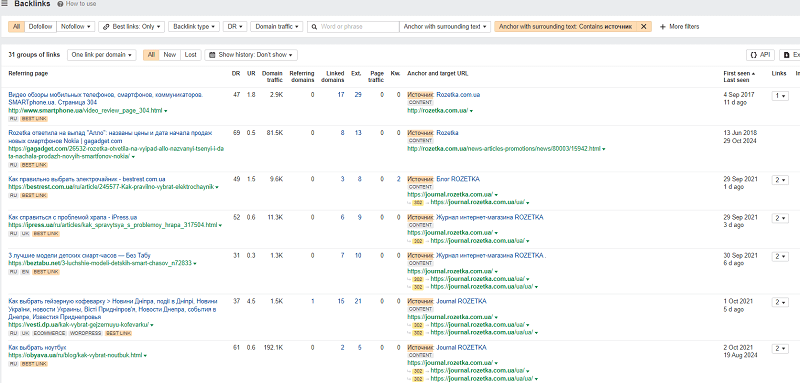
As an example there are also foreign publications — they did even such high-quality link building.
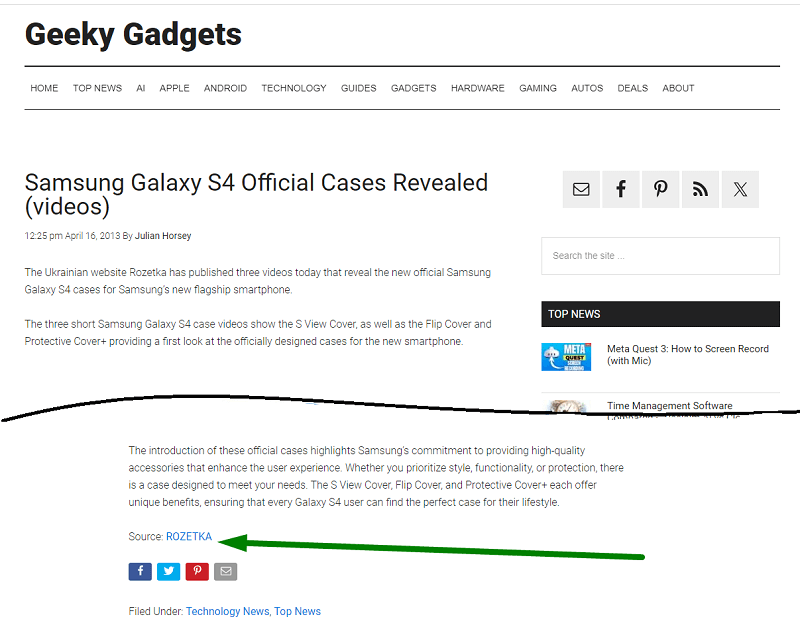
For work on guest publications, the work is built in the following way:
- Queries on the topic with the word "blog / articles" are worked out.
- Domains are collected from the TOP 20 of the search results.
- We clean off the direct-competitor stores and non-target sites.
- We keep everything that has a traffic blog (we check the domains for the level of traffic per month).
- We find out the contacts.
- We compose an email template for guest publications.
- We send it out, collect replies.
- We clarify the terms of cooperation.
- We create a placement calendar for a period — so that our publications come out with constant regularity.
Working with the media
Besides classic outreach, Rozetka also went into the media. They worked with such domains as pravda.com.ua, nv.ua, tsn.ua, rbc.ua, forbes.ua, zn.ua, unian.ual, delo.ua, hromadske.ua, itc.ua, portal24.org.ua, glavcom.ua, injournal.v.ua, eba.com.ua, podrobnosti.ua and not only.
The materials were written together with journalists, a paid integration of links was offered in such a way that it was not so brazenly noticeable.
You could come across a Rozetka link in a review of Generations Z or in an article on how to properly drink Tequila (which can be bought there), and even find it while studying Zelensky's wardrobe.
Rozetka works with the media regularly, and works directly with journalists. Mironova Natalia, Olga Kutova, Vira Khmelnytska, Vasylyna Kopytko, Valeria Shebela, Anna Zdorenko, Violetta Orlova, Vita Molodan — authors of articles on various media portals, with whom they worked directly.
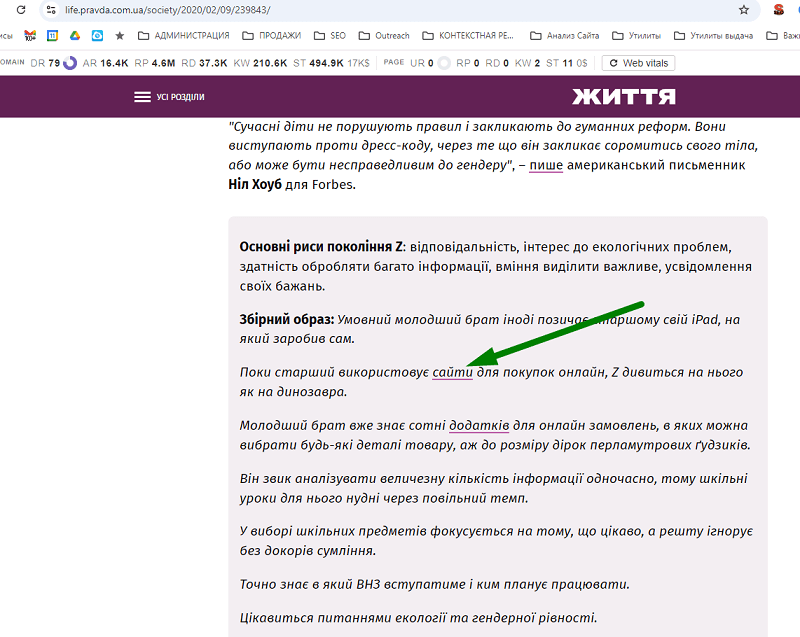
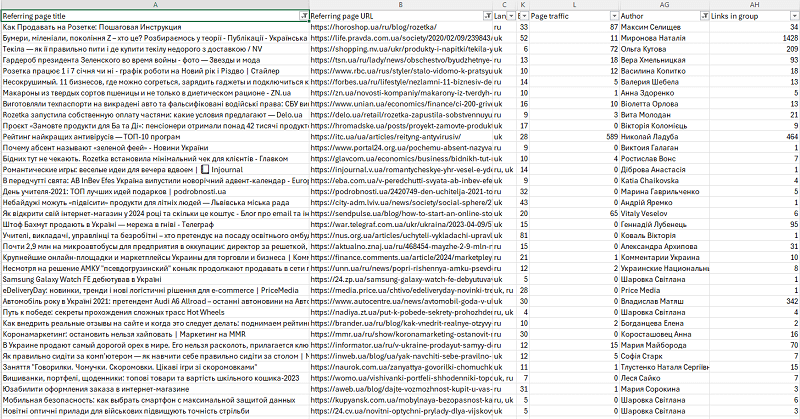
We collected the whole list of media for Rozetka and the contacts of the journalists
Repeating the work with the media "like at Rozetka" will now not be difficult:
- Collect the domains.
- Collect the addresses.
- Clarify the contacts of the journalists.
- Write outreach emails.
- Create a PR template for the emails.
- Send it out to the contacts.
- Collect the terms of cooperation.
The whole path has already been traveled by us, and we can confidently offer this to you!
Affiliate links
This methodology of obtaining links as a strategy at Rozetka appeared not so long ago. But if you believe Ahrefs, affiliate links started appearing actively as early as 2013.
The essence of obtaining an affiliate link is the following:
- You as a store reach out to the manufacturer of a product directly.
- You understand that it sells the product through dealers. You ask it to create an Online partners page or you look for a similar page.
- You add its products to your site on the condition of selling through your store (or you make a purchase to the warehouse, if needed).
- You arrange to create a page for the brand on your end (see above).
- You send it your logo and ask to add it with a link to you.
An example of such a link. You see a picture, but in fact there is a clickable link there
Each such link requires thorough work of the purchasing and marketing departments: with everyone you work with — you already need to make such a partnership, and then look through the competitors at who works with whom else, and dig up the brands and products for yourself.
You should not forget that not all brands may have cool sites, but it is important to partner up competently with each one!
Not all manufacturers have sites worthy of You
In the end the number of links to you will be replenished — and such links Google does not consider spammy!
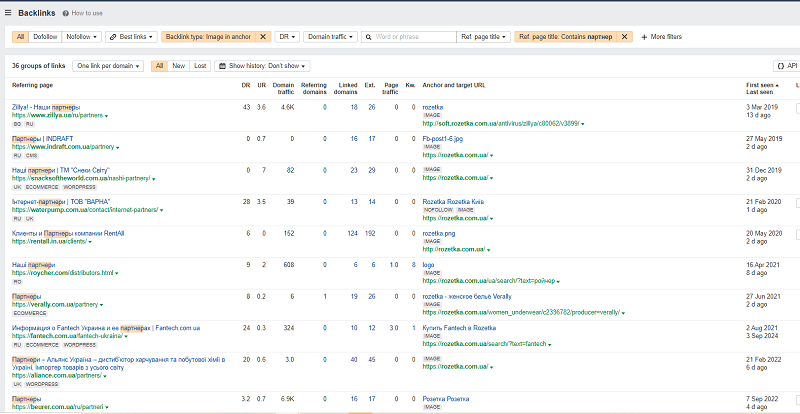
Rozetka has far more than 36 affiliate links
Further Rozetka went in an increasing manner — and already set up partnerships not only with those who sell. But also with whom it cooperates. Privat24, Nova Poshta, the Sergiy Prytula Charity Foundation, the Ukrainian Red Cross — links to Rozetka through images are almost everywhere.
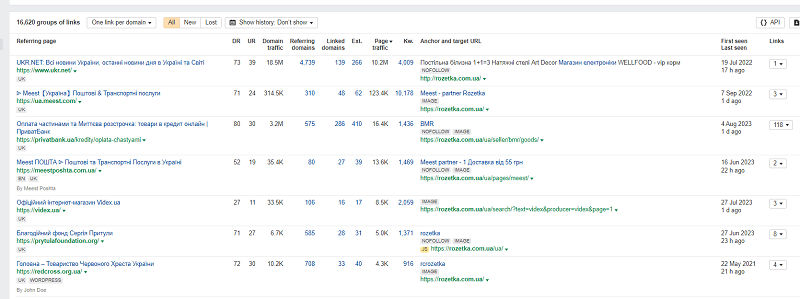
How to work with affiliate links? Well, here it's already pure work on Email marketing. Collecting bases, building chains of follow-up emails, communication, the offer of cooperation, creating conditions for this cooperation, adding products to your marketplace — this is no longer SEO work. Although the basics of outreach are encountered here.
As you can see, the success of a commercial site is long and painstaking work. There are no simple recipes here. Quality SEO, SEO and once more SEO.
Why this case is relevant in 2026
It may seem that the breakdown of an old catalog structure is outdated in the AI era. But that is not so. In 2026 AI Overviews already appear in more than 40% of commercial (shopping) queries, and ChatGPT Shopping, Perplexity and Gemini pull product data — price, characteristics, reviews — straight from store pages. And they pull them precisely from what Rozetka built over the years: a clean URL hierarchy without parameters, static indexable filter pages, neat Product, BreadcrumbList schema markup and reviews in Schema.org.
In other words, what makes a page understandable for classic search is exactly the same thing that makes it "readable" for AI assistants and agentic shopping. A site without garbage parameters in the URL, with unique H1s and correct markup — that is the foundation of getting into AI answers. Rozetka accidentally (or rather, naturally) built an architecture that in 2026 works for the new search surfaces without a single rework. That's why the principles from this case do not lose value — on the contrary, betting on structure and structured data is more important today than ever.
If you don't know where to start checking Your site and how to carry out SEO optimization, write to me. I will help You conduct an audit and develop the right business strategy.
SEO Case Study for Binary Options Affiliate Sites
A practical guide to promoting sites that earn from binary options broker affiliate programs (Quotex, Pocket Option and others). Up-to-date strategies, geo-targeting nuances and link cloaking for maximum revenue in 2026.
Read →
Corporate Website Promotion: A Business Guide for 2026
Learn how to promote a corporate website in 2026 with SEO. Strategies, case studies, and trends. Order an audit!
Read →
Social Programs in Brand Promotion: The SEOquick Case Study
How Scholarship contests and charity work for a brand: the SEOquick case study, media mentions and brand signals for AI search.
Read →Want to apply this to your site?
We will review the current situation, find the first growth levers, and suggest a practical working format.