Online Store Promotion
Learn how to push your online store to the top of search and lift conversions. From keyword research to UX — clear, no-fluff instructions. Start with an audit and turn your site into a sales machine!


How eCommerce Has Changed: From Template to System
Five years ago you could launch an OpenCart template, fill it with 100 products, build a couple of links — and that was enough. Today it isn't.
A website is no longer just a set of product cards. It has become a complex structure where every page must answer a specific query. And there may be not 20 such pages, but 4,000 — if you have the right architecture.
Where does that lead?
- A category is no longer limited to a list of products — it includes filter pages, subcategories, brands, geo-queries, and all of this has to be manageable.
- Pages must be logically connected. Menus, breadcrumbs, internal linking, URL templates — all of it works for SEO.
- Inside the site there must be technical mechanisms that let you control indexing, canonicals, load speed, structured data and content. Without that you won't even get indexed for most filters.
What should an online store be today?
An online store today is not a visual mockup. It is:
- a structure built around semantics;
- an architecture that scales;
- a search system tuned to user behavior;
- a platform where every element solves a task: attract → show → convince → sell.
The user needs: clear landing pages; fast loading; filters that lead to the right result; sensible names and URL structure. And the search engine needs a clear skeleton of the site with signals of relevance and content.
Why an online store doesn't grow without SEO
The usual story: the site exists, products are uploaded, ads are running — but there are no sales.
- Because the site doesn't answer real queries.
- There are no pages for brands, for filters, for long-tail queries, for regions.
- Product cards are duplicates, the canonical isn't set up, the sitemap isn't updated.
- Even if someone does land there — they won't understand anything and will close the page.
SEO is not something you configure after launch. It is something built into the site at the design stage.
Like the foundation of a building. A bad foundation = you won't finish construction.
In this article we'll break down:
- which pages an online store should have and how to create them;
- how to build filtering, URL structure, meta-tag templates;
- how to manage indexing, how to collect semantics, how to avoid duplicates;
- and most importantly — what separates a sound online store from the ones that will never grow.
Looking for traffic to your site? SEOquick will bring you 100% organic!
SEO is your long-term, reliable source of traffic from Google and Bing.
We'll deliver complete SEO promotion: content, reputation, on-page optimization, link building.
Our SEO is white-hat, and our goal is your spot in the TOP! We know exactly what to do and how. That's exactly what you need, right?
Keyword Research for an Online Store
The first thing you'll start with is building a semantic core. And let me tell you — this is no easy stroll.
To collect semantics for an online store, you'll need:
- A keyword planner — that's where you'll gather keywords for a chosen phrase.
- A handy clustering service (our old clusterizer will do, or the new one from Unmiss).
- Keywords distributed across future pages — whether a filter or a tag page for a search query (more on that below).
The number of keywords for an online store can start at 50,000 (here's an example — our case study on a furniture store in Poland) and reach into the millions.
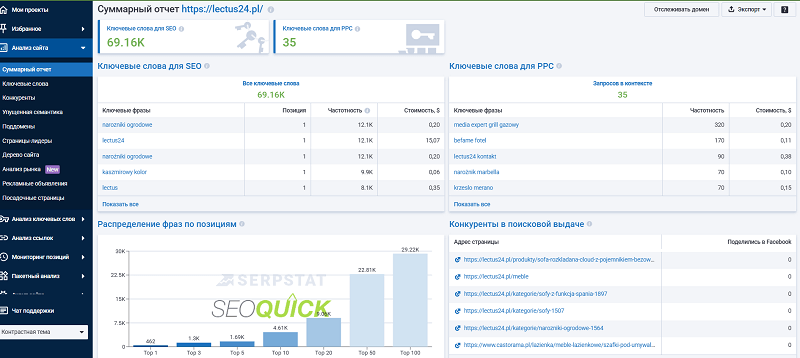
For example, take the query "baby stroller" and collect every keyword for it. Absolutely every one that ranks even nearby. And cluster them.
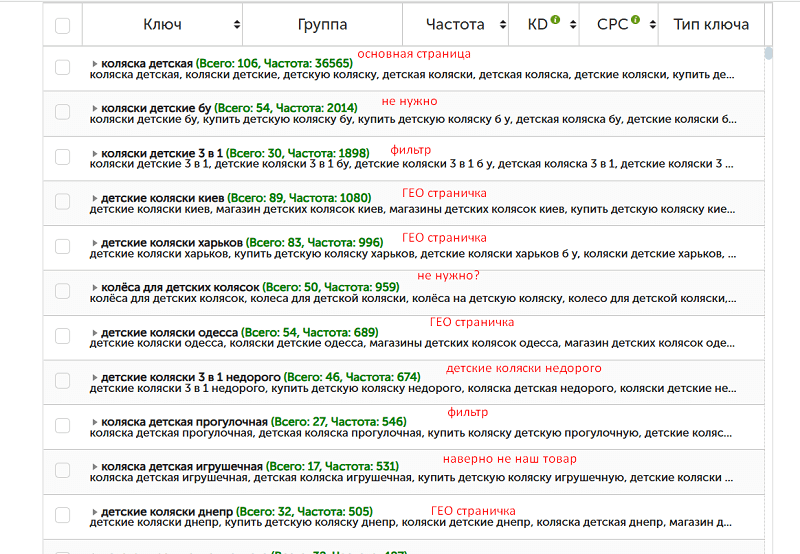
Then we go through EACH cluster to decide whether we need it or not. And what type of page it will become.
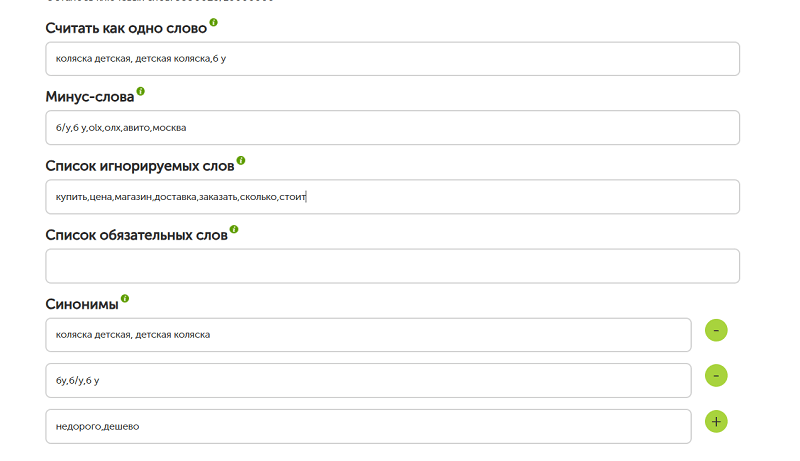
When setting up the clusterizer, immediately add to the ignore list — in your languages — the words you want to hide, otherwise it will "mistakenly" create clusters around them.
If you're interested in professional keyword research for your online store, we've been doing this for over 18 years. We ran our own online store ourselves, so we know exactly how to collect and use keywords!
Write to me, and as a bonus I'll send you starter semantics for one of your pages!
Technical SEO for an Online Store
Statistically, 40% of the sites that came to us for promotion services share nearly 80% of the same recurring technical SEO mistakes. The list includes:
- a problematic link structure (sometimes redundant);
- the absence of indexable filter combinations;
- the absence of content on categories;
- the absence of internal linking via a tag cloud;
- the absence of structured data to display stars;
- stars displayed for products with 0 reviews.
The list is far longer, but these are the TOP 6 that show up almost every time.
Structure That Google Understands
The most common mistake is designing a site "from the design." Pretty menu, stylish cards, a footer three screens tall.
But where's the structure? Where's the clear hierarchy of categories? Where are the manageable filters, logical URLs, breadcrumbs, canonicals?
Google doesn't see beauty. It sees HTML, link structure, semantic nesting. If everything is on one page — you're not in the top.
And the most interesting part — the structure of an online store falls mainly on the catalog or product-category pages.
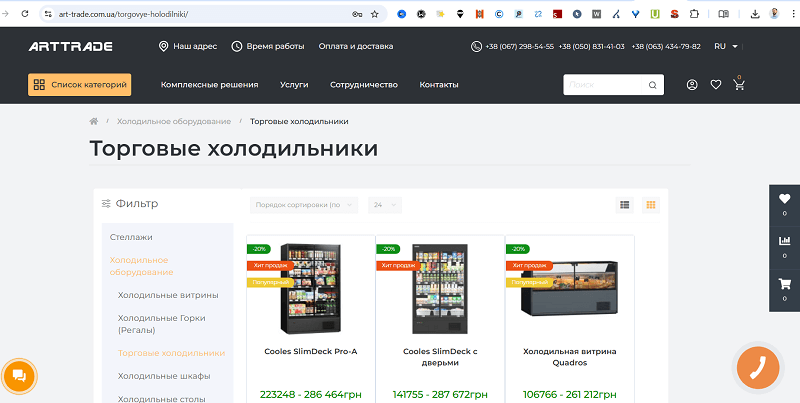
An example of a typical category page for a store
And these pages collect 80% of the entire store's traffic. I analyzed the TOP 5 online stores in Ukraine and concluded that a properly worked-out structure is already the lion's share of success.
So I'll outline a few steps for how to implement this kind of functionality.
Think through your URL structure so it looks concise and clear. For example, put all categories into a categories subfolder like /catalog/.
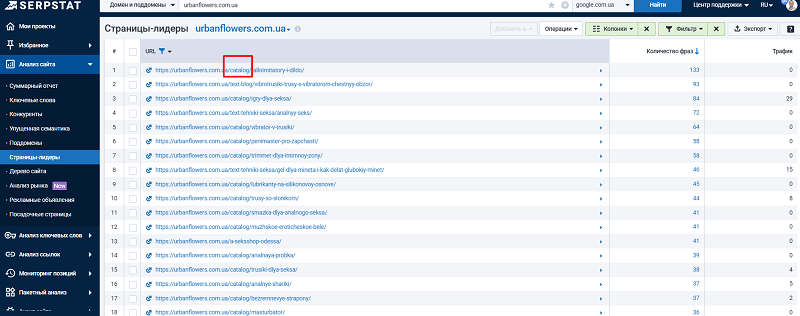
Or you can simply place all categories into a second folder and make them effectively pages of the same level, like my second client did:
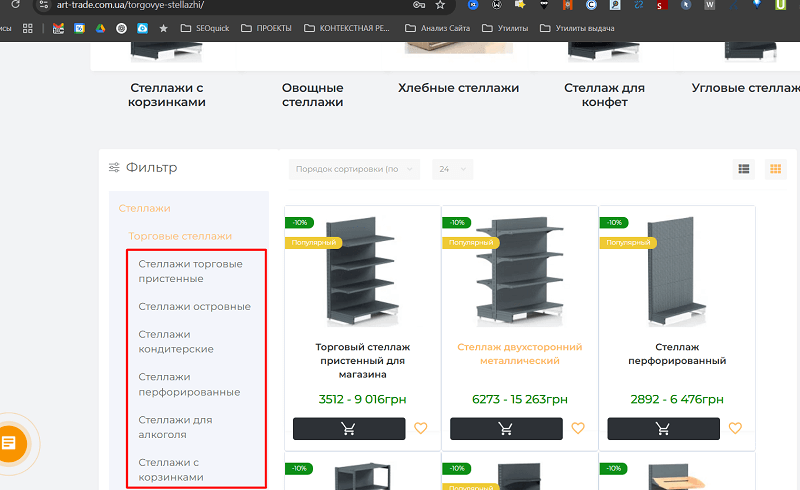
It was enough to just work through the semantics and distribute products by relevance into each landing page. Both methods work.
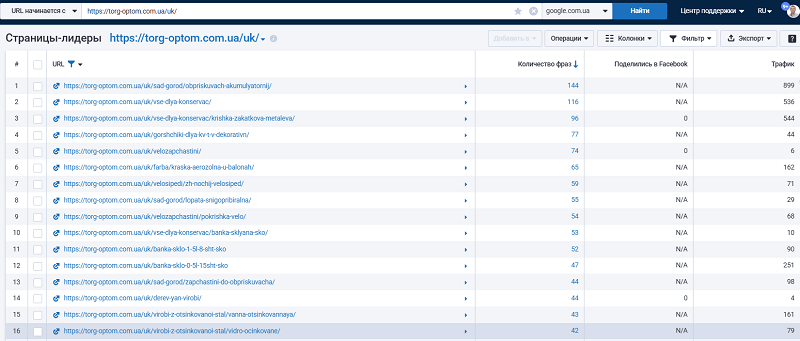
It's important that your URLs follow clean-URL logic, but without fanaticism — if a URL becomes very long, shorten it and just add the page ID number, for example.
The URL structure doesn't have to mirror the breadcrumb logic. In the example below, the breadcrumb has three levels, while the URL is built from just one of them.
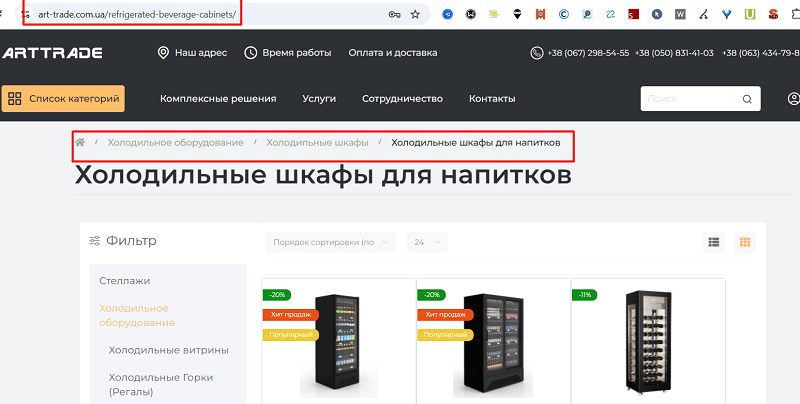
For each semantic cluster, decide where you'll have a subcategory and where a filter combination. We'll cover filters below.
How Filters Should Work
In many stores, filters work visually — but do nothing for the index.
You pick brand + color + size → the URL stays the same.
Or it creates a link like ?brand=adidas&color=black&size=43 that isn't indexed.
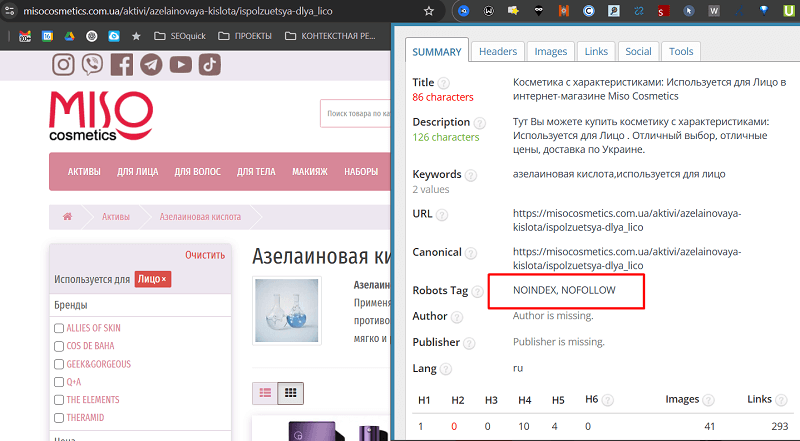
Or, for example — here the landing page is (for now) closed with a NOINDEX, NOFOLLOW tag.
Now compare that with a site where every such filter has a real page with:
- URL: /krossovki/adidas/chernye/43/
- title: Men's Adidas sneakers size 43 black
- meta tags around this keyword
- breadcrumbs
- a self-referencing canonical
For example — the filter landing page of my client.
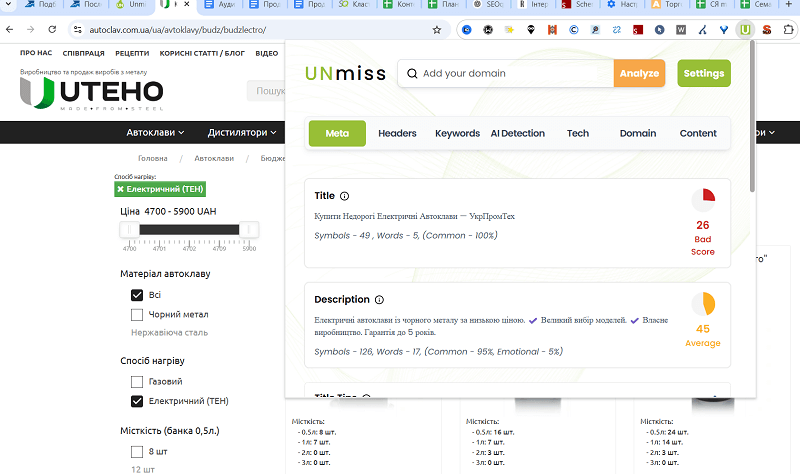
A landing page has been created for a specific filter combination — with its own metadata, title, and even content written for it.
So our conclusion is as follows:
- Sort the semantics by "intent." Different intent — different pages.
- Clearly define which filters should form separate pages and which shouldn't.
- Work out the logic of "pretty URLs."
- Assign a canonical URL to each filter.
- Define URL generation templates: /muzhskaya-obuv/krossovki/nike/43/ instead of ?x=1&y=2.
- Check which pages actually made it into the index (via Search Console or Screaming Frog).
Pages like that are the ones that rank.
What to make a filter and what to make a subcategory depends on your product volume. But, for example, you can put all products around ONE keyword into a category, and work through all the combinations as filter sections.
Indexing is the foundation of SEO for online stores. If Google doesn't understand which pages of your site matter, or wastes crawl budget on duplicates, you lose traffic and rankings.
In eCommerce, duplicate pages appear everywhere: one product in several categories, filters with similar URLs, sorting by price or newness, pagination. According to Ahrefs, up to 30% of an online store's pages can be duplicates, which cuts organic traffic by 20-40% in competitive niches.
Setting up indexing and eliminating duplication is the first thing I do when I start working with any store. Here's how to do it right, with examples and technical details.
Junk Pages
Every online store accumulates junk over time. Not literally, of course, but in the form of pages that bring no traffic, don't sell, and only get in the way of search engines understanding what matters on your site. These can be old filter pages, duplicate product cards, categories with a couple of products, or articles no one reads. Such pages aren't just useless — they steal your SEO potential, confuse search engines, and lower the rankings of the pages you actually want.
The problem with junk pages starts with the fact that no one notices them at all. Take a typical case: you have an electronics store, and at some point you added a "smartphones with a 4-inch screen" filter. A year passed, the fashion for such screens faded, the filter page stayed, but it has zero traffic and one outdated product.
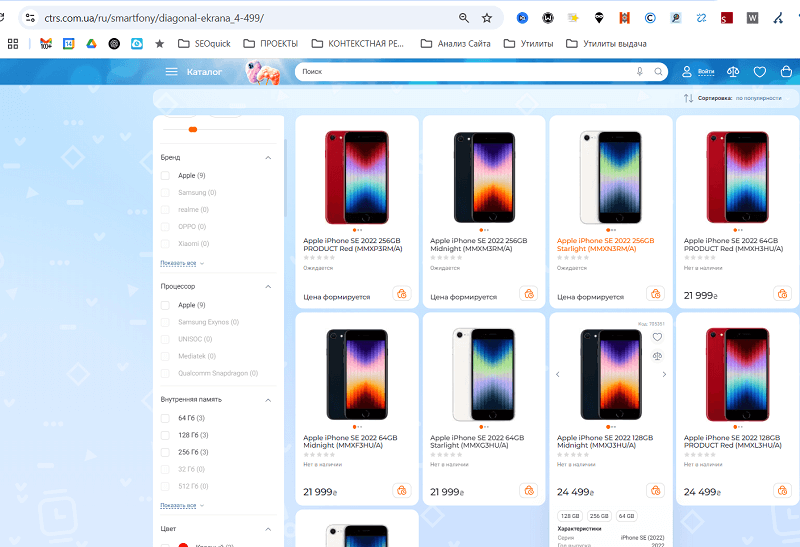
Search engines keep indexing it, spending your crawl budget — that is, the time Google allocates to crawling your site — for no benefit whatsoever.
Or another example: a category page "sony accessories" with completely the wrong products on it.
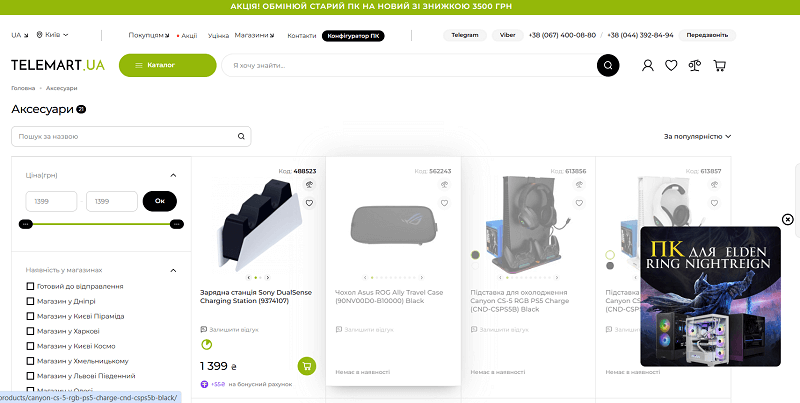
Such pages aren't optimized for keywords, don't solve user queries, and only dilute the site's relevance.
The first step is to find this junk. Open Google Analytics or any other analytics tool and look at which pages brought no traffic at all over the last six months, or got fewer than 10 visits.
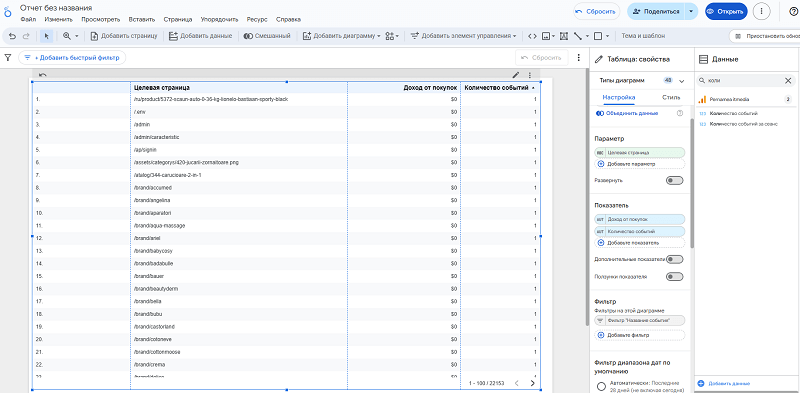
Using Looker Studio, I see a list of such pages with almost no traffic that produced 0 sales.
It's also worth selecting pages with 0 traffic. You can do this through Screaming Frog by pulling in visit metrics and highlighting the zeros.
Usually these are old filters, empty categories, duplicate pagination pages, or product cards long since discontinued. Another way is to look in Google Search Console, in the "Coverage" section. There you can see which pages the search engine indexes but marks as "low quality" or "low value." If a page brings no traffic and doesn't rank for keywords, it's most likely junk. Don't be afraid to be ruthless: if a page doesn't work toward sales, it has no place in the index.
Now the question: what do you do with this junk? The simplest way is to close such pages off from indexing. Use the noindex meta tag in the page code to tell search engines: "Don't touch this."
Place it as high as possible.
<meta name="robots" content="noindex,nofollow">
An example implementation.
This doesn't delete the page from the site, but it removes it from search results.
Another option is to set up robots.txt to deny crawlers access to whole sections. Say you have a bunch of pagination pages like "category?page=2." The rule Disallow: /?page= will indeed take them out of crawling. But be careful: if the products from page two onwards are reachable only through pagination, the crawler will never get to them. Do this only when there is another path — a sitemap, internal links, feeds.
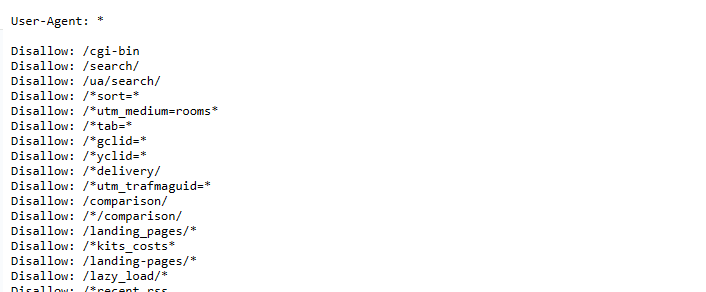
But be careful: robots.txt blocks access entirely, so make sure you're not closing off anything important.
Closing pages is only half the job. If a page is still accessible to users, it can receive internal links and people will land on it. And that's a problem, because junk pages confuse visitors and lower conversion. To avoid this, set up proper internal linking.
Take an example: you have a smartphone card, and the specs section lists "screen size: 6.5 inches." That value should be clickable and lead to a filter page that gathers all smartphones with a 6.5-inch screen. Technically this is done through dynamic links.
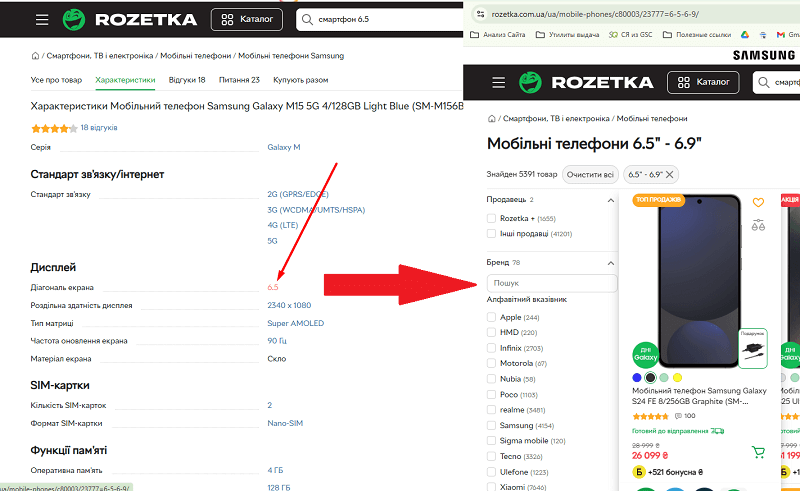
In your CMS, set up a template so that every spec value automatically generates a URL like "/smartphones?screen_size=6.5". Such filter pages should be optimized for keywords, e.g. "smartphones with a 6.5-inch screen," with a unique description and meta tags. If a filter page isn't relevant or is empty, don't make the spec clickable — that saves you from creating new junk.
Internal linking inside product cards is a real gold mine if done wisely. Say a laptop's specs list "processor: Intel Core i9." Make that value a link to "/laptops?processor=i9," which gathers all laptops with this processor. But don't just drop a link — make sure the target page is optimized: it has an H1 like "Laptops with an Intel Core i9 processor," a 500-700-character description, and filters for further refinement.
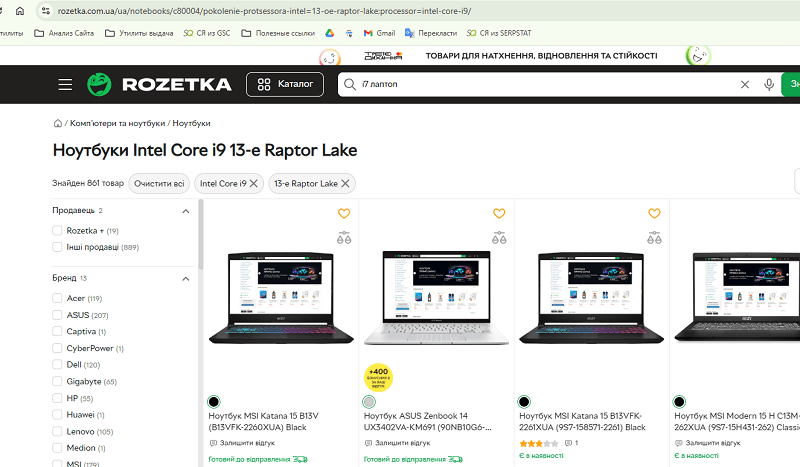
This not only helps the user find the right product faster, it also strengthens SEO, because you distribute internal link equity to relevant pages. And to avoid breeding junk, regularly check which filter pages bring traffic. If a page like "laptops with 2 GB of RAM" doesn't rank and doesn't collect visits, close it with noindex or remove links to it.
Another trap is internal links that lead to junk pages. Stores often automatically generate links in the menu, footer, or tag cloud, and they point to empty categories or irrelevant filters. This not only confuses users but also wastes crawl budget.
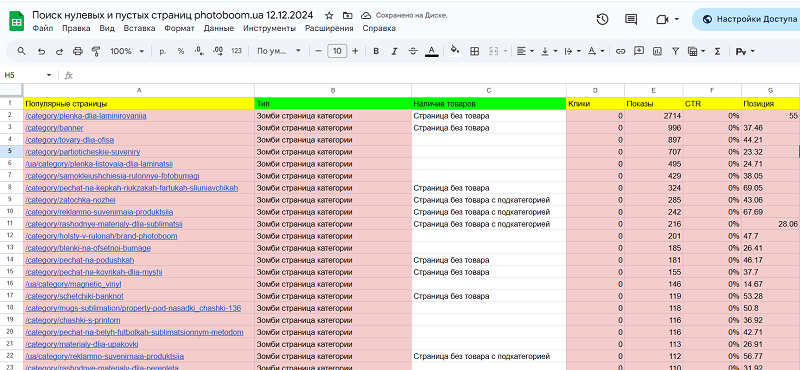
Here's a screenshot of a classic report for finding pages like this. 174 of 280 pages were zombie pages.
Crawl your site with Screaming Frog or another crawler and see where your internal links lead. If you find links to pages with zero traffic, remove them. For example, the menu shouldn't have an "accessories for old models" category if it holds a single product. Redirect such links to a more general category, like "phone accessories," or to the catalog homepage. And be sure to set up sitemap.xml so it contains only priority pages: categories, product cards, popular filters. Don't include junk pages there, so search engines focus on what brings sales.
Finally — about keywords. Junk pages often appear because no one thought about which queries to optimize them for. Say you have a filter page "tank tops and t-shirts." And you also have a separate Tank Tops and a separate T-shirts.
Before creating any page, whether a filter or a category, check demand through tools like Google Keyword Planner. If there are no queries, or far too few, don't create the page. And if the page already exists but isn't optimized, either improve it for keywords or close it with noindex. This frees your site of ballast and directs traffic to where it converts into money.
Eliminating Duplicates
Duplicate pages create cannibalization: Google doesn't know which page to rank for a query, and either picks a random one or demotes all of them. For example, if you have /krossovki/nike/ and /krossovki/nike/?color=black, and both pages are indexed, they compete for the same query, diluting link equity and lowering rankings. Worse, Google may treat duplicates as spam and apply a filter, as happened with one client's site where 25% of pages turned out to be duplicates due to filters. After fixing them, traffic grew by 22% in three months.
Another problem is crawl budget. Google allocates a limited amount of resources to crawling a site. If the bot wastes time on duplicates like /krossovki/?sort=price, it may not reach new product cards. For large stores with thousands of pages this is critical. According to Screaming Frog, sites with more than 10,000 pages often lose up to 15% of indexable pages due to an unoptimized structure.
How to Detect Duplicate Pages
The first step is a site audit. I use a combination of Screaming Frog and Google Search Console (GSC) to find duplicates. Here's my checklist:
- Checking meta tags. In Screaming Frog I look at pages with identical Title, Description, or H1. For example, if /krossovki/nike/ and /krossovki/nike/?color=black have identical Titles, that's a potential duplicate.
- Analyzing URL parameters. Filters like ?sort=price, ?color=black, ?page=2 often create duplicates. In Screaming Frog I filter URLs with parameters (?) and check their status (200, 301, 404).
- Comparing content. I use the "Near Duplicates" feature in Screaming Frog to find pages with similar content (e.g. product cards with identical descriptions).
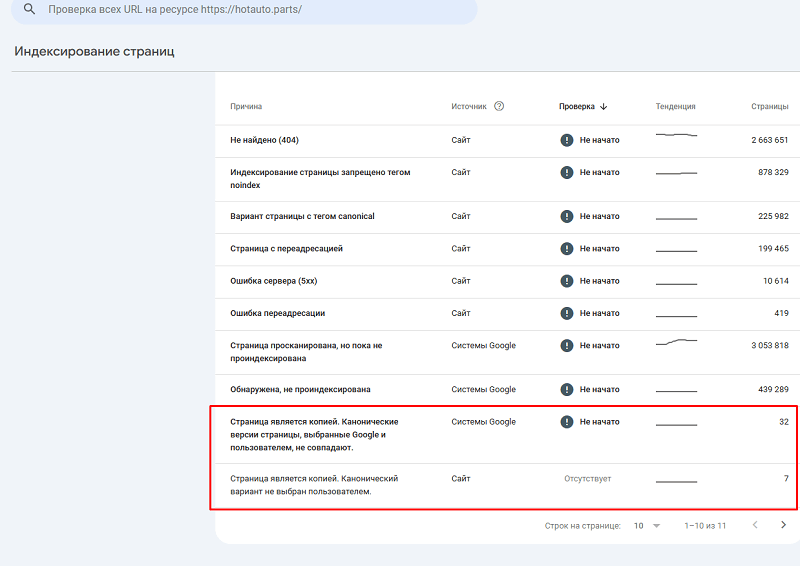
- Checking GSC. In the "Coverage" section I look at which pages are excluded as duplicates.
Setting Up Canonical URLs
Canonical URLs are the main tool for fighting duplicates. The tag <link rel="canonical" href="main_URL"> tells Google which page to treat as the primary one. For example, if you have /krossovki/nike/ and /krossovki/nike/?sort=price, the canonical on both pages should be:
<link rel="canonical" href="https://site.com/krossovki/nike/">
In the code it looks like this.
This tells Google: "Index only /krossovki/nike/, and the rest of the versions are duplicates." According to Backlinko, correct canonicals raise rankings by 15-20% in highly competitive niches.
How to Set Up Canonicals
- For categories and filters. The main category page (e.g. /krossovki/nike/) is always canonical. All filters (?color=black, ?sort=price) point to it.
- For pagination. Every list page gets its own self-referencing canonical, not one pointing at page one. Google explicitly asks you not to canonicalise pagination to the first page, and it will ignore such a canonical anyway: page two is not a duplicate of page one, it holds different products. Example for
/krossovki/?page=2:
<link rel="canonical" href="https://site.com/krossovki/?page=2">
A detailed breakdown with measurements from live stores is in our article on pagination SEO. - For products in several categories. If a product is in /krossovki/nike/ and /obuv/sport/, we pick one category as the main one and set the canonical to it (if the same product ends up with different URLs — though it's better to avoid this at the design stage).
Canonical Mistakes
- Wrong URL. The canonical points to a non-existent page (404) or a redirect (301). Check with Screaming Frog.
- Multiple canonicals. Two <link rel="canonical"> tags on one page. This confuses Google. Example: a CMS can generate two canonicals because of plugins.
- Self-canonical for a duplicate. If /krossovki/?color=black has a canonical to itself rather than to /krossovki/, that doesn't solve the problem.
Most bugs like this require pinpoint configuration, and the spec will differ dramatically for each store.
Blocking Unnecessary Pages from Indexing
Not every page should be in the index. Sorting, secondary filters, pagination (except the first page) — these are junk that wastes crawl budget. I use two methods: robots.txt and the noindex meta tag.
Configuring robots.txt
In robots.txt we close off dynamic parameters and unnecessary sections. Example:
User-agent: *
Disallow: /*?sort=*
Disallow: /*?page=*
Disallow: /search/
Disallow: /cart/
Allow: /
Sitemap: https://site.com/sitemap.xml
- Disallow: /*?sort=* – blocks sorting (?sort=price, ?sort=new).
- Disallow: /*?page=* — blocks pagination pages from crawling. Use this rule only if another path leads to your product pages; otherwise you are closing the crawler's road to your entire range. When pagination can and cannot be blocked is covered separately.
- Disallow: /search/ — blocks internal search pages.
- Allow: / — allows indexing of the rest of the pages.
Likewise, Robots is composed manually for each site, and there are only "baseline" settings for different CMSs. The right content is also blocked or, conversely, opened up for different bots.
The noindex Meta Tag
For pages that can't be closed in robots.txt (for example, if they're already in the index), we use <meta name="robots" content="noindex, follow">. Example:
<meta name="robots" content="noindex, follow">
- Where to apply: sorting pages (/krossovki/?sort=price), pagination (/krossovki/?page=2), filters with weak semantics (?color=purple).
- Why follow: it lets Google account for links from these pages without indexing them.
What do we close? By default we close all filter combinations on a page for which you haven't yet written your own Title, Description, H1, and content.
Configuring sitemap.xml
The sitemap is an instruction for Google on which pages to index. In eCommerce, sitemap.xml should include only priority pages: categories, subcategories, key filters, product cards. Example:
<?xml version="1.0" encoding="UTF-8"?>
<urlset xmlns="http://www.sitemaps.org/schemas/sitemap/0.9">
<url>
<loc>https://site.com/krossovki/</loc>
<lastmod>2025-05-05</lastmod>
<changefreq>weekly</changefreq>
<priority>0.8</priority>
</url>
<url>
<loc>https://site.com/krossovki/nike/</loc>
<lastmod>2025-05-05</lastmod>
<changefreq>weekly</changefreq>
<priority>0.7</priority>
</url>
</urlset>
- What to include: categories (/krossovki/), filters with traffic (/krossovki/nike/), product cards.
- What to exclude: sorting, pagination, search pages, the cart.
- Automation: we configure sitemap generation through the CMS (e.g. Yoast SEO for WordPress). We update it once a week.
According to Conductor, sites with an optimized sitemap have 25% more indexable pages. For one client, after excluding 5,000 unnecessary URLs from the sitemap, Google's crawl time dropped from 10 days to 7.
Working with URL Structure and Redirects
Clean, human-readable URLs are the standard for eCommerce. Instead of /category/123/ we use /krossovki/nike/. But old URLs can remain in the index, creating duplicates. We set up redirects:
- From www to non-www:
RewriteEngine On
RewriteCond %{HTTP_HOST} ^www. [NC]
RewriteRule ^ https://site.com%{REQUEST_URI} [L,R=301]
- From HTTP to HTTPS:
RewriteCond %{HTTPS} off
RewriteRule ^ https://site.com%{REQUEST_URI} [L,R=301]
- From old URLs to new ones: if you changed the structure, e.g. from /category/123/ to /krossovki/, set up a 301 redirect in .htaccess.
Example: a client changed the structure from /product/456/ to /tovar/nike-air-max/. Without redirects, 40% of pages went to 404. After setting up 301 redirects, traffic recovered within a month.
Content for Categories
Categories are the backbone of SEO traffic in an online store. They cover high- and mid-frequency queries such as "men's sneakers" or "Nike sneakers." Here's how I optimize categories.
Content in an online store isn't just text to fill pages — it's a tool that closes user intents, strengthens SEO, and lifts conversion. In 2026, Google evaluates pages through the lens of E-E-A-T (experience, expertise, authoritativeness, trust), especially in eCommerce, where competition for the top of the results is fierce.
Product categories must be useful, unique, and better than your competitors'. According to SEMrush, pages with optimized content attract 20-30% more organic traffic, and quality product cards increase conversion by 15%. Here's how I set up content for categories and cards, with technical examples and case studies from practice.
And there's one more layer you can no longer ignore in 2026 — AI shopping. Some users never reach the classic search results at all: they ask ChatGPT, Gemini, or Perplexity for advice, while Google increasingly shows AI Overviews and AI Mode right above the organic listings. These shopping assistants don't "browse" sites the old-fashioned way — they pull out facts: price, availability, specs, reviews, and rating. So everything we do for classic online-store SEO — a clean structure, correct Product and Offer structured data, unique descriptions, and honest reviews — simultaneously works toward getting into AI results. The more machine-readable and unambiguous your data is, the higher the chance the store gets cited in an assistant's answer and a purchase-ready customer is sent your way.
For a store to truly land in AI answers, content should be built in "answering" blocks: a short direct answer to the intent up front, facts in tables and lists, current price and availability in the markup. I covered preparing a site for generative search in more detail in the piece on GEO optimization for GPT, and how to write the text itself so assistants cite it in the guide on AI content and answers.
Content solves three tasks:
- it answers user queries;
- it helps Google understand the page's relevance;
- it builds trust.
Without this, Google may consider the page insufficiently useful, especially after the Helpful Content Update. According to Moz, pages with unique content that meets E-E-A-T rank 10-15% better in highly competitive niches.
The problem with many stores is templated or copied text. For example, 60% of product cards on an average eCommerce site use supplier descriptions, which lowers uniqueness and rankings. Even worse — no content on categories, or minimal descriptions like "Buy sneakers cheap." That approach doesn't answer intents and gives Google no reason to push the page to the top.
Unique Descriptions
We write category text around the cluster's keywords, identified through Ahrefs or Serpstat. For example, for the "Men's sneakers" category we gather the cluster: "men's sneakers," "buy men's sneakers," "Nike men's sneakers."
Text length is 500-1000 characters — enough to cover intents without over-spamming. We place the text at the bottom of the page, with the option to hide it via JavaScript (but the content must be in the HTML for Google).
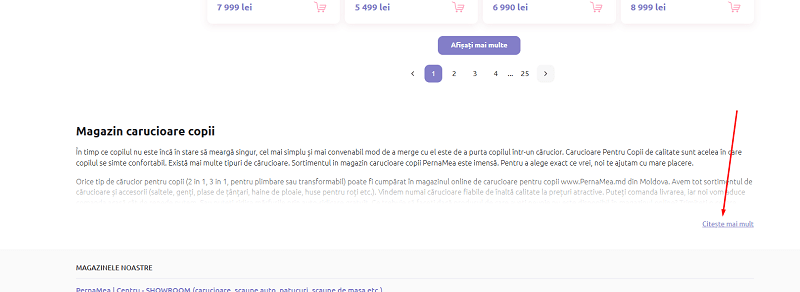
Example code for hiding text:
<div class="category-description">
<p>Men's sneakers are versatile footwear...</p>
<div class="hidden-content" style="display: none;">
<p>Pay attention to sizing...</p>
</div>
<button onclick="toggleContent()">Show more</button>
</div>
<script>
function toggleContent() {
document.querySelector('.hidden-content').style.display = 'block';
}
</script>
The content itself can be written either with GPT or by hand. Remember how to write content while avoiding the AI style! I have a great guide on this topic about how to write content.
Visual Content
Photos, video, and infographics increase time on page and lower bounce rate. According to OptinMonster, pages with video have a 10-15% lower bounce rate. For the "Men's sneakers" category I add:
- Photos: at least 3-5 images (banner, products, lifestyle). WebP format, up to 200 KB, with an alt attribute: <img src="krossovki-nike.webp" alt="Men's Nike running sneakers">. Keywords in images give you an excellent chance to rank in image search and catch traffic in the results.
- Video: a model overview or a buying guide (e.g. "How to choose running shoes"). We embed it via YouTube with structured data:
{
"@context": "https://schema.org",
"@type": "VideoObject",
"name": "How to choose running shoes",
"description": "A guide to choosing men's sneakers for running and walking",
"thumbnailUrl": "https://site.com/video-thumb.jpg",
"uploadDate": "2025-05-01",
"contentUrl": "https://youtube.com/watch?v=abc123"
}
- Infographics: a size chart or a brand comparison. We optimize: <img src="size-chart.webp" alt="Men's sneaker size chart">.
Tag Cloud
At the bottom of the category we place links to filters: "Nike sneakers," "Black sneakers," "Size 43 sneakers." This improves UX and strengthens internal linking. Example:
<div class="tags">
<a href="/krossovki/nike/">Nike sneakers</a>
<a href="/krossovki/chernye/">Black sneakers</a>
<a href="/krossovki/razmer-43/">Size 43 sneakers</a>
</div>
According to Ahrefs, tag clouds increase pages per session by 10% and help index filters.
Content for Product Cards
Product cards cover long-tail queries such as "Nike Air Max sneakers size 43 black," and they influence conversion. According to Razorpay, cards with detailed descriptions attract 25% more organic traffic and convert 15% better.
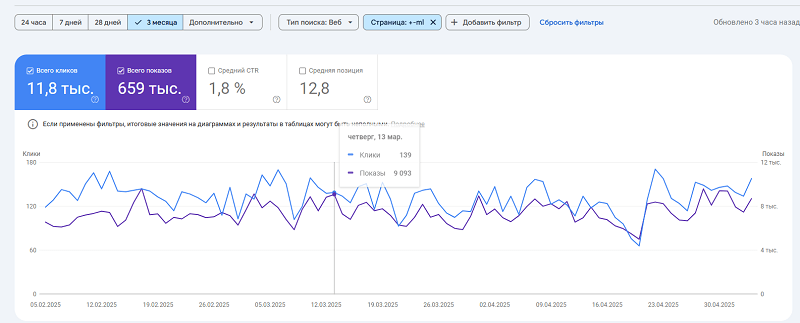
Traffic to product cards in online stores rarely exceeds 40% (and sometimes is as low as 15% of traffic), but it's exactly here that traffic can be the most conversion-ready.
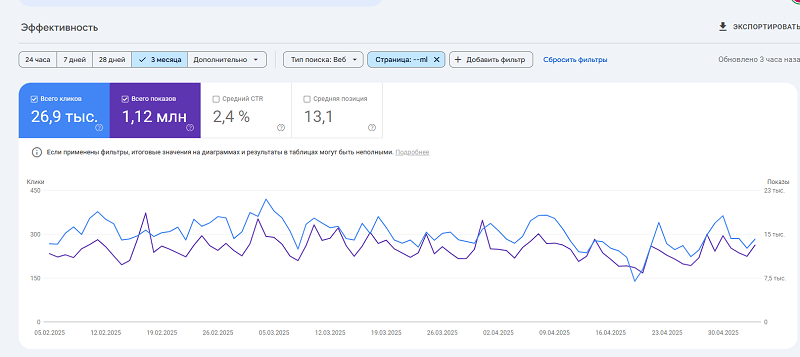
For example, here the chart shows traffic collected on all pages except products, and the chart below shows product traffic exclusively.
But these queries have one advantage — you'll likely take the top spots in search for them more often.
Detailed Descriptions
We write descriptions of 200-400 words, targeting long-tail queries:
- Specifications. To generate product descriptions you can use the spec table and lean on it. You can also list them (pick the key ones) in the description section, and put the detailed ones in a dedicated block.
- Benefits. Always rely on the 6 rules of content writing.
- Keywords. Always embed the product name in the description, and for some niches account for the queries people Google when looking for one product or another (for example, in the auto-parts niche — car VIN codes or part numbers; in the niche of spare parts for equipment — a list of compatible device models). Here the approach to keywords is built on the logic of long-tail LSI queries.
Here's a description of my client's highest-traffic page. A page like this consistently brings him 50 direct customers a month for this product. And if someone types its full product name — it ranks 2nd (and SEO work on the site has only just begun).
It's important to think through the text part, and it should be aimed at selling. In marketing there are 6 methods for building advertising copy, and we'll kindly share them with you. Choose your scenarios when crafting card copy using the following logic:
- AIDA — stands for Attention, Interest, Desire, Action. Example: "Discover the secret of smooth skin. Loved by thousands. Why wait? Try now!"
- PAS — (Problem, Agitate, Solution). Example: "Tired of dull hair? You're not alone. Discover our rejuvenating shampoo."
- 4Cs or Clear, Concise, Compelling, Credible. Example: "Fast relief. No side effects. Trusted by doctors. Get your sample today."
- FAB or Features, Advantages, Benefits. Example: "Ultra-light laptop. Saves space & boosts productivity. Perfect for on-the-go tasks."
- ACC or Awareness, Comprehension, Conversion. Example: "Meet our new skincare line. Vegan & paraben-free. Shop the collection now."
- SLAP or Stop, Look, Act, Purchase. Example: "Wait! Check out our summer collection. Limited stock. Grab yours today!"
Schema.org Structured Data
Structured data surfaces the rating, price, and reviews in the search results, raising CTR by 5-10% (according to BigCommerce). For cards we set up the Product type:
{
"@context": "https://schema.org",
"@type": "Product",
"name": "Nike Air Max sneakers size 43",
"image": ["https://site.com/images/nike-air-max-1.jpg", "https://site.com/images/nike-air-max-2.jpg"],
"description": "Men's Nike Air Max sneakers size 43 for running and everyday wear.",
"sku": "NKE-12345",
"brand": {"@type": "Brand", "name": "Nike"},
"offers": {
"@type": "Offer",
"priceCurrency": "UAH",
"price": "4500",
"availability": "https://schema.org/InStock",
"priceValidUntil": "2025-12-31"
},
"aggregateRating": {
"@type": "AggregateRating",
"ratingValue": "4.5",
"reviewCount": "120"
},
"review": [
{
"@type": "Review",
"author": {"@type": "Person", "name": "John"},
"datePublished": "2025-04-01",
"description": "Great sneakers, comfortable, true to size."
}
]
}
- Fields: sku — the unique product code, image — an array of photos, priceValidUntil — the price expiry date.
- Validation: we use the Google Rich Results Test.
To get a nice rich snippet, this structured data will be more than enough.

Reviews and a "Questions and Answers" section add uniqueness and build trust. According to BrightLocal, 79% of shoppers trust reviews as much as personal recommendations.
- Reviews: we implement them through the CMS, with moderation. It's important that product reviews come from real buyers, not just "passersby."
- FAQ: we collect popular questions and provide answers to them at the bottom of the product. Implemented through the CMS, with moderation.
- Internal linking in cards. We add "Similar products" and "Frequently bought together" blocks to retain users and strengthen SEO.
A Blog for an Online Store
Online-store owners often consider a blog a mandatory part of the site. The idea is simple: you write articles, they land in search, attract people, and some of them buy something. But in practice a blog often turns into a waste of time and money.
What's more, sites with million-strong traffic don't develop their blogs and pay no attention to this kind of semantics on store sites at all.
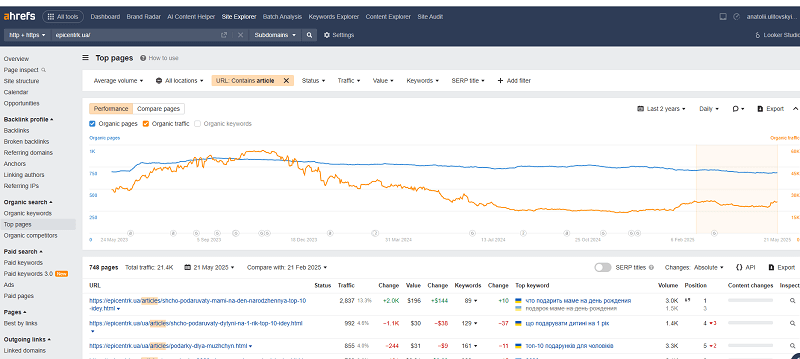
For example, Epicentr, with 600,000 pages and 7 million in traffic, has only 748 blog articles that deliver mere crumbs of clicks. And it has held this pattern for a long time, without developing it.
Let's break down why a blog might not just fail to help, but even hurt your business.
A Blog Doesn't Bring People Ready to Buy
Blog articles usually attract people looking for information, not people about to buy something right now. For example, an article "How to choose headphones for music" will gather those who want to learn, not those already searching for "Sony wireless headphones." Such visitors read the text, get their answer, and leave.
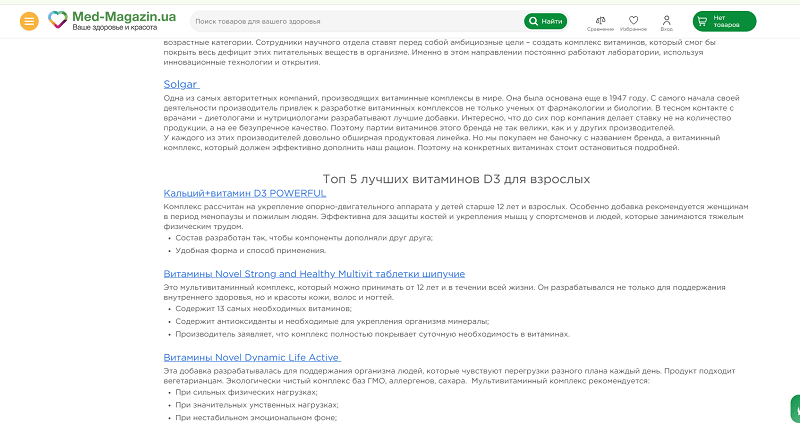
For example, here's an article from one online store. A terrible article, with a wall of text and links. No one needs this. And it certainly won't bring you a customer. You'll get 0 comments, 0 purchases, and a pile of useless traffic — and from the wrong countries, at that.
Most blog readers don't move on to the product catalog. According to eCommerce analytics, only 2-5% go further, and just 0.1-0.3% actually buy. For comparison, category pages convert at 3-7%, product cards at 5-10%.
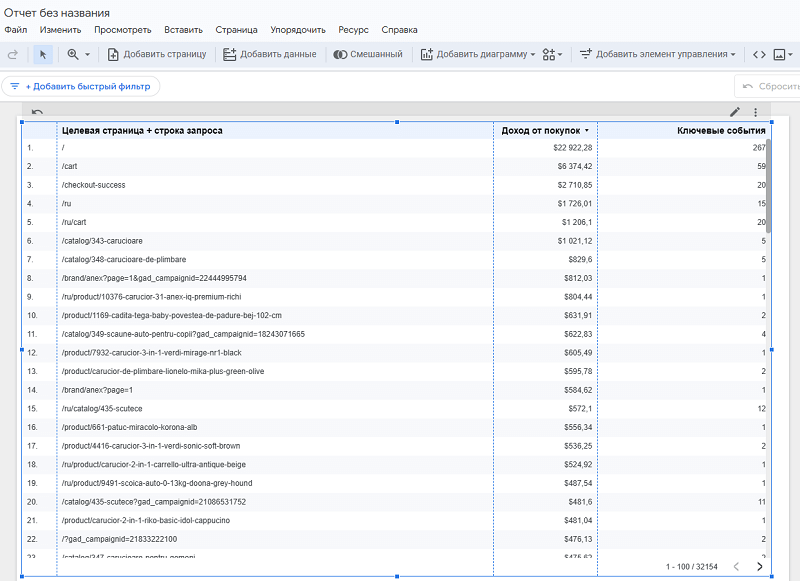
I analyzed an enormous amount of Google Analytics data and nowhere did I see blog pages in the list that brought sales. Nowhere.
Focus on pages targeting queries with clear purchase intent, like "buy headphones" or "Apple smartphones." They bring people who are ready to buy.
A Blog Distracts from Buying
A blog can lead users away from the main goal — buying. A person comes in to pick, say, a laptop, but sees the "Blog" section and goes off to read "Which processor is better for gaming." In the end they drown in information, start second-guessing, and leave without an order. This is especially noticeable on mobile, where an extra click sharply reduces the chance of a purchase.
A blog increases pages viewed but lowers conversion to orders. Analytics shows that sites with an active blog often have a 10-15% higher bounce rate on commercial pages.
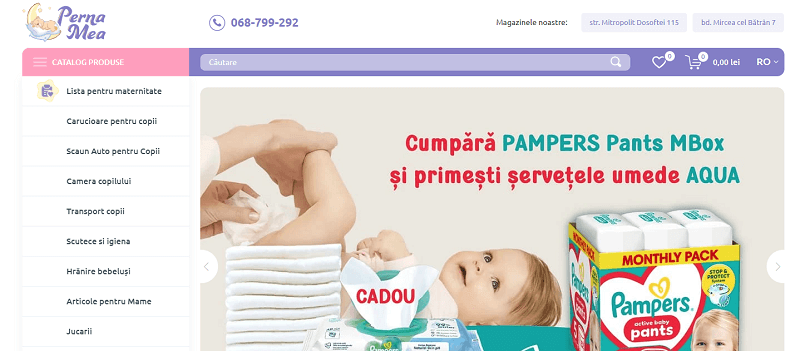
Here's an example of an ideal, simple store header. No blog, and everything is clear.
Remove the blog from the main menu or make it less prominent. Direct users to categories and products through internal linking.
A Blog Eats Resources
Running a blog isn't just writing a couple of texts. You need to collect semantics, write articles, optimize them for SEO, update old content. For an online store this is often too expensive and doesn't pay off.
You roughly spend:
- Keyword research: 10-20 hours per niche.
- Writing an article (2000-3000 words): 2-3 days of a copywriter's work. Even with GPT — pick the photos, make a good piece, proofread it.
- Optimization and publishing: another 2-3 hours per text.
- Bottom line: 10 articles a month = dozens of hours and a significant budget. In agency numbers, one article will run you $50-100.
What's the result? Traffic grows, but sales barely change. Blog visitors rarely reach the cart — they rarely even reach the products!
Where should you invest that money? Better to devote all resources to content for product cards (detailed descriptions, photos, video). That directly affects sales. Get into video marketing and set up a steady flow of video to your social networks.

But a blog isn't always useless — it works in rare cases. For products with a long buying cycle (e.g. professional equipment), a blog helps explain the product and build trust. In any case, the blog must work toward sales. Every article should lead to products through links or calls to action.
You can also use the blog to publish information about your branded promos, Black Fridays, and seasonal sales. That will definitely help you rank.
In the blog you can cover ongoing events, exhibitions, and promotions. We tie such materials into the newsletter and time them to the sales of our own products.
Analytics and Conversion
Talking about online-store promotion without analytics is like driving a car with your eyes closed. You can hit the gas, but where you're going is anyone's guess. Analytics shows what works and what drags your business down. And most importantly — it's directly tied to conversion, that is, to how many of the people who visit your site end up leaving money behind.
The problem is that many store owners look only at traffic, ignoring how users interact with the site. And that's exactly what determines whether they buy from you or go to a competitor.
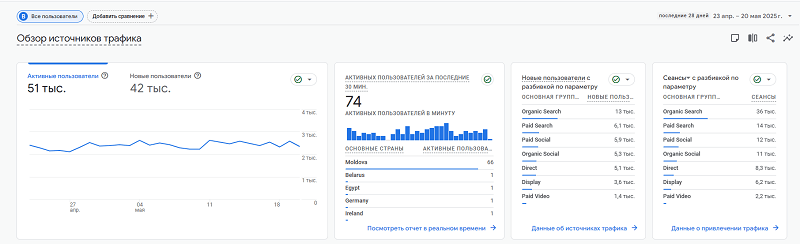
This is where most site owners look most often, thinking: "Oh, traffic is stable" or "traffic is dropping." But as for understanding why — there are basically no mechanisms here.
Let's break down how three key elements of the user experience — the mobile menu, on-site search, and checkout — affect your sales, and how to set them up so you don't lose customers.
The Mobile Menu
More than half of online-store traffic comes from mobile devices. If your menu on the phone is inconvenient, you lose customers right at the door.
Think about how many times you yourself closed a site because you couldn't find the right section. Users won't spend minutes figuring out your menu. They have three seconds to understand where the catalog is, where the cart is, where the deals are. If you don't make it — goodbye.
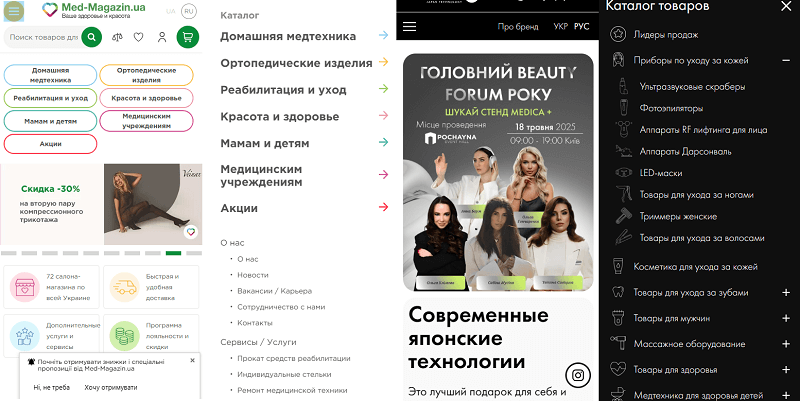
Here are two sites with mobile menus and different approaches to building them. Which option do you like?
A common mistake is an overloaded menu. Some stores try to cram everything in: from "About" to "Blog," and do it inconveniently to browse. As a result the user drowns in links and leaves. Worse still, there are menus not adapted for mobile: tiny fonts, links impossible to tap with a finger, or dropdowns that cover half the screen. All of this raises the bounce rate — the percentage of people who leave the site without taking a single action.
But I'll also show examples of terrible execution.
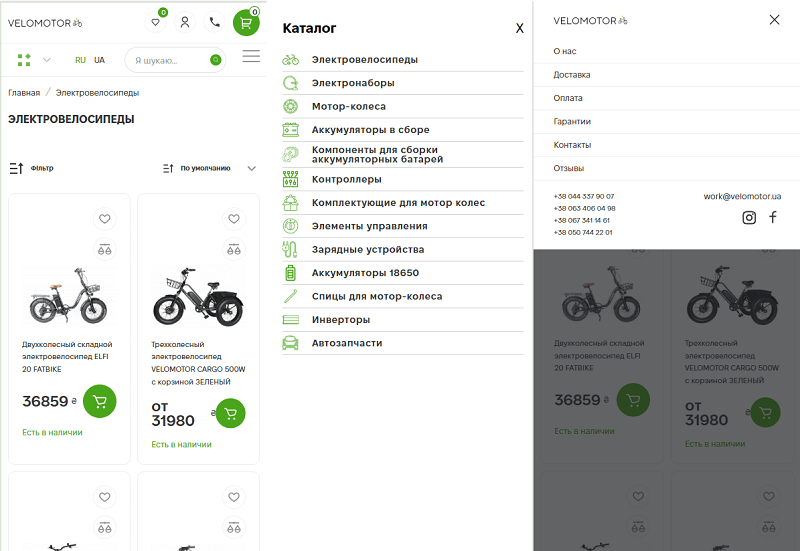
Here, for instance, the owner made TWO different menus. The question is — why.
To fix the situation, simplify. The mobile menu should be concise: main categories, search, cart, account. That's it. Look at the big stores — their menu takes up minimal space, but everything is in view.
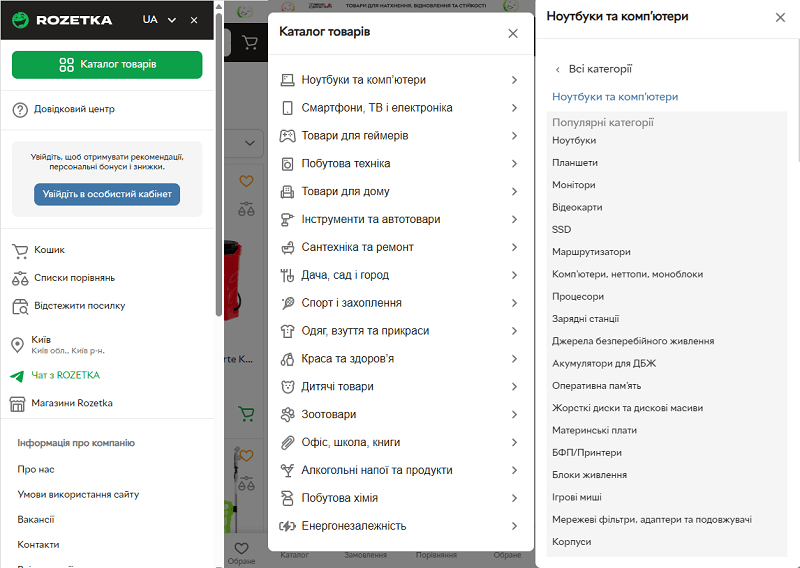
For example, you can build the menu visually like this. The catalog as a button that immediately opens the product list, with everything else remaining accessible.
Technically, set up responsive design: font no smaller than 16px, spacing between links at least 10px, so the user doesn't miss with their finger.
And be sure to test on real devices, not just in the browser. Analytics will show the result: if the bounce rate on mobile pages is above 50%, start with the menu. Fix it — and you'll see time on site and pages per session grow.
On-Site Search
Search is the heart of an online store. Users who use it are 30% more likely to reach a purchase, because they know what they want. But if search works poorly, you lose these hot customers. And bad search is no rarity.
I tested more than 50 sites for search quality in one niche, and only 3% of them passed all tests with flying colors. In 20% the search simply refused to search (example 1 from the screenshot), and in 76% there were bugs of various kinds:
- No search by SKU/part number.
- No search by category.
- No search by synonyms.
- No search by the joined spelling of a brand (e.g. MonsterPro and Monster Pro).
- No search preview as you type a query.
Setting up search starts with the technical base. Use engines that support synonyms and typo correction, like Elasticsearch or your CMS's built-in solutions. Make sure search indexes not only product names but also descriptions, categories, filters. For example, the query "fatbike" should return relevant fat bikes — bicycles — not everything under the sun, as we see.
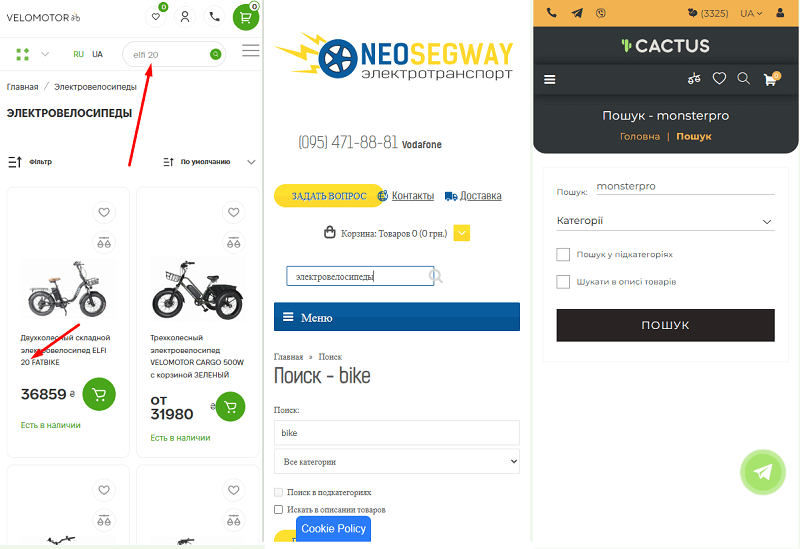
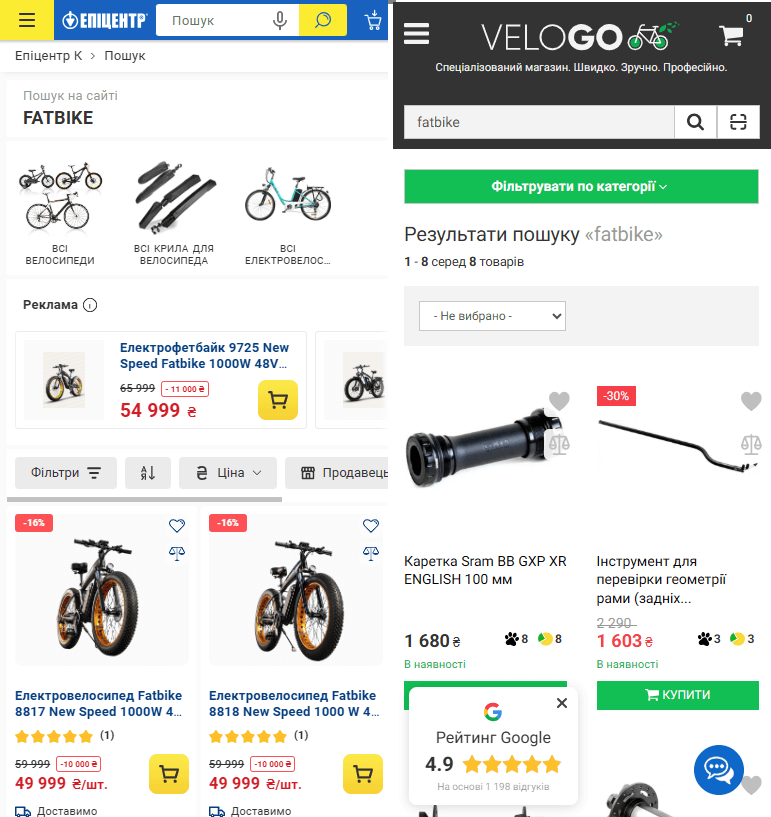
Add autocomplete — that's when a user starts typing and the site immediately suggests options. It saves time and lowers the chance someone leaves over a failed query.
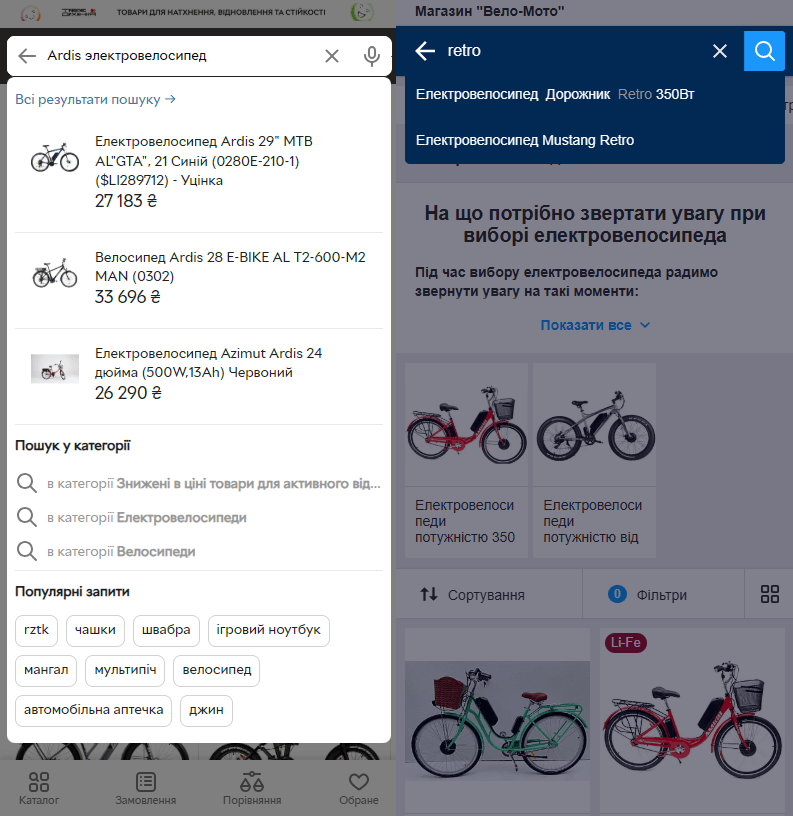
Guess where a preview will help a person buy right away. Google's "autosuggest" function exists for a reason too.
Don't forget analytics. In tools like Google Analytics you can set up tracking of on-site search queries. You can also set up your own service to collect "search queries and field entries" inside the site.
Look at what people search for and don't find. If many queries return zero results, then your search or catalog isn't meeting demand. Suppose users often search for "smartwatch under 200 dollars" but find nothing. That's a signal — create a category or filter for such a query. Good search not only retains customers but also hints at how to improve the site's structure.
A Smooth Checkout and Payment
Checkout is the moment of truth. A person has decided to buy, but if the process is complicated, they change their mind. According to eCommerce data, up to 70% of users abandon the cart because of an inconvenient checkout. Typical problems: too many fields in the form, unclear steps, the absence of popular payment methods. Sometimes a store requires registration before purchase. That's like putting a barrier in front of the register. Or, for example, the site doesn't show the total with shipping until the last step. The customer sees an unexpected price and leaves.
You can view your own stats in the Google Analytics report — Monetization — Purchase journey.
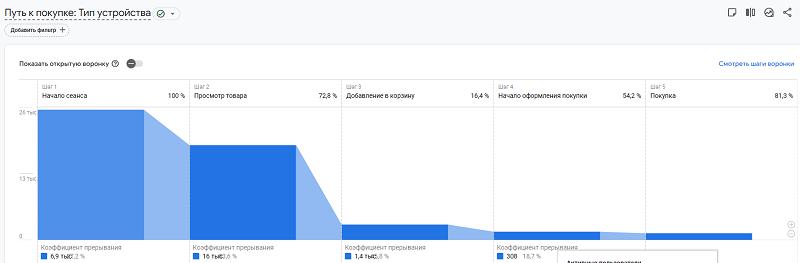
On average, statistically, good store numbers fall within the ranges above.
- Product view 60-80%.
- Add to cart 15-40%.
- Purchase 75-95%.
If your stats differ, you have problems.
To fix it, simplify everything down to the minimum.
- The order form should be short: name, email, phone, address.
- Login via social networks, Google, or Apple ID.
- Allow placing an order without registration — this increases conversion by 10-20%.
- The steps should be transparent: choosing products, shipping, payment, confirmation. At each stage show what the customer gets and how much they'll pay. For example, state the shipping cost right away so there are no surprises.
Payment is a separate story. If you operate in international markets, offer the maximum of options: cards (Visa, Mastercard), PayPal, Apple Pay, Google Pay. Make sure the payment gateway works fast and doesn't throw errors.
Analytics here is critically important. Track the sales funnel: how many people added a product to the cart, how many reached checkout, how many paid. If there's a big drop-off at some stage, look for the problem. For example, if 80% abandon the cart at the payment stage, check whether the payment gateway works and whether the needed payment methods are available.
Tools like Hotjar or Clarity will help you see where users get stuck — they record actions on the site and show which fields people give up on.
Your Next Step
You've read this far, and you most likely already understand: an online store isn't just a site with products, but a complex system where every element must work toward sales. Semantics, technical SEO, content, analytics, user experience — these are all links in one chain. If even one link is weak, you lose traffic, rankings, and, most importantly, money.
The problem is that many store owners hope for luck: they launch the site, upload products, run ads, and wait for customers to come on their own. They won't. Without a thought-out structure, optimization, and analysis, your project will remain a pretty storefront no one sees.
But here's the good news: everything we talked about in this article can be implemented. Yes, it's no easy stroll. Setting up filters, cleaning out junk pages, collecting semantics across hundreds of thousands of keywords — it takes time and knowledge. And you know what's the funniest part? Most stores don't even understand where their money leaks out. Maybe half your traffic goes to duplicate pages. Or the mobile menu scares customers off. Or on-site search returns phone cases instead of smartphones. You won't know until you look under the hood.
That's exactly why your first step is an audit. Not just "looking at the site," but a deep inspection: from technical errors to user scenarios. An audit will show where you lose traffic, why users leave without buying, and which pages drag you down. It's like an X-ray for your business: you see what's broken and understand how to fix it. Without an audit you'll spend budget on ads, content, or development, but there's no guarantee it works. Imagine pouring fuel into a car with a punctured tank — that's what promotion without analysis looks like.
My team and I have been doing this for more than 18 years. We know how to take your site apart down to the screws, find the weak spots, and turn it into a sales machine. And no, this isn't about "making it pretty." It's about results: more traffic, higher conversion, better rankings. If you're ready to stop guessing and start earning, write to us.
An audit isn't an expense but an investment that pays off when your store starts bringing in customers. Take the step. Order an audit right now, and let's figure out how to get your project to the top.
Making Money Online in 2026: Which Methods Actually Work
An honest breakdown of making money online in 2026: why 'easy money with no investment' is a myth, 5 models that actually work, and how to monetize your own site with affiliate and CPA — by SEOquick.
Read →
Performance Max for an Online Store: A Setup and Optimization Case Study
How to set up Performance Max for an online store: a case study with ROAS growth from 2.8 to 5.1, the Merchant Center feed, asset groups, budget and optimization.
Read →
SEO Promotion in 2026: 13 Steps to Rank Your Website
A 13-step SEO plan for 2026: competitor analysis, keyword research, content, link building, E-E-A-T, and optimization for Google's AI search.
Read →Want to apply this to your site?
We will review the current situation, find the first growth levers, and suggest a practical working format.