LinkedIn Advertising in 2026: Targeting, Ad Formats, and Real B2B Costs
LinkedIn has the most expensive click in paid traffic — and it is still the number one B2B lead generation channel for Western markets. I break down Campaign Manager 2026: formats from Thought Leader to Document Ads, targeting by job title and company, real CPC/CPL numbers — and an honest answer on who should stay away from LinkedIn.


LinkedIn is 1.3+ billion profiles and the only social network where people voluntarily state where they work, at which company, and which skills they have. For a media buyer this is a dream: not “interested in business,” as in Meta, but literally “Head of Procurement at a 500+ employee logistics company in Germany.”
For service businesses selling to Western markets — software development outsourcing, SaaS products, engineering and legal services — LinkedIn has long been the primary lead generation channel. (This guide was originally written for Ukrainian companies exporting B2B services to the US and EU, but the mechanics apply to any agency, dev shop, or SaaS targeting those markets.) According to Cognism (2026), 87% of B2B marketers use LinkedIn, and four out of five users on the platform influence business decisions at their companies.
But that precision comes at a price — literally. A click here costs 3–5 times more than in Meta or Google Ads, and with a poorly configured account the budget burns through in days without a single lead. I have rewritten this guide for Campaign Manager 2026: which formats work now, how targeting is structured, what a lead really costs, and in which cases you do not need LinkedIn at all.
LinkedIn advertising is targeted campaigns in Campaign Manager aimed at professional attributes: job title, industry, company size and name, skills, seniority. The core 2026 formats are Single Image, Video, Carousel, Document Ads, and Thought Leader Ads; leads are captured through native Lead Gen Forms. Average B2B CPC is $5–12 and a form lead costs $50–130, so the channel pays off when a deal is worth at least several thousand dollars.
Who needs LinkedIn ads — and who doesn’t
Let me start with an honest filter that will save you money. Over 18 years of work we have seen plenty of companies that “tried LinkedIn,” burned $2–3K, and left with the verdict “it doesn’t work.” Almost always the problem was not the platform but a mismatch in unit economics.
LinkedIn makes sense if:
- You sell high-ticket B2B. Development outsourcing and outstaffing, SaaS with annual contracts, consulting, industrial equipment. If customer LTV is in the thousands or tens of thousands of dollars, a $100 lead is a great deal.
- Your audience is defined by job title, not interests. “CTOs at 200+ employee fintech companies in the US and UK” — that is a query built exactly for LinkedIn. No other platform can do this.
- You recruit rare specialists or build an employer brand in Western markets.
- You have a long sales cycle. B2B deals that take 3–12 months require nurturing: retargeting, content, webinars. LinkedIn was made for this.
You don’t need LinkedIn if:
- You sell B2C — products, mass-market courses, local services. Meta and Google Ads will deliver leads several times cheaper.
- Your average order value is under $500–1,000 with no repeat sales — the economics will not work at a $50–130 CPL.
- Your test budget is below roughly $1,500–2,000 per month. With less, the algorithm will not finish learning and you will not collect enough data to draw conclusions.
- Your audience is a single small local market. For example, the Ukrainian LinkedIn audience exists (mostly IT and corporate), but it is small, and for most local B2C/B2B niches Google Ads and Meta are far more efficient.
SEOquick experience. B2B never lives on one paid channel. For the customs brokerage rastamozhka.com (customs clearance, classic B2B) we bet on organic search: after recovering from a Google penalty, traffic doubled, transactions grew 3.5x, and sales rose 226%. Paid LinkedIn ads work dramatically better when a lead who clicks your ad also finds your company in Google and in AI answers. Details in the case study (in Russian): /portfolio/rastamozhka-com/.
What changed in Campaign Manager by 2026
If you last set up LinkedIn ads in 2020–2022 and are only coming back now, here are the key changes:
- Lookalike audiences are dead. In February 2024 LinkedIn switched off classic lookalikes — they were replaced by AI-based Predictive Audiences (more on that below).
- Thought Leader Ads arrived — promoting posts by real people instead of company pages. Today it is the most efficient format by CTR and cost per click.
- Accelerate campaigns launched — an AI mode where the algorithm assembles creatives, audience, and bids on its own.
- Message Ads and Conversation Ads survived a near-death experience. In 2023 LinkedIn announced their shutdown, then reversed course; in the EU the format was blocked over GDPR, and since October 2024 it has been partially restored — only for users who explicitly opted in to sponsored messages.
- Document Ads and native Lead Gen Forms became the B2B lead gen standard — the lead never leaves LinkedIn, and the form auto-fills with profile data.
- Analytics got stronger: Conversions API (server-side conversion tracking), Revenue Attribution Report with CRM integration, Company Engagement Report for ABM.
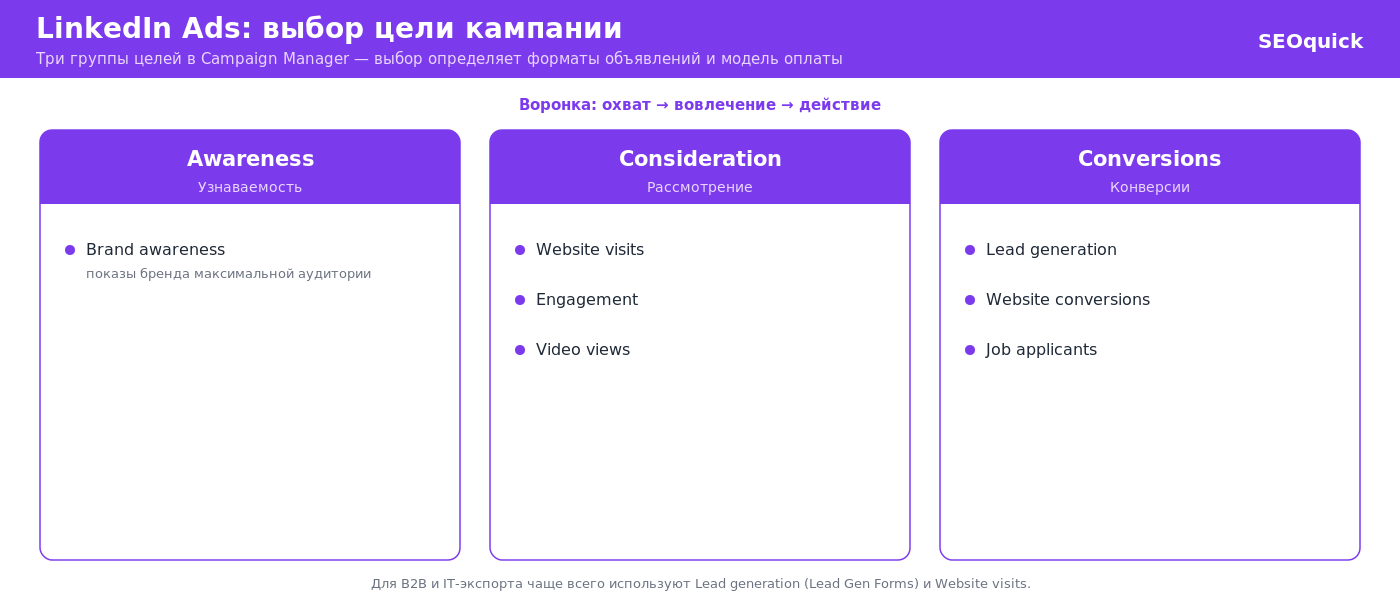
The account structure itself remains three-tiered: Campaign Group → Campaign → Ads. Campaign-level objectives: Brand Awareness, Website Visits, Engagement, Video Views, Lead Generation, Website Conversions, Job Applicants.
Ad formats in 2026
Thought Leader Ads — the headline B2B format
Thought Leader Ads (TLA) promote a regular post by a real person: a founder, CEO, team lead, or even an external expert (with their consent). In the feed such a post looks like organic content, just with a “Promoted by [company]” label.
Why it works: people on LinkedIn trust people, not logos. According to agency research from 2025–2026 (Fractional Demand, ZenABM), TLA deliver 3–5x higher CTR than sponsored content from a company page and a noticeably cheaper click — with identical targeting settings.
For an outsourcing company this is the perfect mechanic: the CEO or Head of Delivery writes a breakdown post (“how we cut a client’s cloud bill by 40%”), and the company promotes it to CTOs in the target geo. It does not look like an ad — it looks like expertise.
Limitations: you can only promote an existing post (text, image, or video), with no CTA button and no Lead Gen Form. TLA is a warm-up format, not a lead capture one; retargeting collects the leads afterwards.
Single Image Ads — the workhorse
The classic sponsored feed post: a 1200×627 image (or square), a headline up to 70 characters, and up to 150 characters of intro text before truncation. Compatible with Lead Gen Forms — which is why Single Image carries most lead gen campaigns.
What works in B2B creatives: a specific number in the headline, a product screenshot instead of a stock photo, an explicit “who this is for” (“For Heads of Engineering”). What does not: abstract “We deliver excellence” banners.
Video Ads
In-feed video, autoplay with sound off. The sweet spot is 15–30 seconds, captions are mandatory — most people watch muted. In B2B, video wins by demonstrating, not selling: a product screencast, a 20-second case study with numbers, a short talking-head clip from an expert.
Video views are also the cheapest way to build a retargeting pool: viewers who watched 25%+ of the video become a separate segment.
Document Ads — the underrated lead gen format
A format that appeared in 2022 and by 2026 became a B2B marketer favorite: you upload a PDF (a guide, checklist, research report, pricing structure), and users flip through it right in the feed. Two modes:
- Ungated — the document is fully readable; works for reach and authority.
- Gated — the first 2–3 pages are visible, then a Lead Gen Form appears. The lead gets the document, you get their profile-sourced contact details.
A practical 8–12 slide deck (“SaaS pricing benchmarks 2026,” “AWS infrastructure audit checklist”) often produces cheaper leads than the classic Single Image + landing page combo, because the person sees the value before handing over their contacts.
Carousel Ads
Up to 10 cards at 1080×1080, each with its own link. Good for step-by-step stories: a “problem → solution → result” case study, a service lineup, process stages. Used less often in B2B — it demands strong design, and CTR is usually lower than Document Ads carrying the same content.
Conversation Ads and Message Ads — handle with care
Direct messages sent on behalf of a person (Conversation — with a tree of reply buttons, Message — a single message with a CTA). Status as of 2026: both formats are alive, but in the EU they only reach users who have explicitly opted in to sponsored messages — so European reach is heavily cut. The format has also burned out: open rates stayed high, but reply conversion dropped — there is simply too much templated outreach.
Where they still work: webinar and offline event invitations, promotion to warm audiences (retargeting, contact lists). A cold “we have the best developers” pitch in someone’s inbox is money down the drain.
Text Ads and Dynamic Ads — cheap, but desktop only
Small text blocks and personalized banners (Spotlight, Follower) in the right column of the desktop interface. Low CTR (~0.02–0.05%) but dirt-cheap CPM. Fine as background brand support and low-cost retargeting; they cannot be a primary channel — mobile users never see them at all.
Event Ads and Live
Promotion for LinkedIn Events: webinars, conferences, LinkedIn Live. For companies selling expertise into Western markets, the webinar remains one of the highest-converting warm-up formats — and Event Ads collect registrations in one click, no landing page needed. We covered how to prepare the webinar itself in a separate article (in Russian).
Targeting: what we pay that CPC for
Targeting is the only reason to tolerate the expensive click. Let’s go through the layers.
Professional attributes
Basic targeting is built on profile data:
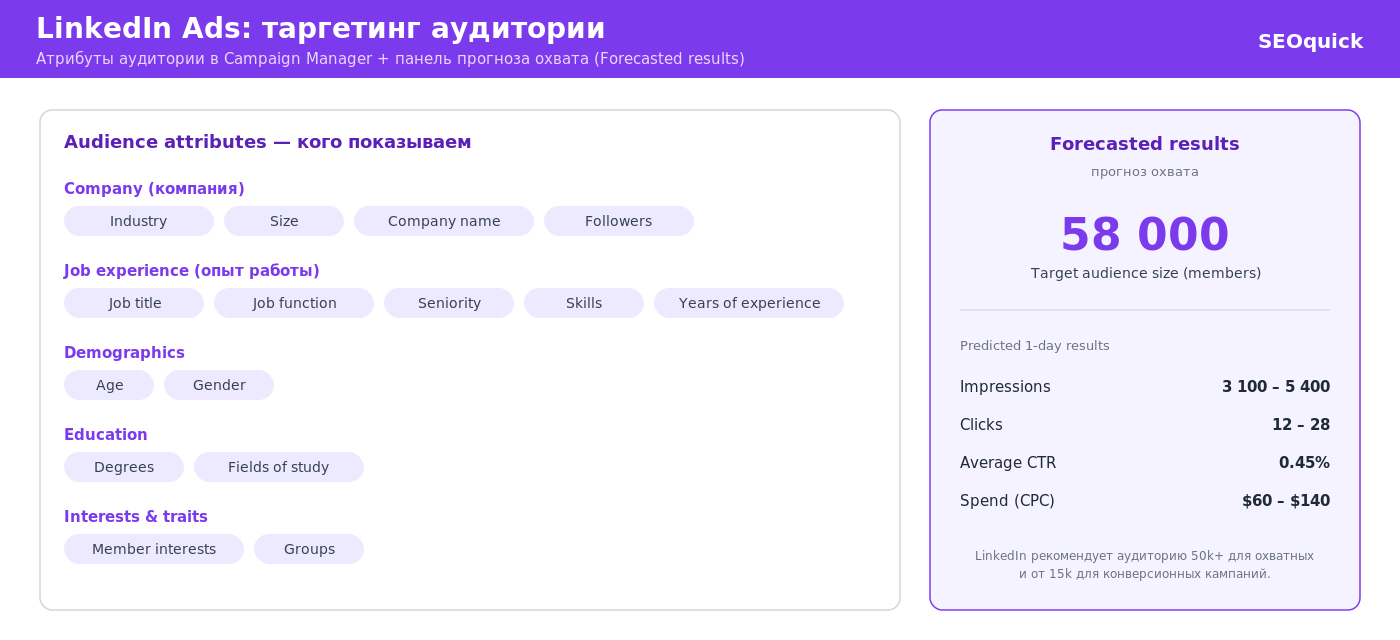
- Company: name (manual lists up to 200), industry, size (from 1–10 to 10,000+), growth rate, category (Fortune 500 and similar).
- Job: Job Title (LinkedIn normalizes thousands of spelling variants), Job Function (Engineering, Finance, Marketing…), Seniority (from Entry to CXO/Owner).
- Experience and skills: Skills (from the skills section and profile text), years of experience, education, field of study.
- Demographics and geo: location by permanent residence or recent visit, profile language, age/gender (estimated).
- Interests and groups: membership in professional groups, interests, Traits (e.g., frequent travelers).
Practical rules, paid for with real budgets:
- Don’t narrow down to a microscope. The recommended audience size is 50,000+ for Sponsored Content. An audience of 3,000 people means a brutal CPM and burnout within a week.
- Title vs. Function + Seniority. Targeting exact job titles is narrow and expensive but precise. Function + Seniority is broader and cheaper but catches irrelevant people. Test both combinations in separate campaigns.
- Always exclude. Competitors, recruiters, juniors, your own company. Audience Exclusions is the first thing I check when auditing other people’s accounts — and it is usually missing.
- Turn off Audience Expansion. The “expand audience” checkbox is on by default and dilutes the very targeting you came for. For precise B2B — switch it off.
- LinkedIn Audience Network (LAN) — impressions on third-party placements. Cheaper, but placement quality is questionable; acceptable for brand campaigns, but for lead gen I turn it off.
Matched Audiences: your data inside LinkedIn
Matched Audiences are audiences built from your own data, and for mature B2B marketing they matter more than attribute targeting:
- Website Retargeting. Install the Insight Tag (a JS snippet, LinkedIn’s equivalent of the Meta pixel) and collect site visitors: all of them, visitors of specific pages (e.g., /pricing), with filters. Complemented by the Conversions API for server-side event tracking — critical after the death of third-party cookies.
- Company List (ABM). Upload a CSV of target companies (up to 300,000) — LinkedIn matches it against its registry of company pages. This is the backbone of Account-Based Marketing: only employees of companies in your pipeline see the ads.
- Contact List. An email list (300 contacts minimum to launch, ideally 1,000+) — subscribers, CRM leads, booth visitors from a conference.
- Engagement Retargeting. Audiences built from people who interacted with your activity inside LinkedIn: watched a video, opened a Lead Gen Form (but did not submit!), reacted to a Single Image ad, visited your company page, registered for an event.
The stack that consistently works for outsourcing and SaaS: a cold layer (TLA + Document Ads to a broad attribute-based audience) → retargeting (Lead Gen Form for those who engaged) → the closer (a Conversation Ad inviting the warmest prospects to a call).
Predictive Audiences: AI instead of lookalikes
After lookalike audiences were switched off in 2024, their place was taken by Predictive Audiences: you provide a source (a contact list, Lead Gen Form conversions, Insight Tag data), and LinkedIn’s AI model builds an audience of users similar to those who already converted — factoring in signals from across the platform.
The essential difference from lookalikes: the model predicts conversion probability rather than cosmetic profile similarity. In practice, Predictive Audiences scale campaigns well once precise segments have burned out, but they require a quality source — 300 records minimum, ideally several thousand.
Campaign setup: step by step
Campaigns are created in Campaign Manager — to launch you need a company page and a linked card (pick the account currency once, usually USD; billing works with cards from most countries, including Ukraine).
- Create a campaign group and set the overall budget/schedule. One group = one job to be done (e.g., “Lead gen US, Q3”).
- Pick the objective. For native form leads — Lead Generation; for site traffic — Website Visits; for nurturing — Engagement or Video Views. The objective determines which formats and bid optimizations are available.
- Build the audience. Geo + attributes or a Matched Audience. Watch the forecast panel on the right: Forecasted Results shows audience size and expected reach. Save audiences as templates — you will need them for A/B tests.
- Choose the format (Single Image, Document, Video…) and decide on the LAN and Audience Expansion checkboxes (my default: both off).
- Set budget and bidding. Daily budget starts at $10, but a realistic test is $30–50/day per campaign. Strategies: Maximum Delivery (auto-bidding, spends the full budget), Cost Cap (target cost per result), Manual Bidding (manual CPC). Start with Maximum Delivery for 1–2 weeks of learning, then move to Cost Cap based on your actual CPL.
- Create the ads. At least 3–4 creative variants per campaign — the algorithm reallocates impressions on its own. For Lead Generation, configure the form: the fewer fields, the cheaper the lead; profile fields (name, email, job title, company) auto-fill.
- Set up tracking. Insight Tag on the site, conversions (demo request, sign-up), and where possible — Conversions API and a Lead Gen Forms-to-CRM integration (native connectors for HubSpot, Salesforce, Zapier) so leads do not sit untouched in the ad account.
Accelerate: LinkedIn’s AI campaigns
Accelerate is a mode where AI does almost everything: you provide a product URL, the system analyzes your site and past campaigns, generates creatives (copy included), assembles the audience, and manages bids. LinkedIn’s stated goal is a campaign in 5 minutes; by their data, Accelerate cuts cost per result by ~15–20% versus classic campaigns for a share of advertisers.
My take is pragmatic. Accelerate is worth testing once the account already has conversion history — the AI learns from your data. On a fresh account with no conversions it will learn at your expense. And always review the generated creatives by hand: AI copy can be sterile, and for a B2B audience genericness is a death sentence. We covered how to use AI for content deliberately rather than on autopilot in our article on AI content that gets cited in answers (in Russian).
How much LinkedIn ads cost in 2026
The big question. Consolidated benchmarks based on aggregated data from The B2B House, Stackmatix, and MetadataONE (2026):
| Metric | Range | Comment |
|---|---|---|
| CPC (Sponsored Content) | $5–12 | C-suite and US geo — $12–15+ |
| CPM | $25–35 | Narrow audiences cost more |
| CTR (feed) | 0.4–0.65% | Thought Leader Ads — 3–5x higher |
| CPL (Lead Gen Forms) | $50–130 | Depends on the offer |
| Landing page conversion | 2–3.5% | Lead Gen Forms convert higher |
CPL strongly depends on what you ask for in return: a lead for a guide/checklist runs about $45–60, a webinar registration $55–80, a demo request $100–150+. That is healthy economics: a demo lead is pricier, but it is several steps closer to a deal.
For a sense of scale: according to Funnel (2026), LinkedIn captures about 39% of B2B paid social budgets — the market votes with its money despite the prices.
SEOquick experience. Always measure lead cost against your deal size, not against other platforms. In Meta Ads we generated $2–3 leads for UPK Energy (power equipment) — but that was broad B2C demand for generators in peak season (case study, in Russian). A $120 LinkedIn lead for an outsourcing contract with $100,000+ LTV is mathematically a better purchase than a $3 lead converting to a deal at 0.5%. Compare CAC to LTV, not CPL to CPL.
How not to burn the budget: a short checklist
- Don’t run lead gen to a cold audience with a “book a call” offer — warm up first (TLA, Document, Video), then add the conversion layer.
- Turn off Audience Expansion and LAN in lead gen campaigns.
- Exclude non-targets (juniors, recruiters, competitors) and cheap-click countries if you target tier-1 geos.
- At least 3 creatives, rotated every 3–4 weeks — LinkedIn creatives burn out slower than in Meta, but they do burn out.
- Process Lead Gen Form leads within the first hours — a CRM integration is mandatory.
- Look beyond CPL: the Company Engagement Report shows which target accounts are actually warming up from your campaigns.
Organic and personal brand: the free amplifier for your ads
LinkedIn is the only major platform where organic reach is still alive. And advertising here works in tandem with organic, not instead of it.
Before clicking an ad, a B2B buyer almost always checks: the post author’s profile, the company page, the team’s activity. An empty CEO profile with 87 connections kills conversion more expensively than any bad creative.
The minimum program for a company entering Western markets:
- Founder and lead profiles polished in English: a meaningful headline (not “CEO,” but “CEO @ X — we ship fintech MVPs in 12 weeks”), a banner, a Featured section with case studies.
- 2–3 expert posts per week from the leadership: breakdowns, numbers from practice, opinions. These are the posts that later become Thought Leader Ads — organic performance tells you which content to amplify with money: promote the posts that already earned the best organic response.
- The company page is a case study showcase, not a business card; employees reshare key posts (Employee Advocacy delivers reach you cannot buy).
- Content expertise works beyond LinkedIn too: the same breakdowns and case studies published on your blog end up in ChatGPT and Google AI answers — we covered how to set this up in our guide to GEO: optimizing your site for GPT.
When you don’t need LinkedIn: the alternatives
To repeat the main point: LinkedIn is a niche tool for expensive B2B. If your economics cannot sustain a $50–130 lead, the options are:
- Google Ads — hot demand on commercial queries; for services with clear search demand this is the first channel, not LinkedIn. Our search campaign case for multi-region targeting hit ROAS ≈7.4 (details, in Russian).
- Meta Ads — cheap reach and lead gen for B2C and “light” B2B (the SMB audience lives in Facebook/Instagram at least as much as in LinkedIn).
- SEO + content — the long game, but the cheapest per-lead strategy for B2B with search demand.

And the reverse holds too: if you sell development, SaaS, or consulting into the US and EU markets — nothing replaces LinkedIn. Cold email outreach complements it but does not cover nurturing and ABM.
Conclusions
LinkedIn advertising in 2026 is not “an expensive version of Facebook” — it is a separate discipline with its own economics. The platform offers what exists nowhere else: targeting by job title, company, and skills, plus formats engineered for B2B trust — Thought Leader Ads, Document Ads, native Lead Gen Forms.
The formula for a working campaign: sound economics (the deal size justifies a $50–130 CPL) → a layered funnel (warm-up with expert content → retargeting → conversion) → clean targeting with Expansion off and exclusions on → real, living team profiles behind the ads. And a constant CAC-versus-LTV calculation instead of panicking over an expensive click.
And if your deal size cannot carry it — go honestly to Google Ads and Meta: a marketer’s strength is not a favorite platform but the ability to match the channel to the business economics.
FAQ
How much does LinkedIn advertising cost in 2026?
Average B2B CPC is $5–12; for C-level audiences in the US — $12–15+. A lead via Lead Gen Forms costs $50–130: around $45–60 for a guide, $55–80 for a webinar registration, $100–150 for a demo request. The minimum daily budget is $10; a realistic test starts at $1,500–2,000 per month.
Which LinkedIn ad format is the most effective for B2B?
For warm-up — Thought Leader Ads: promoting posts by real experts delivers 3–5x higher CTR and a cheaper click than ads from a company page. For lead capture — Document Ads and Single Image with native Lead Gen Forms: the form auto-fills with profile data, and the lead never leaves the platform.
What are Matched Audiences on LinkedIn?
Audiences built from your own data: website retargeting via the Insight Tag, target company lists for ABM (up to 300,000), email contact lists, and engagement retargeting based on interactions inside LinkedIn — video views, form opens, page visits. The backbone of mature B2B funnels.
Do lookalike audiences still work on LinkedIn?
No, classic lookalikes were switched off in February 2024. They were replaced by Predictive Audiences: LinkedIn’s AI model analyzes your source (conversions, contact lists, Insight Tag data) and assembles users with a high predicted conversion probability. You need a source of at least 300 records.
Can you run Message and Conversation Ads in Europe?
Partially. After the GDPR-driven block, since October 2024 LinkedIn shows sponsored messages in the EU only to users who explicitly opted in — so European reach is heavily limited. The format makes sense for warm audiences and event invitations, but not for cold outreach.
Is LinkedIn suitable for advertising to a small local market?
With limits. Take Ukraine as an example: the local LinkedIn audience is mostly IT and corporate, and it is small compared to Meta. LinkedIn pays off there for recruiting specialists and B2B services aimed at the IT sector; for most other local tasks Google Ads and Meta deliver noticeably cheaper leads.
X/Twitter promotion for business: when the channel still makes sense
How to use X/Twitter for B2B, experts, launches, events, and performance: content, ads, targeting, conversion tracking, and SEO signals.
Read →
SMM Promotion in 2026: The Complete Social Media Guide for Business
SMM promotion for business in Ukraine: Instagram, TikTok, Telegram, YouTube, LinkedIn. 2026 audiences, formats, organic vs paid, content plan.
Read →
Facebook Targeting 2026: Step-by-Step Setup Scheme and Strategy
How to set up targeted advertising on Facebook and Instagram in 2026: Advantage+ audiences, the Andromeda AI algorithm, privacy, placements, and budgets. A step-by-step guide from SEOquick.
Read →Want to apply this to your site?
We will review the current situation, find the first growth levers, and suggest a practical working format.