Content Refresh in 2026: How to Revive Old Posts and Win Traffic Back
Publishing new articles matters, but updating old ones is more profitable. Based on a video from our channel, I show how to find weak pages in Search Console, rewrite content with AI and win back the traffic you have almost already earned.


I will look at your site and answer your questions on the topic of this article. 30 minutes, no slide decks, no pressure.
Book a consultationUpdating old articles is almost always more profitable than writing new ones: the content is already indexed, has built up backlinks, and has a history with Google. A surgical refresh of pages sitting at positions 4–20 gives you the maximum traffic boost with minimum effort — and simultaneously spikes your chances of hitting AI overviews, which crave freshness.
The most common business blunder is chasing new articles while leaving the old ones to rot. Yet, your archive is exactly where the pages Google already likes are hiding, just waiting for one final push. I’ll break down the topic based on a video from our SEOquick channel: how to pick pages for an update, how to rewrite them, and how to track the results — with hard numbers and sources.

Why updating old stuff beats writing new stuff
A new article starts from zero: no links, no click history, no Google trust. An old page has already banked all that — often, it’s just missing freshness and a couple of key blocks. Nikolay sums it up in the video in one line:
“Publishing new articles is important, but updating old ones is more profitable.”
The data backs this up. HubSpot’s classic "historical optimization" case study saw +106% organic traffic without a single new post. Brian Dean from Backlinko pulled the same move and scored +260.7% traffic in 14 days, bumping a page from 7th to 4th place just by reworking existing material. And in 2026, we’ve got another heavy hitter: AI search. Models cite fresh content way more eagerly: market analysis shows about half of AI-cited content is less than 13 weeks old, and pages under 30 days old get roughly 3.2 times more AI citations. An updated date and fresh facts are a direct signal for both Google and the likes of ChatGPT or Perplexity. For more on AI SERP mechanics, check our breakdown on AEO, SEO, and GEO and Google AI Mode.
Which pages to update first
There’s one rule: don’t update everything blindly. That’s a mistake and a total time sink.
“You don’t need to update every single page on the site. That’s a mistake. You need to find the pages that have high potential but aren't quite squeezing out the traffic for you.”
The video breaks down four types of refresh candidates.
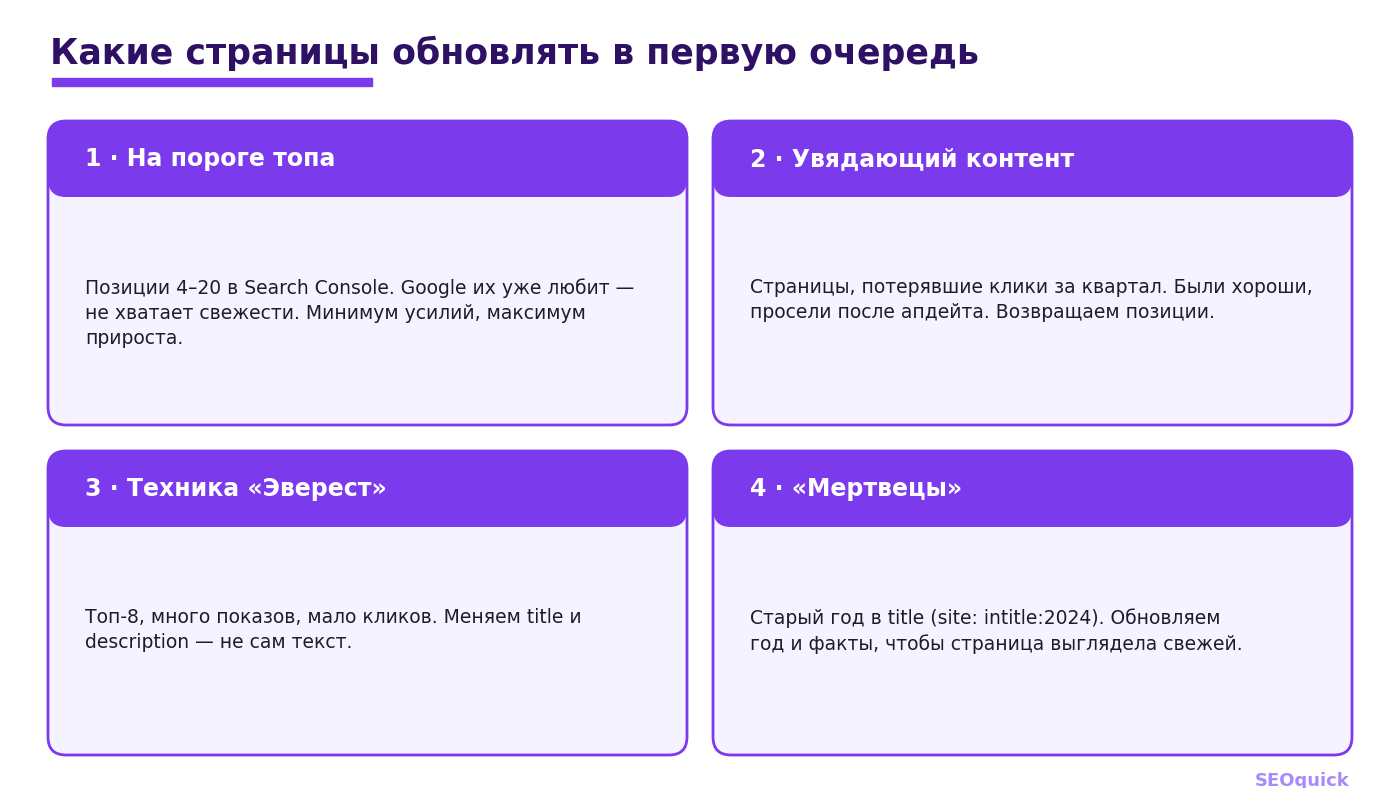
The first and juiciest are pages on the threshold of the top, sitting at positions 4 to 20. Google already likes them, but they lack the authority or freshness to crack the top 3. Nikolay calls them exactly what they are:
“This is real gold because minimal effort will yield the maximum traffic growth.”
The second type is fading content: pages that used to be great but have slumped over the last few months, usually after a recent update. Put them back on the rewrite list. Third is the "Everest" technique: pages in the top 8 with high impressions but low CTR; here, you don't change the text, you fix the title and description, because a weak snippet is usually what's stealing your clicks. And fourth — the "dead": pages with last year stuck in the title. The operator site:yourwebsite.com intitle:2024 will dig them up in a minute — the year and facts need a refresh.
How to find these pages via Google Search Console
You only need one tool — your Google Search Console. It’s free and knows everything about your site. For "threshold" pages, pull a three-month report, filter by average position (say, under 20), export to Excel, and sort by descending impressions: pages with tons of impressions hanging out on the second page of results are your priority. For fading content, take those same three months (roughly the gap between Google updates) and turn on the comparison with the previous period; for seasonal businesses, compare with the same period last year and look for pages that lost the most clicks. For "Everest," filter for positions under 9 and sort by impressions — you’ll see pages ranking high but gathering few clicks, meaning they need a new snippet, not a full rewrite. The result of this stage is one Excel sheet with a list of URLs actually worth touching. Leave everything else alone.
How to rewrite content, not just change the date
Swapping the date without touching the text is a scam, and Google sniffs it out fast. The rule is simple: an updated article should be the same length or longer, but contain more facts, not more fluff. The workflow in the video centers on AI as an assistant: the old page code and SERP data (AI overview, People Also Ask block, main keyword) are fed into Gemini or ChatGPT with a structured prompt, and the result is proofread and beefed up with your expert experience. A good prompt relies on role, input data, processing logic, and output format — plus a separate block for constraints.
“Imagine this is your colleague—smart enough, but you just need to set the tasks correctly. But it's just a colleague — they aren't perfect, they can make mistakes.”
Key takeaway: AI writes the skeleton and structure, but you add the expertise, examples, and personal experience. It’s that first-hand experience that separates an AI-cited article from rewritten fluff. For more on how this relates to quality, see our piece on AI content and Google penalties: they don't punish you for using AI, they punish you for empty text with zero value.
How to check if the update worked
The final stage is the check-up, and you can't skip it. First, run the text through a readability and structure check: sentence length, heading hierarchy (no double H1s), heavy phrasing — you can see this in any editor. Then, check for fluff: export the text and ask an AI to compare the original with the updated version — if the volume grew but the fact count didn't, you’ve just added water. Use a separate prompt to check the article for factual accuracy and experience signals. But nothing beats a final manual read-through:
“Scanning the text with your own eyes is mandatory.”
How often to update content
There’s no magic number — frequency depends on the page type and how close it is to the money and trends. Here’s the benchmark for 2026.
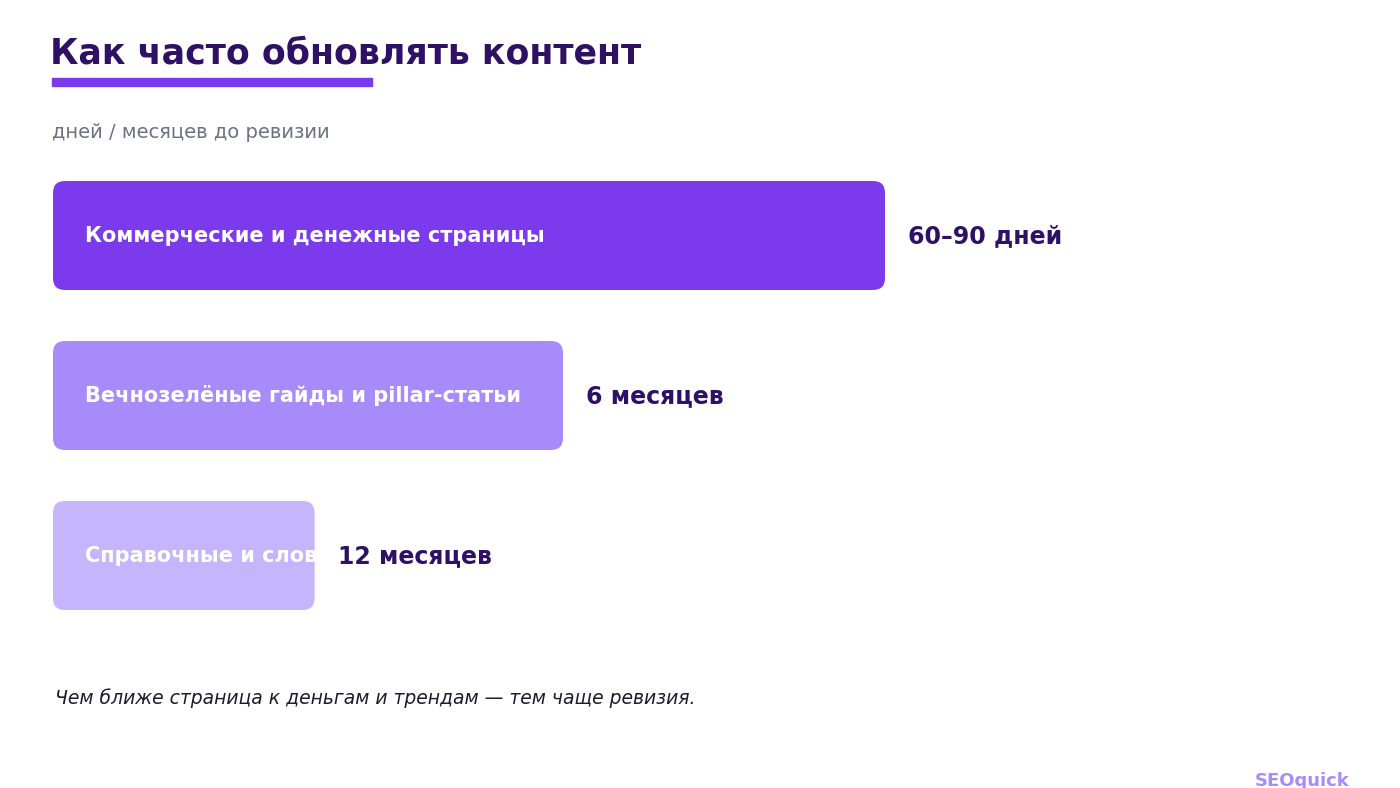
Commercial and "money" pages should be reviewed every 60–90 days, evergreen guides and pillar articles every six months, and reference or dictionary pages once a year. A well-executed refresh usually brings back 40–60% of lost traffic within 60 days and restores positions in about 90.
FAQ
Is just changing the publication date enough? No. Google looks for actual changes in the text, not just the date field. Faking a date without working on the content will hurt your trust rather than help it.
Update an old article or write a new one? If there’s already an indexed page with history on the topic — it’s almost always better to update it rather than spawn duplicates that dilute your signals (more on this in our duplicate content breakdown).
Can I trust AI to do the update entirely? No. AI is great at building the skeleton and structure, but a human adds the facts, examples, and expert experience. Manual proofreading is a must. See which tools fit the bill in our AI SEO tools 2026 roundup.
Conclusion
Content updating isn't just cosmetics; it’s a full-blown growth strategy that’s often cheaper and faster than writing new articles. Start small: pull the pages at positions 4–20 from Search Console, pick 10–15 with high potential, and run them through the "find — rewrite — check" cycle. Freshness in 2026 works for both Google and AI search engines, and your most underrated traffic is already sitting in your archive.
TikTok SEO in 2026: How to Rank in TikTok Search and Get Into Google
TikTok is now a second search engine: 49% of users search on it, 65% of Gen Z. Here is how TikTok indexes video (ASR, OCR, captions), how to optimize clips for search, and how TikTok content also surfaces in Google — with 2026 data and SEOquick experience.
Read →
SEO for Service Websites: A Real SEOquick Case Study and the 2026 Strategy
How to promote a service website in 2026: keyword structure, thin content, links, the Local Pack, and AI search. A real SEOquick case with a 10x organic traffic increase.
Read →
Traffic or Conversion: Which Matters More for Business in 2026
Conversion matters, but traffic does more: it feeds the brand signals AI search needs to cite you, powers retargeting, A/B tests and GA4 attribution. With 2025-2026 numbers, we explain why growing traffic earns more than fighting for an extra point of conversion.
Read →Want to apply this to your site?
We will review the current situation, find the first growth levers, and suggest a practical working format.