Bing Webmaster Tools in 2026: How to Get Into the Bing Index — and Into ChatGPT Answers
Bing Webmaster Tools is no longer a tick-box webmaster panel: its index feeds ChatGPT Search and Copilot. Here is how to sign up in 5 minutes by importing from GSC, set up instant indexing with IndexNow, and which reports are worth watching in 2026.


Ten years ago, adding a site to Bing Webmaster Tools was a “just in case” checklist item: there was almost no Bing traffic in Ukraine, and the panel got opened once a year.
In 2026 the reason to create an account is a different — and far weightier — one. The Bing index is used by ChatGPT Search and Microsoft Copilot. If your site is not in the Bing index, ChatGPT simply cannot cite you in an answer, no matter how much you invest in content.
In this guide I will show you how to close the question completely in one evening: sign-up with settings imported from Google Search Console, connecting instant IndexNow indexing, and the three reports actually worth monitoring.
In short: Bing Webmaster Tools is a free control panel for your site in Bing search (the equivalent of Google Search Console). In 2026 its main value is not traffic from Bing itself (in Ukraine its share is around 1–2%) but getting into the index that ChatGPT Search and Microsoft Copilot draw their answers from. Sign-up takes 5 minutes: the site is imported from GSC in two clicks, with no verification needed.
Why Bing Matters in 2026: The ChatGPT Factor
Let’s start with honest numbers, so there are no illusions.
According to Statcounter, Bing’s global share of classic search is around 4% (up from 3% after the Copilot integration in 2023), and around 10% in the US. In Ukraine, Bing holds some 1–2%: Google dominates totally here, and direct traffic from Bing is pennies for most Ukrainian projects.
If the story ended there, the article would not need updating. But a new variable has entered the equation.
ChatGPT Search runs on top of the Bing index. When a user asks ChatGPT a question that requires current data, the model turns to a search index — and its main supplier for OpenAI remains Microsoft Bing. The same goes for Microsoft Copilot (in Windows, Edge and Bing itself) and a number of smaller AI search engines that license the Bing API instead of building their own crawler.
The practical conclusion is simple:
- No site in the Bing index → no chance of being cited in ChatGPT Search and Copilot. This is a binary condition, a hygiene minimum.
- AI traffic is growing: according to Statcounter analytics and industry reports from 2026, referral visits from ChatGPT, Perplexity and Gemini grew roughly fivefold in a year. The share is still modest, but it is the fastest-growing source.
- In our own projects we already see ChatGPT conversions in the reports — more on that in the case study below.
So the right framing for 2026 is this: Bing Webmaster Tools is not about “promotion in Bing” but about the infrastructure of presence in AI search. I covered how ChatGPT selects sources for its answers in detail in a separate guide — how to get into ChatGPT answers.
SEOquick experience: for the service website nadomu.kiev.ua we grew organic traffic tenfold over five years — and in 2025–2026 a new segment appeared in the project’s analytics: leads that came from ChatGPT. The site is in the Bing index and serves clean HTML and direct answers to questions — that turned out to be enough for AI search to start recommending it. Details are in our service website case study (in Russian).
Signing Up for Bing Webmaster Tools: 5 Minutes via GSC Import
Today’s Bing Webmaster Tools looks nothing like the clunky interface the 2018 guides described. Microsoft rewrote the panel and simplified the site-adding process as much as possible.
Step 1. Sign In
Go to bing.com/webmasters. You can sign in three ways: a Microsoft account, Google or Facebook. If your GSC is tied to a Google account, log in with that one — it opens the fastest path.
Step 2. Import from Google Search Console (recommended)
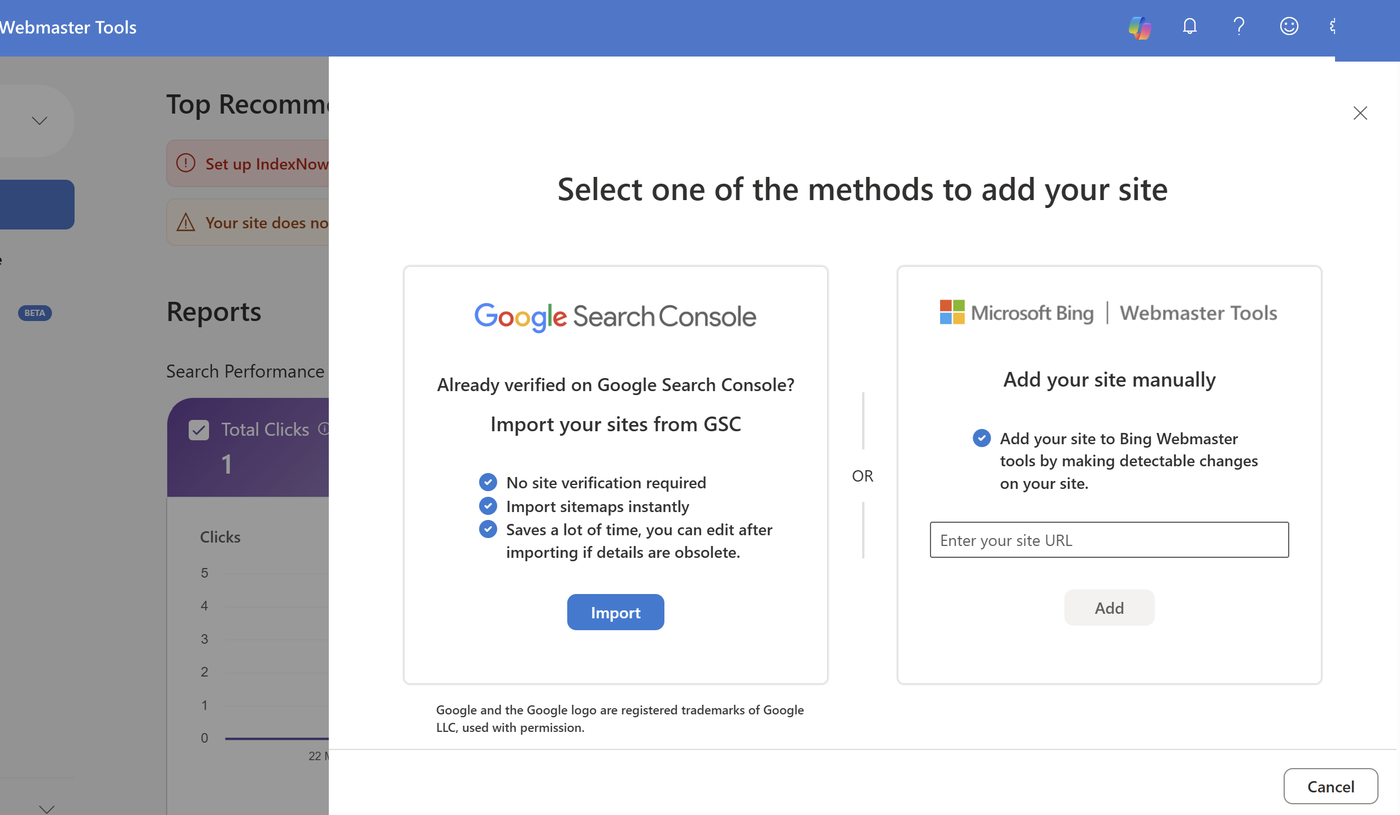
Instead of adding the site manually, choose the Import from Google Search Console option. Here is what happens:
- Bing requests access to your list of verified sites in GSC.
- You tick the sites you need.
- Bing imports them without re-verification — ownership is confirmed by the fact of ownership in GSC.
- The sitemaps you submitted to GSC (sitemap.xml) get pulled in along with the site.
This is a legitimate, official mechanism, not a hack. For a typical project the whole process takes two minutes.
Step 3. Manual Adding (if there’s no GSC)
If there is nothing to import from, add the URL manually and confirm ownership in one of three ways:
- XML file. Download BingSiteAuth.xml and upload it to the site root.
- Meta tag. Insert
<meta name="msvalidate.01" ...>into the<head>of the home page — through your CMS’s SEO plugin this takes a minute. - DNS record (CNAME). The method for sites on closed platforms with no code access: you add a record at your domain registrar.
After verification, submit sitemap.xml in the Sitemaps section — this is the baseline, without which Bingbot will crawl the site slowly and selectively.

IndexNow: Instant Indexing Instead of Waiting for the Crawler
IndexNow is an open protocol by which a site tells search engines about new and changed pages itself, without waiting for the crawler to visit. You publish an article, send a ping, and the page enters the indexing queue within minutes rather than days.
For getting into ChatGPT answers this is critical: fresh content that is not yet in the Bing index does not exist for AI search.
The protocol’s scale is already serious: according to indexnow.org as of early 2026, more than 5 billion URLs are submitted through IndexNow every day, and the protocol is used by over 80 million sites.
Who Accepts IndexNow
- Microsoft Bing — the main participant; it is through Bing that the data reaches ChatGPT Search and Copilot.
- Seznam.cz (Czech Republic) and Naver (South Korea) — regional search engines.
- Amazon — since 2025 it accepts IndexNow feeds with Schema.org markup for product content.
- Google — does NOT support it. For Google, only the sitemap, internal linking and crawl budget still work. IndexNow does not replace classic indexing in Google — it complements it for the Bing ecosystem.
How to Connect IndexNow
You generate an API key once (a text file in the site root), and from then on pings are sent automatically. The options, from simplest to least simple:
- WordPress: the Rank Math, AIOSEO or official IndexNow plugins submit URLs automatically on publish and update.
- Cloudflare: if your site is behind Cloudflare, enable Crawler Hints with one toggle — Cloudflare sends IndexNow signals itself when content changes. No code at all.
- Wix, Shopify: native integration — Wix has submitted URLs by default since 2023, and Shopify has official apps.
- Your own engine: a direct POST request to
api.indexnow.orgwith a list of URLs — about an hour of development.
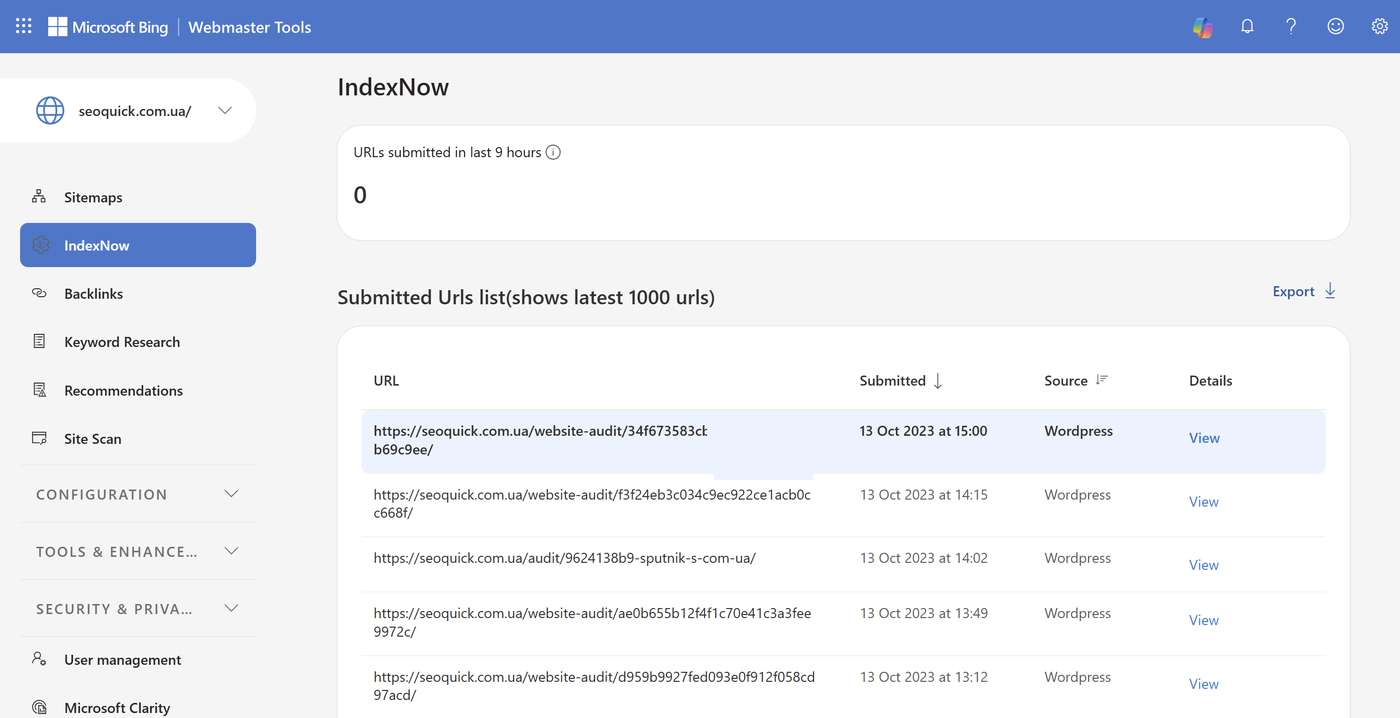
You can monitor the protocol right inside the webmaster panel: the IndexNow Insights report shows which URLs were submitted, accepted and indexed, and highlights errors (an unavailable key, invalid URLs).
Bing Webmaster Tools Reports: What to Watch
The 2026 panel is more compact than the old one, and it has four genuinely useful sections.
Search Performance
The equivalent of the “Performance” report in GSC: clicks, impressions, CTR and average position by query and page over a period of up to 6 months. Two nuances Google doesn’t have:
- the data includes traffic from Yahoo and other partners running on the Bing index;
- result-type filters help you see where the site shows up beyond the classic “ten blue links.”
If you work US and European markets, this report is a must: Bing’s share there is several times higher than in Ukraine, and ignoring 8–10% of the market is simply wasteful.
Site Explorer
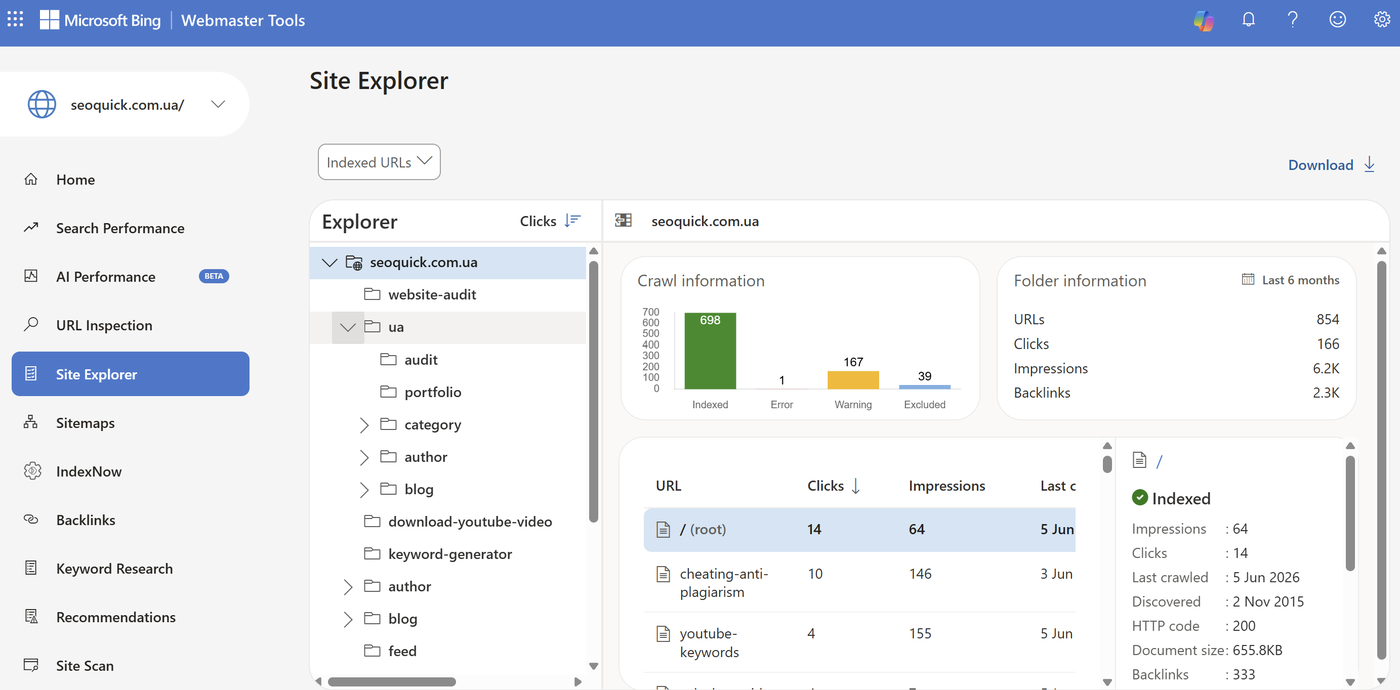
A unique Bing feature with no GSC equivalent. Site Explorer shows the site through Bingbot’s eyes as a file structure: folders, sections, the number of indexed URLs in each, plus clicks and errors for each branch.
This is the fastest way to find sections dropped from the index, junk URLs with parameters eating up crawl, and redirect chains. In GSC such tasks require exporting data and building pivot tables — here everything is visible at once.
Site Scan (SEO Audit)
A built-in technical audit: you run a scan of up to a few thousand pages and get an error report with severity priorities — missing titles and descriptions, broken links, canonical URL issues, heavy pages, missing alt attributes.
It is not a replacement for a full Screaming Frog audit, but it is free, regular “health” monitoring of your site — set up recurring scans once a month.
URL Inspection and Backlinks
- URL Inspection — checks a specific page: whether it’s in the index, how Bingbot sees the HTML, whether there are markup issues. From here you can also request indexing manually.
- Backlinks — your site’s link profile, with the option to compare it against any other domain. A free alternative to Ahrefs’s basic features: it’s enough for a quick read on a competitor’s link mass.
- Disavow — unlike Google, which tucked its link-disavow tool well out of the way, Bing keeps it available right in the panel.
Worth a separate mention is Keyword Research — keyword research with real Bing query data. For Ukrainian semantics the volumes are small, but for English-language projects it’s a working free source of ideas.
Copilot in the Bing SERP: How the Results Themselves Changed
The Bing search results in 2026 are a hybrid. Above the classic results for informational queries, Bing shows a Copilot Answer — a generated answer with links to sources — and Copilot itself is available in a separate tab as a chat search mode.
For a site owner this means three things:
- Citation instead of a click. As with Google AI Overviews, the user gets some answers without clicking through. The winners are sites that Copilot cites as a source — links in an AI answer are more visible than the tenth position in the classic results.
- Content requirements match GEO. Copilot picks pages with direct answers, a clear structure (headings, lists, tables), current dates and microdata. These are the same principles as for optimizing for ChatGPT — a full breakdown is in the article on GEO: optimizing a site for GPT.
- One index — three storefronts. A page properly indexed by Bing automatically becomes a candidate for display in the classic results, in the Copilot Answer and in ChatGPT Search. One investment, three channels.
SEOquick experience: a medical site we promote, after systematic work on content structure and direct answers, reached the top 2 for the query “dentistry Kyiv” and appeared in Google’s AI answers for 26,714 queries. The principles that worked for Google AI are identical to the requirements of Copilot and ChatGPT: a direct answer at the start of a section, markup, expertise. Details are in our medical website case study.

Checklist: Your Site in the Bing Index in One Evening
- Sign in to bing.com/webmasters with the Google account your GSC is tied to.
- Import the site from Google Search Console (no verification needed).
- Check that sitemap.xml was pulled in; if not, submit it manually in the Sitemaps section.
- Connect IndexNow: a WordPress plugin, the Crawler Hints toggle in Cloudflare, or your CMS’s native integration.
- Run Site Scan and fix the critical errors (titles, canonicals, broken links).
- Open Site Explorer and make sure the important sections are indexed and the junk URLs are not.
- Check robots.txt: Bingbot must not be blocked (this happens after copying someone else’s configs — see our robots.txt guide).
- After 2–4 weeks, check Search Performance and IndexNow Insights; ask ChatGPT Search something in your niche and see whether you show up among the sources.
Steps 1–4 take under an hour. After that the system works on its own.
Conclusions
Bing Webmaster Tools in 2026 is an entry point not so much into the Bing search engine as into the AI-search ecosystem of Microsoft and OpenAI. Direct traffic from Bing in Ukraine will stay small, but the Bing index is a mandatory condition for being cited in ChatGPT Search and Copilot — and that is the fastest-growing source of visits.
The cost of entry is an hour of work and zero hryvnias. The effort-to-upside ratio is one of the best in technical SEO right now. In 18 years of work we have rarely seen hygiene actions this cheap with an upside this asymmetric.
FAQ
Is it true that ChatGPT takes results from Bing?
Yes. ChatGPT Search uses the Microsoft Bing index as its main source of web data when searching for current information (OpenAI and Microsoft are strategic partners). If a site is not in the Bing index, ChatGPT cannot cite it in its answers. That is why signing up for Bing Webmaster Tools is a mandatory step for visibility in AI search.
Do I need Bing Webmaster Tools if all my traffic comes from Google?
You do. Direct traffic from Bing in Ukraine is around 1–2% of the market (Statcounter), but the Bing index feeds ChatGPT Search and Microsoft Copilot. An hour of setup opens the path to AI answers for your site, plus you get free tools: Site Explorer, the Site Scan audit and competitor backlink analysis.
What is IndexNow and does Google support it?
IndexNow is an open protocol for instantly notifying search engines about new and changed URLs: the site sends a ping itself, without waiting for the crawler. It is accepted by Bing, Seznam, Naver and Amazon. Google does not support the protocol — for Google, the sitemap and classic crawling still apply.
How do I add a site to Bing without re-verification?
Use the import from Google Search Console: when signing in to Bing Webmaster Tools, choose “Import from GSC,” log in with your Google account and tick the sites you need. Bing will confirm ownership based on your ownership in GSC and pull in your sitemaps. The whole process takes about two minutes.
How does Site Explorer in Bing differ from Google Search Console reports?
Site Explorer shows the site as a file structure: sections, the number of indexed URLs, clicks and errors per folder. GSC has no such view — the data has to be exported and aggregated manually. It is the fastest way to find sections dropped from the index and junk URLs.
How do I check whether a site is already in the Bing index?
Three ways: the site:yourdomain.ua operator in Bing search; the URL Inspection tool in Bing Webmaster Tools for a specific page; and the Site Explorer section for a picture across the whole site. If far fewer pages are in the index than in Google, check robots.txt and resubmit the sitemap.
SEO Trends 2026: 10 Changes You Need to Prepare For Right Now
The key SEO trends of 2026: AI Overviews on 48% of queries, 68% zero-click, the rise of ChatGPT and Google AI Mode. What is changing in search and how to prepare your site — a breakdown by SEOquick.
Read →
How to create content for AI answers: AEO and GEO guide for 2026
How to create pages that can be used in AI Overviews, ChatGPT, Gemini, and other answer systems: structure, sources, entities, and UX.
Read →
SEO optimization for GPT and AI answers: GEO guide for 2026
How to prepare a site for visibility in ChatGPT, Gemini, AI Overviews, and other AI systems: technical base, content, schema, llms.txt, and conversion.
Read →Want to apply this to your site?
We will review the current situation, find the first growth levers, and suggest a practical working format.